Assign, track and close programme tasks
← All tasks · Programme tasks and grievances
Roles named in these sections:Centre / Senior DGT
Where the DPR describes it
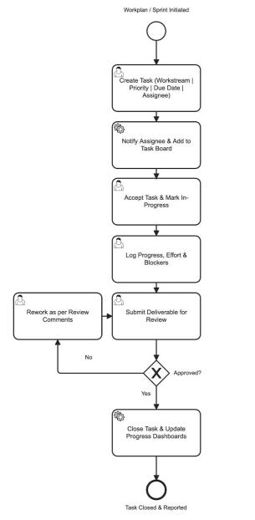
Sub-module 1: PM-SETU Project Management — user journeyAdmin Management · PDF p.8
programme workstreams, workplans, and sprint/milestone calendars; the system auto- initializes task boards and reporting structures for each workstream.Read the full section (1 diagrams) →
PM-SETU Project Management — task assignment and trackingAdmin Management · PDF p.27
This process diagram illustrates the end-to-end task lifecycle across the SPMU/Workstream Lead, Team Member, Reviewer/Approver, and the PM-SETU Admin Module. A task is created against a workstream with a due date and assignee; the assignee logs progress and effort until the deliverable is submitted for review; on approval the task is closed and dashboards are refreshed, while a rejected review routes back for rework.Read the full section (1 diagrams) →
Task Board (Kanban view)Admin Management · PDF p.30
Read the full section (1 diagrams) →Task Creation formAdmin Management · PDF p.31
Read the full section (1 diagrams) →1. Who does what: user journey
Admin Management · PDF p.8 ↓3. Business Requirements > Sub-module 1: PM-SETU Project Management — user journeyOpen in document →
2. The steps and decisions: BPMN process flow
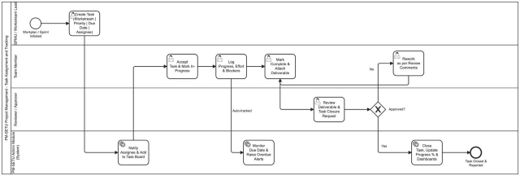
Admin Management · PDF p.27 ↓Figure 12 — Process design: PM-SETU Project Management task assignment and trackingOpen in document →
3. Where to do it: screens
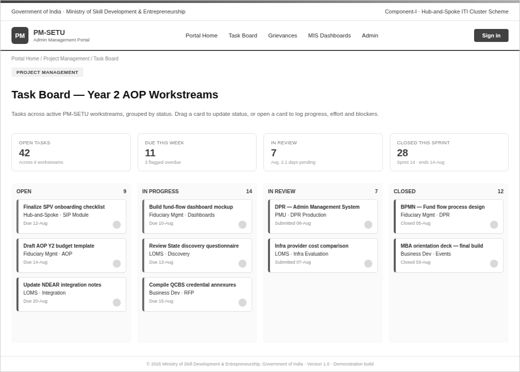
Admin Management · PDF p.30Figure 17 — Mockup: PM-SETU Project Management task board.Open in document →
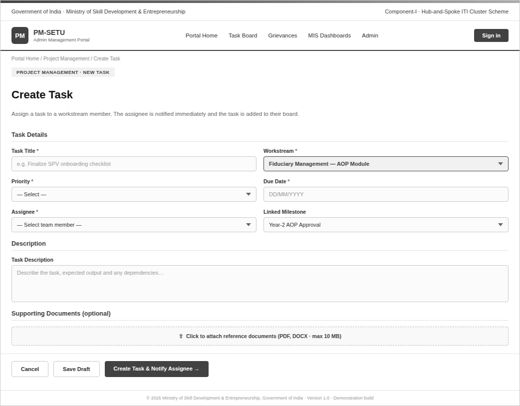
Admin Management · PDF p.31Figure 18 — Mockup: Task creation form with workstream, priority, and assignee capture.Open in document →