Sign in and get access to the analytics portal
← All tasks · Analytics, alerts and reports
Where the DPR describes it
2.1. Portal Access & LoginAnalytics · PDF p.5
Every stakeholder of the Portal authenticates through Single Sign-On via the Government Identity and Access Management framework. Upon successful authentication, the Portal identifies the stakeholder's role and renders a left-hand navigation panel comprising the five pillars: Fiduciary Management, Performance Analytics, Approvals, Alert Engine and Reports. The stakeholder proceeds by selecting a pillar from this panel. The Portal does not present the erstwhile Fiduciary Management System and LOMS as a choice between two separate systems; both are represented as pillars within a single navigation experience.Read the full section (1 diagrams) →
7.1. Access and data acquisition process designAnalytics · PDF p.42
This process diagram illustrates how the Portal establishes what a stakeholder may see and how it obtains the information presented to them. The process begins when a stakeholder authenticates through Single Sign-On via the Government Identity and Access Management framework, or, in the case of a learner, through a learner credential verified by electronic Know Your Customer. The framework returns the stakeholder's identity together with the role and organization attributes held against it, from which the Portal resolves a role and an entity. The role determines which pillars are rendered on the left-hand navigation, and the entity …Read the full section (1 diagrams) →
2. The steps and decisions: BPMN process flow
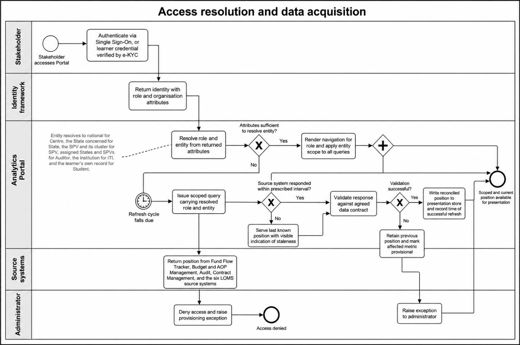
Analytics · PDF p.437. Process Designs and Mockups > 7.1. Access and data acquisition process designOpen in document →
Background: architecture and overview
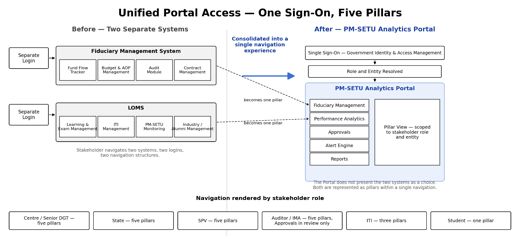
Analytics · PDF p.52. Business Requirements > 2.1. Portal Access & LoginOpen in document →