Enrol and start a course (learner)
← All tasks · Learning (LMS)
Roles named in these sections:Learner / Student / Candidate
Where the DPR describes it
3.2 Learner / trainee user journeyLMS · PDF p.14
displays the active course, institution, and batch; current progress, attendance, and assessment status; credentials already issued; the next required and next recommended action; and, where enabled, the AI Learning Assistance entry point. It does not expose administrative configuration or another learner's information.Read the full section (1 diagrams) →
provisioned as part of the same workspace, with its availability state (enabled/disabled) drawn from course configuration.Read the full section (2 diagrams) →
8.2 Course and content delivery process designLMS · PDF p.79
active course, citing its source, or returns an explicit unavailability response (Pillar 10); this interaction is logged but does not itself update module-completion state.Read the full section (2 diagrams) →
1. Who does what: user journey
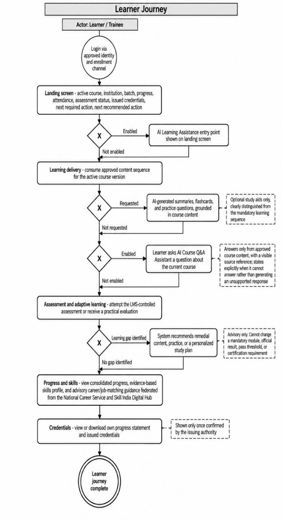
LMS · PDF p.143. Business Requirements > 3.2 Learner / trainee user journeyOpen in document →
2. The steps and decisions: BPMN process flow
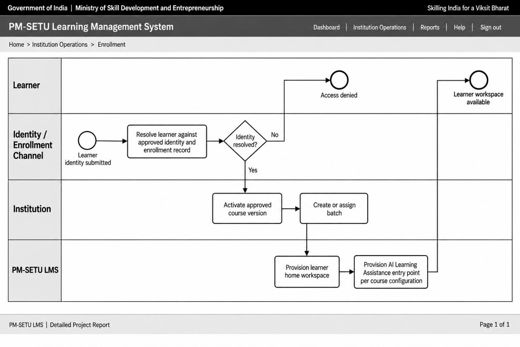
LMS · PDF p.788. Process Designs and Mockups > 8.1 Learner access, enrollment, and course activation process designOpen in document →
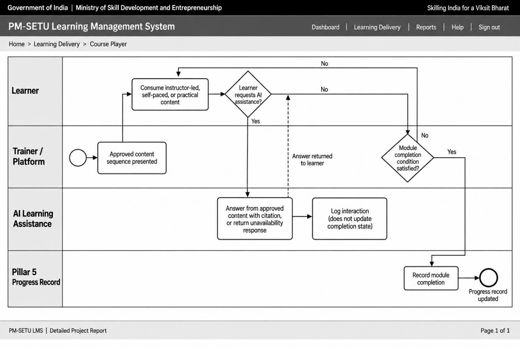
LMS · PDF p.798. Process Designs and Mockups > 8.2 Course and content delivery process designOpen in document →
3. Where to do it: screens
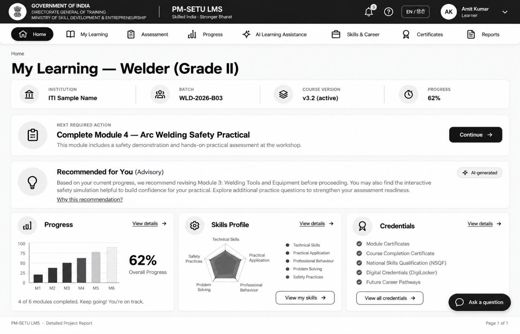
LMS · PDF p.788. Process Designs and Mockups > 8.1 Learner access, enrollment, and course activation process designOpen in document →
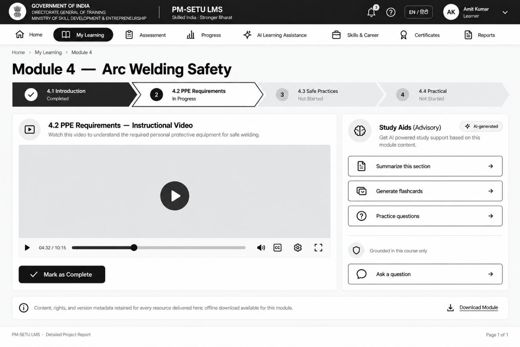
LMS · PDF p.808. Process Designs and Mockups > 8.2 Course and content delivery process designOpen in document →