Schedule classes and allocate resources
← All tasks · ITI operations
Where the DPR describes it
3.3.4. Scheduling (Timetable and resource)ITI Management · PDF p.18
It automates timetable creation based on course requirements, trainer availability, and resource readiness. It optimizes classroom and lab usage, resolves scheduling conflicts, and ensures efficient allocation of ITIs resources.Read the full section (1 diagrams) →
8.4. Class Scheduling SystemITI Management · PDF p.63
The mock-up below shows the resulting scheduling workspace, including the timetable generator, resource allocation form, and schedule dashboard, all aligned under the same visual theme to optimize classroom and trainer utilization.Read the full section (2 diagrams) →
2. The steps and decisions: BPMN process flow
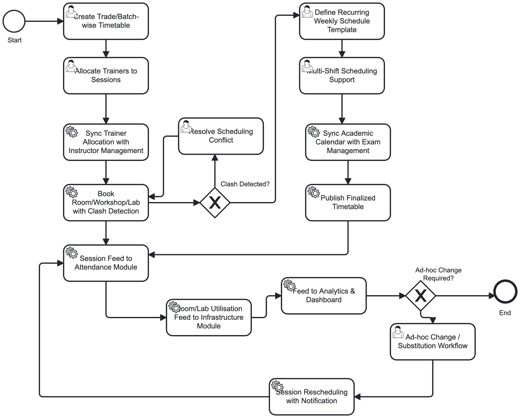
ITI Management · PDF p.203.3. Business processes > 3.3.4. Scheduling (Timetable and resource)Open in document →
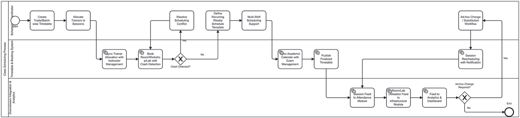
ITI Management · PDF p.638. Process Designs and Mock-ups > 8.4. Class Scheduling SystemOpen in document →
3. Where to do it: screens
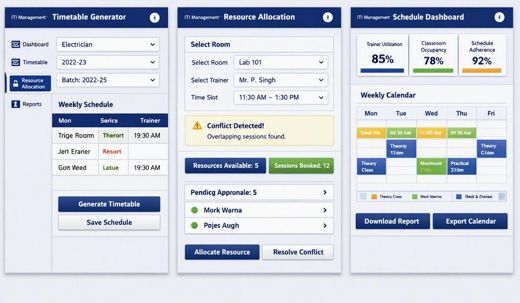
ITI Management · PDF p.648.4. Class Scheduling System > Illustrative Screen Mock-upOpen in document →