On this page: jump to a section
- 1. Overview
- 1.1. Purpose
- 1.2. Scope
- 1.3. Assumptions
- 2. As-Is / To-Be System Landscape
- 2.1. Key Observations / gaps in the current landscape
- 2.2. Gap vs Solution Matrix
- 3. Business Requirements
- 3.1. User personas
- 3.2. Student Life Cycle Journey
- 3.3. Business processes
- 3.3.1. Admissions
- 3.3.2. Student lifecycle Management
- 3.3.3. Attendance Management
- 3.3.4. Scheduling (Timetable and resource)
- 3.3.5. Hostel Management
- 3.3.6. Fee Management
- 3.3.7. Train the Trainer (ToT) Management
- 3.3.8. Infrastructure and Asset
- 4. Functional Requirements Specification (FRS)
- 4.1. Admissions
- 4.1.1. Functional Capability
- 4.1.2. Acceptance criteria
- 4.1.3. Validation Rules
- 4.1.4. Exception Management
- 4.2. Student Information System (SIS)
- 4.2.1. Functional Capability
- 4.2.2. Acceptance criteria
- 4.2.3. Validation Rules
- 4.2.4. Exception Management
- 4.3. Attendance Management
- 4.3.1. Functional Capability
- 4.3.2. Acceptance criteria
- 4.3.3. Validation Rules
- 4.3.4. Exception Management
- 4.4. Class Scheduling (Timetable)
- 4.4.1. Functional Capability
- 4.4.2. Acceptance criteria
- 4.4.3. Validation Rules
- 4.4.4. Exception Management
- 4.5. Hostel Management
- 4.5.1. Functional Capability
- 4.5.2. Acceptance criteria
- 4.5.3. Validation Rules
- 4.5.4. Exception Management
- 4.6. Fee Management
- 4.6.1. Functional Capability
- 4.6.2. Acceptance criteria
- 4.6.3. Validation Rules
- 4.6.4. Exception Management
- 4.7. Train The Trainer (ToT) Management
- 4.7.1. Functional Capability
- 4.7.2. Acceptance criteria
- 4.7.3. Validation Rules
- 4.7.4. Exception Management
- 4.8. Infrastructure / Asset Management
- 4.8.1. Functional Capability
- 4.8.2. Acceptance criteria
- 4.8.3. Validation Rules
- 4.8.4. Exception Management
- 4.9. Cross-Cutting areas
- 5. Software Requirements Specification (SRS – High level)
- 5.1. Solution Architecture (Conceptual Block Diagram)
- 5.2. API requirements (indicative)
- 5.3. Integration points
- 5.3.1. Integration with other LOMS modules
- 5.3.2. External linkages with Digital Public Infrastructure (DPI)
- 5.4. User Access Layer
- 5.5. Application & Technology Principles
- 5.6. Data model (High level entities)
- 5.7. Reports and Dashboards
- 5.8. Master Data structure and Data Ownership
- 6. Non-functional Requirements
- 6.1. Performance requirements
- 6.2. Security requirements
- 6.3. Availability and disaster recovery requirements
- 6.4. Backup and data retention requirements
- 6.5. Audit logging and monitoring requirements
- 6.6. Accessibility and inclusion requirements
- 6.7. Compliance requirements
- 7. Testing Strategy and Deployment
- 7.1. Testing strategy
- 7.2. Acceptance criteria
- 7.3. CI/CD and deployment approach
- 7.4. Product Development Methodology
- 8. Process Designs and Mock-ups
- 8.1. Admission
- 8.2. Student Information System
- 8.3. Attendance Management System
- 8.4. Class Scheduling System
- 8.5. Hostel Management
- 8.6. Fee Management System
- 8.7. Instructor Management System
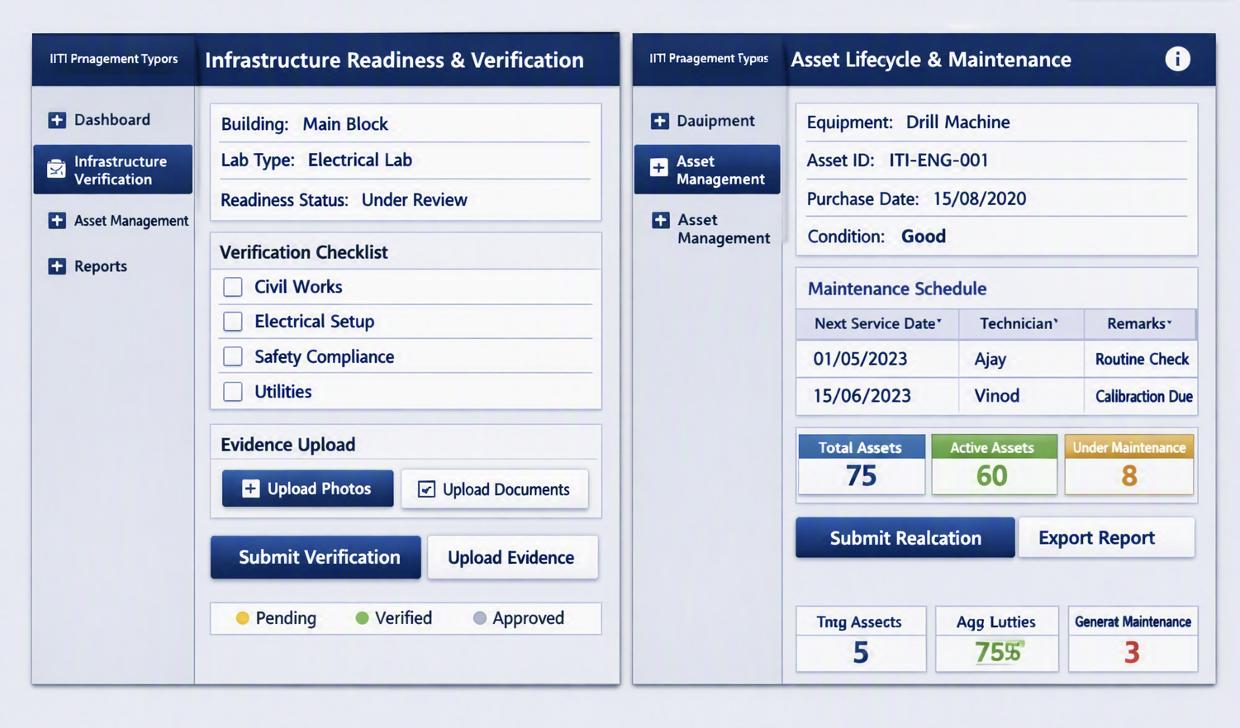
- 8.8. Infrastructure Management System
ITI Management System
Document Control
| Field | Details |
| Module | ITI Management System (Module 8 of LOMS) |
| Parent Module | PM-SETU, Directorate General of Training (DGT) |
| Document type | Part of LOMS DPR |
| Version | v0.1 – Draft for stakeholder consultation |
| Prepared for | DGT / State Directorates / PM-SETU Officials |
1. OverviewPDF p.6
1.1. PurposePDF p.6
The ITI Management System is the institutional backbone module of LOMS. It digitises the core administrative and operational functions of an Industrial Training Institute (ITI) admissions, student records, attendance, timetabling, fee management, hostel administration, trainer/staff management and infrastructure tracking that today are largely handled through manual registers, spreadsheets and disconnected state-level systems.
The module is intended to give every ITI a single system of record for ITI operations, give State Directorates and DGT real-time visibility into institutional functioning, and feed clean, validated data to the other LOMS modules (LMS, Exam Management, Analytics & Dashboard, Financial Management, PM-SETU Monitoring).
1.2. ScopePDF p.6
In scope
- •Student admission workflow – application, eligibility/seat-matrix check, document verification, seat
allotment, enrolment
- •Student Information System (SIS) -unified student profile, academic history, batch/trade mapping,
transfers, dropouts
- •Attendance management - trainer and student attendance, biometric/app-based capture, leave workflows
- •Timetable and scheduling - trade-wise, batch-wise class and workshop scheduling, trainer allocation
- •Hostel management -allotment, occupancy, mess and warden workflows
- •Fee management - fee structure, collection, receipts, dues, scholarship/DBT linkage (interfacing with the
Financial Management module for actual fund flow)
- •Instructor management -Instructor profile, Instructor Induction, performance and utilisation tracking
- •Infrastructure management - PM-SETU asset/infrastructure readiness tracking (initially PM-SETU
Clusters, extensible to all ITIs)
- •Industry partnership records at the ITI level ( Alumni basic records (detailed alumni engagement owned
by Industry/Alumni Management module)
1.3. AssumptionsPDF p.6
- •A defined seat-matrix / trade-affiliation process already exists at Centre & State level and will be
Integrated to this module with the APIs.
- •Aadhaar-based eKYC and DigiLocker will be available as identity and credential verification services (as
used in SIDH) for admission and certification linkage.
- •Biometric/app-based attendance infrastructure will be provisioned at the ITI level where absent, a
manual-entry fallback will be supported in early phases.
- •PM-SETU Clusters ITIs will be onboarded first; architecture will allow extension to the wider ITI
ecosystem without redesign.
- •Legacy student records (where digitised) will be available for migration; paper records will require a
phased digitisation plan.
2. As-Is / To-Be System LandscapePDF p.7
The current ITI management ecosystem is fragmented, with each State/UT operating its own digital systems. This has led to non-uniform terminology, lack of standardisation, and disjointed capabilities. These gaps PM- SETU LOMS is required to addressed. The business requirements, functional system requirements, architecture, and non-functional requirements set out in the remainder of this report are specified against capability, standards, and interfaces, and are deliberately independent of any single existing platform or product. The following outlines the present status of key areas:
| Areas | Description |
| Admissions | Admissions are managed through state-specific systems with no centralised platform. Data is uploaded via APIs or spreadsheets, but eligibility validation is limited. Processes vary widely across States/UTs, resulting in non-standardisation. |
| Student Information System (SIS) | No dedicated SIS exists for ITIs. Student data is primarily collected for examination purposes through NMCVT MIS, now integrated into the SIDH platform. This system does not provide comprehensive lifecycle management of student records. |
| Attendance | Attendance is largely recorded in manual registers, with digitisation inconsistent across ITIs. There is no unified or automated attendance tracking mechanism. |
| Timetable & scheduling | No specific system exists for timetable or scheduling. Some States use standalone or disjointed applications, but these lack integration with other modules. |
| Hostel Management | Hostel management is handled through standalone systems, with no centralised occupancy tracking or grievance redressal mechanism. |
| Fee Management | Fee collection is primarily through cash/manual receipts, leading to delayed reconciliation and errors. Digital fee management systems are not standardised across ITIs. |
| Instructor Management | The NIMS platform under SIDH is in the implementation stage for ToT management. It is not yet fully operational across ITIs. |
| Infrastructure / Asset Management | Infrastructure records are maintained through periodic manual reporting to States/DGT. Some States have developed platforms, but these lack structured data collection and proper tagging of resources. |
2.1. Key Observations / gaps in the current landscapePDF p.7
The As-Is landscape reveals a system that is fragmented, manual, non-standardised, and poorly integrated. These issues collectively hinder efficiency, transparency, and scalability. Addressing them is critical for the success of PM-SETU LOMS, which aims to provide a centralised, standardised, and integrated platform for ITI management.
- •Fragmentation - Each State/UT has developed its own ITI management systems, often with different structures, processes, and terminologies. This leads to duplication of effort, inefficiency in data handling, and difficulty in creating a unified national view. For example, admissions data in one state may not align with another, making cross-state comparisons or central monitoring almost impossible.
- •Manual Dependency- A significant portion of ITI operations still relies on manual registers, spreadsheets, and paper-based reporting. This not only increases the risk of human error but also slows down processes such as attendance tracking, fee reconciliation, and infrastructure reporting. Manual dependency also hampers transparency and makes real-time monitoring infeasible.
- •Non-Standardisation - Terminology, processes, and data formats vary widely across States/UTs. For instance, eligibility criteria for admissions, fee structures, or hostel management records are maintained
differently in each system. This lack of standardisation prevents interoperability, complicates integration, and creates challenges in policy enforcement at the national level.I
- •Integration Gaps - Existing systems are siloed, with little or no interoperability between modules such as admissions, student information, attendance, and fee management. As a result, data flows are fragmented, and decision-making is based on incomplete or inconsistent information. For example, student records in the SIS are not automatically linked to attendance or fee payment modules, leading to duplication and inefficiency.
2.2. Gap vs Solution MatrixPDF p.8
the ITI Management System must transition into a workflow‑based, high‑automation, and integrated platform where modules are interconnected, processes are digitised end‑to‑end, and data flows seamlessly across functions, enabling efficiency, transparency, and standardisation nationwide. This sets the stage for the To‑Be vision under PM‑SETU LOMS, where platform will all be unified into a centralised, automated, and interoperable system. A workflow‑based system would establish a structured progression of activities, for example, admissions automatically feeding into student profiles, which in turn link to attendance, and examination system and Placement system , thereby eliminating redundancy and ensuring consistency. High automation, through tools like biometric attendance, and real‑time infrastructure tracking, would reduce human error, accelerate reporting, and enable timely interventions. Integration across modules would allow data to flow seamlessly, ensuring that decision‑makers at ITI, state, and centre levels have a unified, accurate view of operations. Such a transformation would not only standardise processes across States and UTs but also enhance efficiency, accountability, and scalability.
The To-Be ITI Management System is envisioned as a workflow-driven, highly automated, and fully
integrated platform that unifies all critical functions of ITIs across States and UTs. Unlike the fragmented and manual As-Is landscape, the LOMS will ensure seamless data flow, interoperability, and standardisation nationwide.
- •Admissions will be centralised, with online applications, automated eligibility checks, digital seat allotment, and DigiLocker-based document verification. This will eliminate duplication, ensure transparency, and provide a uniform admission process across all ITIs.
- •Student Information System (SIS) will evolve into an automated student profile and repository, capturing the complete lifecycle of a student — from admission to training, assignments, and certification. This registry will serve as a single source of truth for student data.
- •Attendance will be digitised through biometric or app-based capture, with real-time roll-up to State and DGT dashboards, ensuring accuracy, accountability, and timely monitoring.
- •Timetable & Scheduling will be automated, enabling daily class scheduling integrated with instructor management. This will optimise resource utilisation and reduce scheduling conflicts.
- •Hostel Management will be managed through an integrated platform, providing centralised occupancy tracking, grievance redressal, and transparent hostel administration.
- •Fee Management will transition to digital fee collection with real-time reconciliation, DBT/scholarship linkage, and automated reporting, ensuring financial transparency and efficiency.
- •Train the Trainer (ToT) will be supported by an automated, integrated, and standardised system, enabling structured trainer lifecycle management and capacity building.
- •Infrastructure / Asset Management will be digitised through a structured readiness tracker, providing real-time status, alerts, and proper resource tagging for assets and infrastructure.
3. Business RequirementsPDF p.9
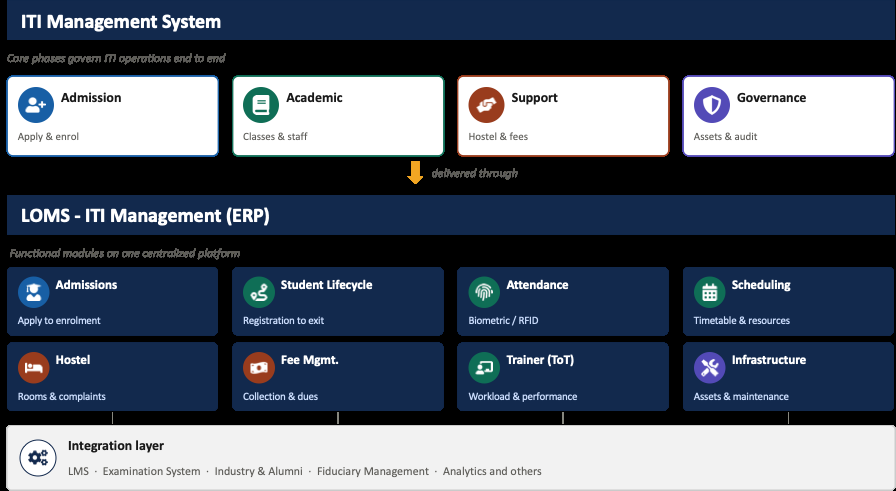
The ITI Management module forms the core of the LOMS ERP, bringing together admissions, student lifecycle, attendance, scheduling, hostel, fee, trainer, and infrastructure functions onto one unified, centralized platform. Rather than operating as disconnected registers and spreadsheets across departments, all ITIs data flows through a single system, giving every stakeholder a consistent, real-time view of operations. The module integrates with supporting systems such as the LMS, Examination System, Fiduciary Management, Analytics, and Industry & Alumni networks, ensuring information moves seamlessly between academic, financial, and administrative functions rather than sitting in silos.
For students and trainers, it means smoother admissions, transparent attendance and scheduling, and fewer manual follow-ups. For administrators and faculty, it offers a single source of truth for tracking performance, resource utilization, and compliance. For management and government bodies, it enables better oversight, faster reporting, and data-driven decision-making across institutes. Overall, the system reduces paperwork and duplication, improves transparency and accountability, and strengthens coordination between academic delivery, welfare services, and infrastructure, ultimately supporting better governance and outcomes across the entire ITI ecosystem.
3.1. User personasPDF p.9
| Persona | Key requirements |
| ITI Principal (Head) | Single dashboard of admissions, attendance, staff and infrastructure status; approval workflows |
| Admission staff | Digitised application intake, seat allotment and enrolment workflow |
| Persona | Key requirements |
| Trainer | Simple attendance marking, access to batch timetable and student list |
| Student/Trainee | Application status, admit/enrolment confirmation, fee dues, attendance visibility |
| Hostel warden | Room allotment, occupancy and mess-management workflow |
| State Directorate official | ITI wise monitoring of admissions, attendance and infrastructure readiness |
| DGT / PM-SETU programme team | National roll-up view across ITIs; exception/risk flags |
Current Platforms used, challenges, digital literacy considerations detailed out during primary consultations in State workshops and As-Is Assessments.
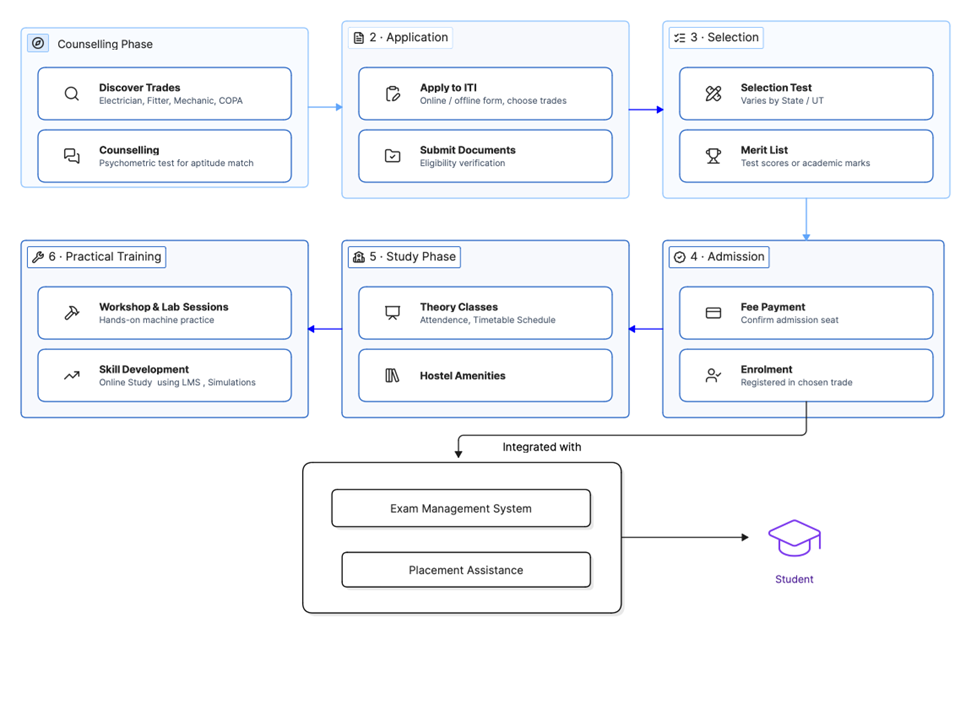
3.2. Student Life Cycle JourneyPDF p.10
1 Exploring Trades
The journey begins with discovering vocational options and assessing their aptitude. This helps students to understand the scope of different trades and identify where their interests and aptitudes lie. By exploring options early, they avoid mismatches and choose a trade where they can excel.
Discover Trades
- •Explore available trade options including:
o Electrician o Fitter o Mechanic o COPA (Computer Operator and Programming Assistant) o And many more specialized trades Counselling & Aptitude Testing: Counselling sessions supported by psychometric tests to help in matching student’s natural abilities and interests with suitable trades, ensuring informed choices rather than random selection.
2 Student Enrolment
The enrolment stage is a critical milestone in the ITI journey because it validates eligibility, ensuring that only qualified candidates enter the program. By verifying documents and credentials, ITIs safeguard the integrity of admissions.
Once a trade is identified and the student clears the selection stage, the next step is enrolment into the ITI.
- •Apply to ITI: Students complete the formal application form (online or offline)
- •Select preferred trades and institutions, and submit before the deadline.
- •Document Submission: Required documents such as educational certificates, identity proof, and category certificates (if applicable) are verified to confirm eligibility.
3 Selection
Selection ensures fairness and merit-based entry. By verifying eligibility and conducting tests or merit lists, ITIs admit students who are both qualified and motivated.
Application & Documents: Completing forms and submitting certificates validates academic background and identity.
Selection Test
- •Appear for selection examination (varies by State/UT)
- •Some states conduct written tests
- •Others may use direct admission based on marks
Merit List -Publishing results transparently builds trust and ensures deserving candidates secure seats.
- •Results declared based on:
o Test scores, or o Academic marks from qualifying examination
- •Merit lists published for seat allocation
4 Admission
Admission is the formal transition from aspirant to enrolled trainee. Fee payment and registration confirm commitment, while orientation familiarizes students with ITI rules, facilities, and expectations. Students gain a clear identity within the ITIs, setting the stage for structured learning and discipline.
Selected candidates complete the admission formalities.
Fee Payment
- •Pay prescribed admission fees
- •Confirm seat in allocated ITI and trade
Enrolment
- •Complete formal registration
- •Receive student ID and credentials
- •Begin academic session in chosen trade
5 Training Period
The training phase is the heart of the ITI experience, blending classroom learning with hands-on practice to build industry-ready skills. Students’ progress through structured modules that balance theory, practical exposure, and personal development.
Theory Classes- Attend trade Theory Classes: Learners attend trade-specific theory sessions covering workshop calculations, applied science, and engineering drawing. These classes provide the conceptual foundation needed to understand and execute practical tasks effectively.
- •Theory sessions
- •Learn workshop calculation and science
- •Study engineering drawing and related subjects Campus Amenities - Beyond academics, ITIs offer hostel accommodation (where available), libraries, playgrounds, and recreational facilities. These amenities foster discipline, teamwork, and holistic growth.
Practical Training: Hands-on skill development forms the core of ITI education. Workshops and labs form the core of ITI education. Students engage in supervised machine practice, tool handling, and trade-specific exercises. This stage emphasizes learning by doing, ensuring skills are not just theoretical but demonstrable.
Workshop & Lab Sessions
- •Hands-on machine practice
- •Use of trade-specific tools and equipment
- •Supervised practical exercises
Skill Development: Progressive training builds competencies step by step, often supported by Learning Management Systems (LMS). Real-world practice on live jobs and exposure to industry-relevant tasks prepare students for professional environments.
- •Students engage in structured learning within the ITI campus.
- •Real-world practice on live jobs
- •Progressive skill building using LMS
- •Industry-relevant competency development
- •AR/VR Simulation
3.3. Business processesPDF p.12
3.3.1. AdmissionsPDF p.12
To manage the complete admission cycle, from application submission to enrolment confirmation. It ensures eligibility verification, document validation, and transparent workflows. Automated communication keeps applicants informed, while integration with fee and hostel systems initiates onboarding seamlessly.
| Inputs | Processes | Outputs |
| Application forms, eligibility documents, entrance results (optional) Application forms, eligibility | Validate eligibility, manage admission workflow, confirm enrolment Validate eligibility, manage | Admission confirmation, student record creation (PRN) Admission confirmation, |
| documents, entrance results | admission workflow, | student record creation |
| (optional) | confirm enrolment | (PRN) |
ADMISSION CYCLE INITIATION
- •Admission Cycle Initiated (DGT)- The DGT initiates the admission process by opening the admission cycle for the academic year and setting the admission schedule and timelines. They define the cut-off dates for application submission and configure the admission portal for the new cycle. Finally, they announce the start of the admission process to all stakeholders.
- •Announce Academic Training Calendar (DGT)- The DGT publishes the academic training calendar for all ITIs, defining training start and end dates along with holiday schedules and examination dates. They communicate the training duration for each trade and publish the academic session timelines for students and institutes.
- •Configure Trade-wise Seat Matrix (State Admission Portal Admin)- The State Admission Portal Administrator defines the number of seats available for each trade and allocates seats across different ITIs. They configure category-wise seat distribution (SC/ST/OBC/General) and set reservation quotas as per government norms. Finally, they update seat availability in the admission portal and review and finalize the seat matrix.
- •Publish Institute/Trade Options & Admission Notification (DGT)- The DGT publishes the list of participating ITIs and displays all available trades with their details. They issue the official admission notification and publish eligibility criteria for each trade. They announce important dates (application start, last date, merit list date) and provide links to the online application portal, circulating the information to all stakeholders.
STUDENT APPLICATION
- •Student Discover Trade and ITI (Student)- The student visits the admission portal to explore options and browses through available trades, reviewing eligibility requirements for each trade. They check ITI locations and infrastructure details, comparing trade options based on interest and career goals. Finally, they shortlist preferred trades and ITIs and understand the fee structure and course duration.
- •Submit Online Application with Documents (Student)- The student registers on the admission portal and fills in personal details (name, DOB, gender, etc.) along with educational qualification details. They upload required documents including educational certificates, caste certificate (if applicable), income certificate (if applicable), disability certificate (if applicable), Aadhaar card, and photograph and signature. After paying the application fee (if applicable), they review and submit the application form, download the application acknowledgement, and save the application number for future reference.
ELIGIBILITY & MERIT LIST
- •Eligibility against Seat Matrix (System - Automated)- The system automatically validates the student's eligibility criteria by checking minimum educational qualification and verifying age requirements. It cross- checks reservation category and validates uploaded documents automatically. The system matches student preferences with available seats and calculates eligibility score based on academic performance, flagging ineligible applications for rejection.
- •Send Rejection List / Conduct Notification (DGT- The DGT prepares the list of ineligible candidates and sends rejection notifications to candidates, providing reasons for rejection (educational, age, documents). They allow candidates to appeal if applicable and publish the rejection list on the portal. They conduct notifications for eligible candidates about next steps and communicate the counselling schedule.
- •Generate Merit List / Conduct Seat Matrix (DGT)- The DGT compiles all eligible applications and calculates merit scores based on academic marks. They apply category-wise reservation policies and prepare the provisional merit list, assigning ranks to candidates. They conduct seat matrix allocation by mapping candidates to available seats and publish the provisional merit list on the portal.
- •Publish Merit List (DGT)-The DGT finalizes and publishes the official merit list, displaying it on the admission portal. They send merit list notifications to candidates and announce the counselling schedule. They provide instructions for the next steps, set deadlines for document submission, and publish the waiting list (if applicable).
COUNSELLING & ALLOTMENT
- •Participate in Counselling & Lock Trade Preference (Student- The student participates in the online counselling process and reviews the published merit list. They attend counselling sessions (online/offline) and select and lock preferred trade and ITI. They confirm the trade choice and accept the offered seat (if applicable), providing consent for the allotted seat. Finally, they download the provisional allotment letter.
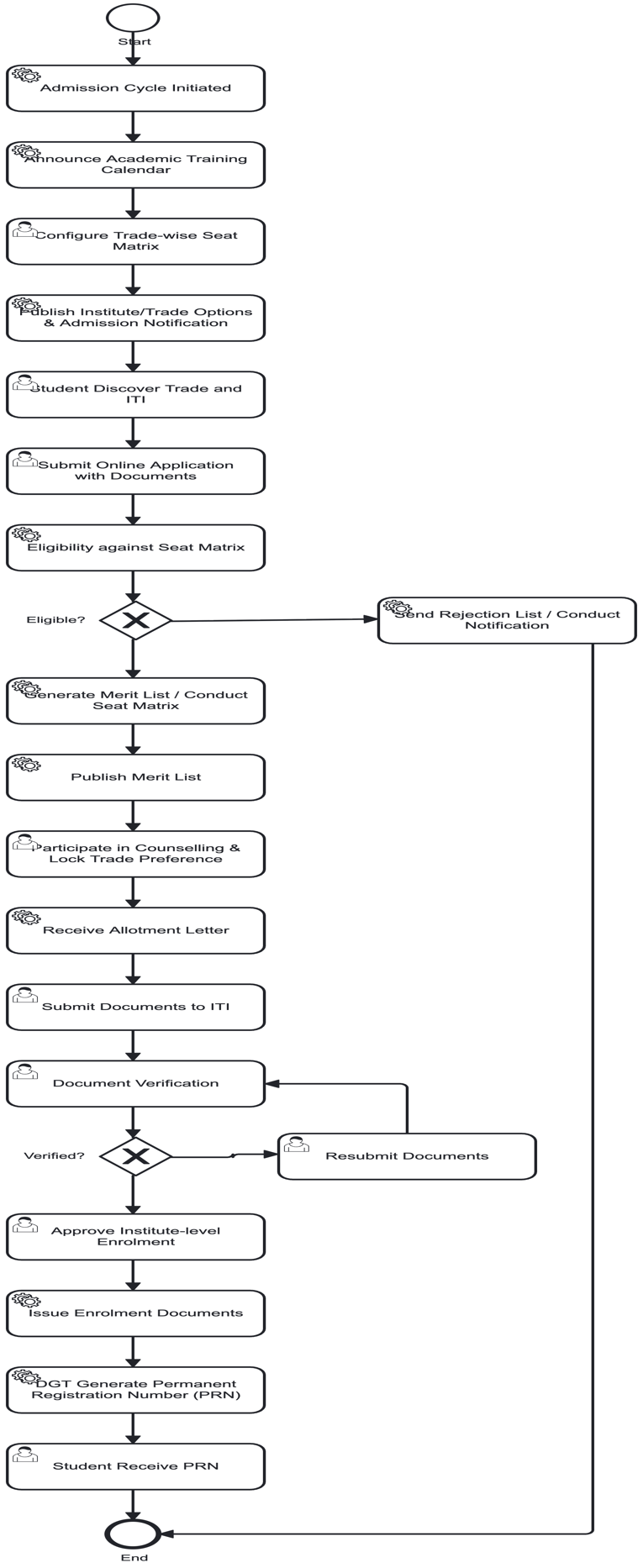
- •Receive Allotment Letter (System - Automated) -The system generates the final allotment letter including all student details (name, DOB, etc.) and mentioning the allotted trade and ITI. It includes the reporting date and time and lists required documents for verification. The system provides payment instructions (if fee is pending) and sends the allotment letter via email/SMS, making it available for download on the portal.
- •Submit Documents to ITI (Student) -The student visits the allotted ITI on the scheduled date, carrying the allotment letter and original documents. They submit Aadhaar card, educational certificates (original + copies), caste/category certificate (original + copies), income certificate (if applicable), transfer certificate, passport-sized photographs, and medical fitness certificate. They submit fee payment receipt, fill in the admission form at the ITI, and complete the document submission process.
- •Document Verification (ITI Admin)-The ITI Admin receives, and checks all submitted documents, verifying the original documents against uploaded copies. They cross-check the eligibility criteria and validate educational qualifications, verifying the authenticity of certificates. They check category and reservation status and update document verification status in the system, flagging discrepancies or missing documents and confirming when documents are in order.
- •Resubmit Documents (Student) - The student receives notification about document discrepancies and rectifies the issues in the documents. They obtain missing documents (if any) and re-submit the corrected documents to ITI Admin. They provide clarifications if required, follow up on verification status, and complete the document submission process.
- •Approve ITI level Enrolment (Institute Admin)-The Institute Admin reviews the completed document verification and approves the final enrolment of the student, confirming the seat allotment. They allocate the student to a specific class/batch and assign the student to the chosen trade. They generate the institute-level enrolment record and communicate the enrolment approval to the student.
- •Issue Enrolment Documents (System - Automated)-The system generates the official enrolment certificate and creates the student ID card. It prepares the admission confirmation letter, generates the class timetable, and issues the student login credentials. The
system provides access to the Learning Management System and prints the welcome kit for the student, making all enrolment documents available for download.
PRN GENERATION & COMPLETION
- •DGT Generate Permanent Registration Number (PRN) (DGT)- The DGT collects all verified student records from ITIs and generates a unique PRN for each admitted student. PRN is linked to the student's Aadhaar number and register the student in the central database. Student's admission details in DGT records have been updated and create a lifelong student profile in the system, assign the PRN to the student's academic records, and publish the PRN generation status on the portal.
- •Student Receive PRN (Student)- The student receives the official PRN via email/SMS and downloads the PRN No. from the portal. PRN is linked to the ITIs, access the digital student profile and complete the admission process successfully.
3.3.2. Student lifecycle ManagementPDF p.15
The student lifecycle module tracks academic progress from registration to ITI dropout. It maintains records of performance, progression, and status changes, ensuring administrators and faculty have a clear view of each student’s journey.
| Inputs | Processes | Outputs |
| Registration data, academic records, performance reports | Track student journey (registration → graduation/dropout), update progression | Student status reports, alumni/dropout records |
ENROLMENT & SIS RECORD CREATION
- •Enrolment Confirmation Received from Admission Module (SIS Platform)- The SIS Platform receives the enrolment confirmation from the Admission Module once a student's admission is finalized. It validates the confirmation data and triggers the creation of the student record. This initiates the student lifecycle management process.
- •Auto-create SIS Record (SIS Platform)- The SIS Platform automatically creates the Student Information System (SIS) record using the enrolment data. It generates a unique student ID and initializes the student profile. The record becomes the central repository for all academic and personal data. STUDENT DATA CAPTURE
- •Capture Trade / Batch / Section Mapping (Registrar - ITI)- The Registrar captures the student's trade, batch, and section details in the SIS. They map the student to the correct trade and assign the batch and section. This ensures the student is placed in the right academic group.
- •Capture Parent / Guardian Contact Details (Registrar - ITI)- The Registrar records the parent or guardian's contact information including name, phone, email, and address. This information is used for communication and emergency purposes. It is stored securely in the student's profile. ASSESSMENT CONFIGURATION
- •Configure Internal Assessment Components for Academic Year (Registrar - ITI)- The Registrar configures the internal assessment components for the academic year, including mid-term exams, assignments, and classroom activities. They define the weightage and scoring pattern for each component. This setup enables systematic evaluation of student performance. ID CARD GENERATION
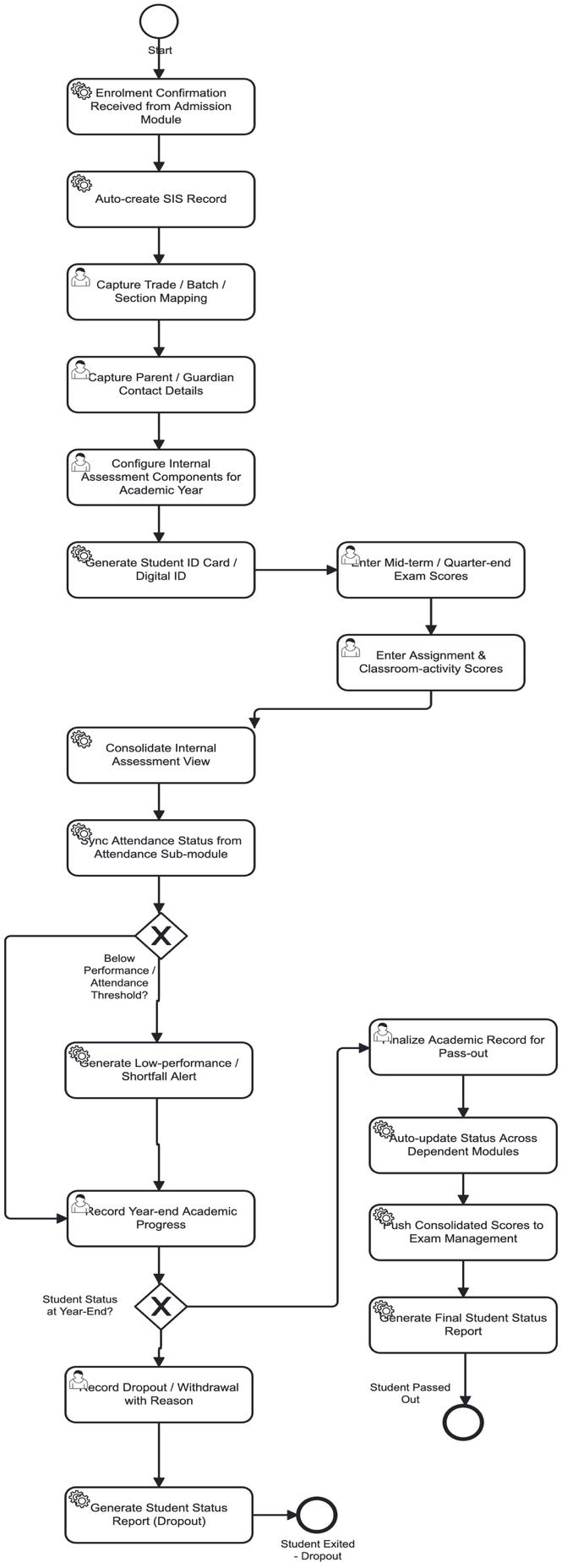
- •Generate Student ID Card / Digital ID (SIS Platform)- The SIS Platform generates the student ID card and digital ID using the captured data. It includes the student's photo, unique ID, trade, batch, and validity. The digital ID is made available on the student portal for access. ACADEMIC SCORE ENTRY
- •Enter Mid-term / Quarter-end Exam Scores (Instructor)- The Instructor enters the mid-term and quarter-end exam scores for each student. The scores are recorded against the configured assessment components. This provides a basis for evaluating academic progress.
- •Enter Assignment & Classroom-activity Scores (Instructor)- The Instructor enters the assignment and classroom activity scores for each student. These scores contribute to the internal assessment total. They provide a holistic view of the student's performance. INTERNAL ASSESSMENT & ATTENDANCE SYNC
- •Consolidate Internal Assessment View (SIS Platform)- The SIS Platform consolidates all internal assessment scores into a unified view. It aggregates mid-term, assignment, and classroom activity scores. This provides a comprehensive assessment dashboard for each student.
- •Sync Attendance Status from Attendance Sub-module (SIS Platform)- The SIS Platform syncs the attendance status from the Attendance Sub-module. It integrates attendance data with the internal assessment view. This provides a complete picture of student engagement and performance. INTERNAL & FORMATIVE ASSESSMENT
- •Feed data from Exam Management system- The SIS Platform gets scores from the Exam Management module. It enables the generation of final marksheets and certificates. The scores are validated and locked for examination purposes. YEAR-END PROGRESS & STATUS DECISION
- •Record Year-end Academic Progress (Registrar - ITI)- Records the year-end academic progress for each student. They review the consolidated assessment and attendance data. This forms the basis for deciding the student's status for the next academic year.
- •Generate Student Status Report (Dropout) (SIS Platform) - The SIS Platform generates the student status report for dropout. It includes the reason, date, and academic record. The report is stored for compliance and reporting purposes. PASS-OUT
- •Auto-update Status Across Dependent Modules (SIS Platform)- The SIS Platform auto-updates the student's status across all dependent modules. It ensures consistency in the student's record across systems. This includes examination, certification, and alumni modules.
- •Generate Final Student Status Report (SIS Platform)- The SIS Platform generates the final student status report. It includes the complete academic record, scores, and certification status. The report is made available to the student and relevant stakeholders.
3.3.3. Attendance ManagementPDF p.17
Attendance management captures student and trainer presence using biometric, RFID, or manual inputs. It generates compliance reports, supports payroll integration, and provides visibility into participation and engagement levels.
| Inputs | Processes | Outputs |
| Biometric/RFID/manual attendance logs | Record attendance, validate trainer/student presence | Attendance reports, compliance dashboards |
SESSION INITIATION
- •Opens Digital Attendance Session for the Batch (Trainer)- The Trainer or authorise person opens the digital attendance session for the assigned batch at the scheduled time. The system activates the attendance window and enables biometric/QR check-in mechanisms. The session remains open for the permitted duration to allow students and staff to mark their attendance. ATTENDANCE MARKING
- •Marks Attendance via Biometric / QR / Others Check-in Mechanism (Student / Staff)-Students and staff mark their attendance using biometric authentication, QR code scanning, or other configured check-in methods. The system captures the attendance event in real time. Each check-in is uniquely identified and linked to the individual's profile. TIMESTAMP CAPTURE & VALIDATION
- •Captures Check-in Timestamp & Validates against Session Schedule (System)- The system captures the exact check-in timestamp for each attendance event. It validates the timestamp against the scheduled session start and end times. The system checks whether the check-in falls within the permitted window. This validation ensures accuracy and prevents proxy or late entries.
STATUS MARKING
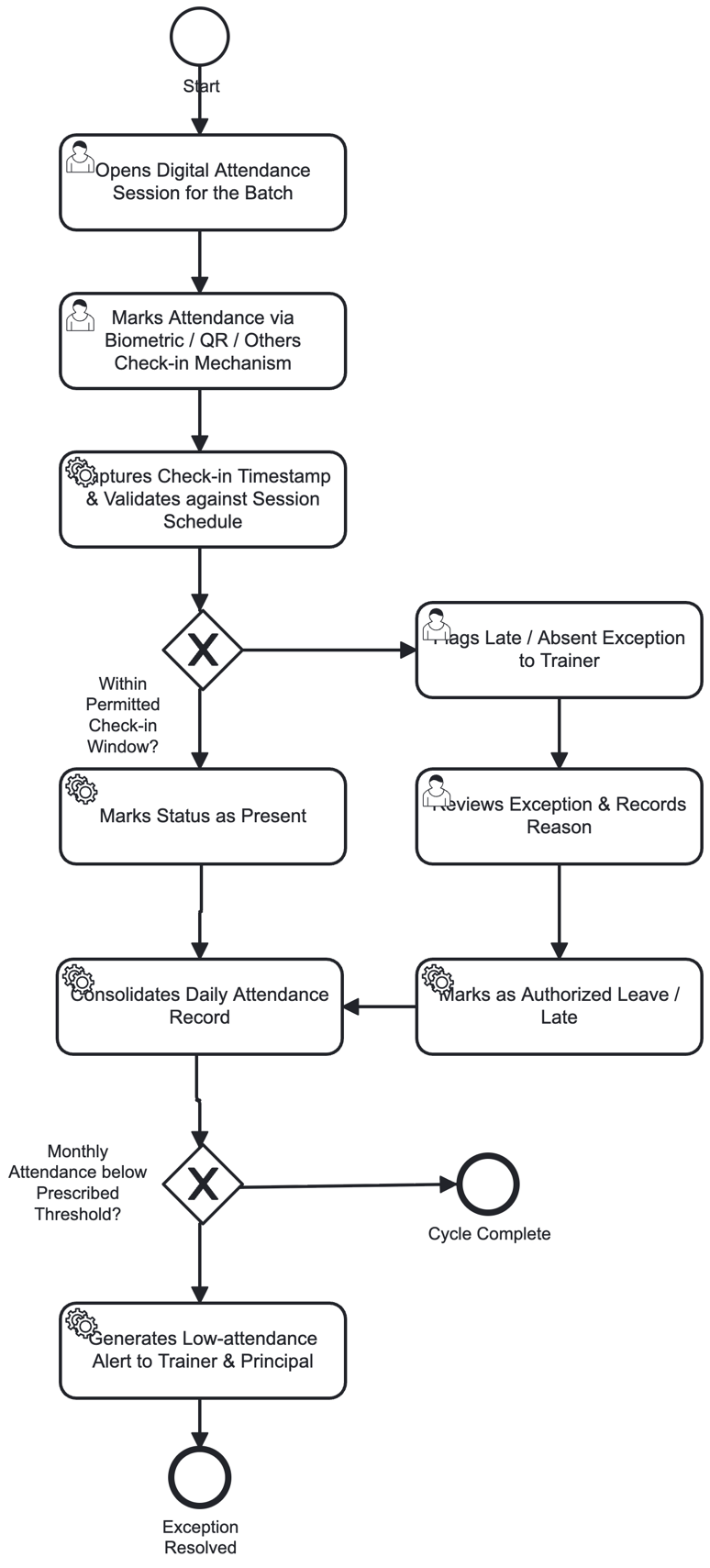
- •Marks Status as Present (System)- If the check-in is within the permitted window, the system automatically marks the status as "Present". The attendance record is updated instantly. No manual intervention is required for on-time check-ins.
- •Flags Late / Absent Exception to Trainer (System)- If the check-in falls outside the permitted window, the system flags a late/absent exception to the Trainer. The exception is recorded with details of the delay or absence. The Trainer is notified for further review and action.
- •Reviews Exception & Records Reason (Trainer)- The Trainer reviews the flagged exception and verifies the reason provided by the student/staff. They record the justification in the system for audit purposes. The Trainer decides whether the reason is justified or not. This step ensures accountability and transparency.
- •Marks as Authorized Leave / Late (System)- if the reason is justified, the system marks the status as "Authorized Leave" or "Late". The attendance record is updated with the authorized status. This ensures the student/staff is not penalized for a valid reason.
- •Marked as Unauthorized Absence; Student Notified (System)- If the reason is not justified, the system marks the status as "Unauthorized Absence". The student is notified about the unauthorized absence. The record is updated for further action as per policy.
CONSOLIDATION & ALERTS
- •Consolidates Daily Attendance Record (System)- The system consolidates the daily attendance record for all students and staff. It aggregates the Present, Late, Authorized Leave, and Unauthorized Absence counts. The consolidated record is stored for reporting and analytics.
- •Generates Low-attendance Alert to Trainer & Principal (System)- If the monthly attendance falls below the prescribed threshold, the system generates a low-attendance alert. The alert is sent to both the Trainer and the Principal.
3.3.4. Scheduling (Timetable and resource)PDF p.18
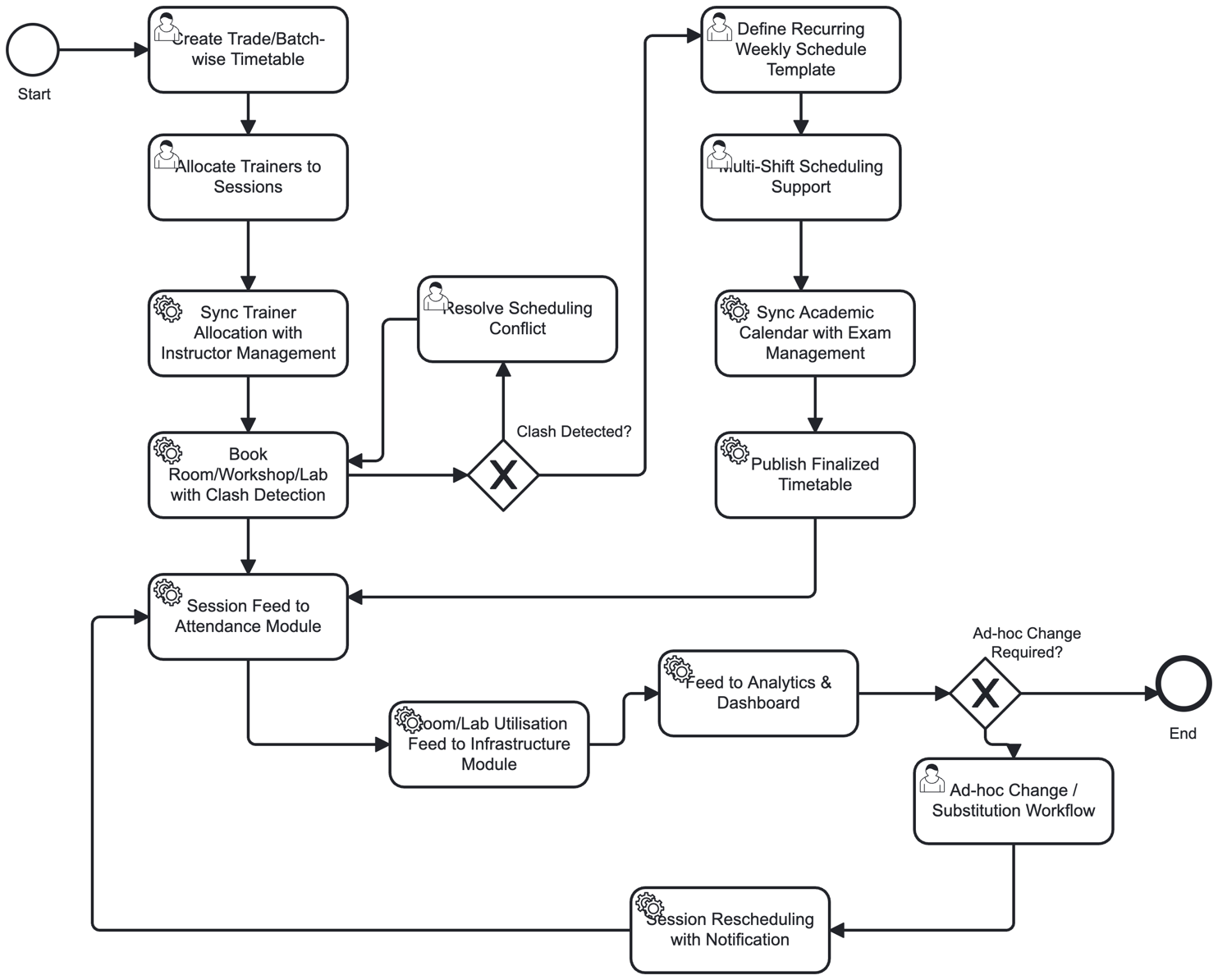
It automates timetable creation based on course requirements, trainer availability, and resource readiness. It optimizes classroom and lab usage, resolves scheduling conflicts, and ensures efficient allocation of ITIs resources.
| Inputs | Processes | Outputs |
| Course schedules, trainer availability, resource inventory | Generate timetable, allocate classrooms/labs, resolve conflicts | Optimized timetable, resource utilization reports |
TIMETABLE CREATION & CONFIGURATION
- •Create Trade/Batch-wise Timetable- ITI staff create weekly timetables for each trade and batch, covering both theory and practical sessions. They define session durations, subjects, and break periods. The system provides a grid-based interface for easy scheduling.
- •Allocate Trainers to Sessions - ITI staff assign trainers to specific sessions with visibility into their workload. The system displays trainer availability and current allocation to avoid overload. Trainers are mapped based on their expertise and trade specialization.
- •Sync Trainer Allocation with Instructor Management - The system syncs trainer allocation and availability data with the Instructor/Staff Management module. This ensures that trainer schedules are consistent across all modules. Any changes in trainer availability are reflected in the timetable automatically.
RESOURCE BOOKING & CLASH DETECTION
- •Book Room/Workshop/Lab with Clash Detection- The system books rooms, workshops, and labs for each session and automatically detects scheduling clashes. It checks for overlapping bookings of the same resource. If a clash is detected, the system prevents the booking and alerts the staff.
- •Resolve Scheduling Conflict (ITI Staff)- When a clash is detected, ITI staff resolve the conflict by rescheduling the session or reallocating the resource. They may change the room, trainer, or time slot to eliminate the clash. The system provides alternative suggestions for quick resolution.
- •Define Recurring Weekly Schedule Template - ITI staff define a recurring weekly template that can be cloned across terms and batches. The template includes standard session patterns, breaks, and resource allocations. This reduces manual effort for similar batches.
MULTI-SHIFT & CALENDAR SYNC
- •Multi-Shift Scheduling Support - ITI staff configure scheduling across multiple shifts for institutes running more than one shift. The system supports morning, afternoon, and evening shifts with separate resource pools. Shift-wise timetables are generated and managed independently.
- •Sync Academic Calendar with Exam Management - The system syncs the academic calendar with the Exam Management module to avoid scheduling conflicts with examination periods. It blocks session scheduling during exam windows. The calendar is updated in real-time across all modules.
PUBLISHING & NOTIFICATION
- •Publish Finalized Timetable - The system publishes the finalized timetable to students and trainers through the self-service portal and mobile app. Notifications are sent via email, SMS, and push notifications. The published timetable is accessible 24/7 for all stakeholders.
- •Session Feed to Attendance Module - The system pushes the scheduled session list to the Attendance sub-module. This structures session-wise attendance capture for each trade and batch. The attendance module uses this feed to mark attendance automatically.
- •Room/Lab Utilisation Feed to Infrastructure Module - The system pushes room, lab, and workshop booking and utilisation data to the Infrastructure/Asset Management module. This helps track resource usage and plan maintenance. Utilisation reports are generated for analysis.
- •Feed to Analytics & Dashboard - The system pushes timetable adherence and utilisation data to the Analytics & Dashboard module. Dashboards display key metrics such as room utilization, trainer workload, and session adherence. Insights help in optimizing future schedules.
CHANGE MANAGEMENT
- •Ad-hoc Change / Substitution Workflow - ITI staff handle ad-hoc rescheduling or trainer substitution requests. The system automatically notifies affected students and trainers about the change. Substitutions are recorded for payroll and workload adjustment.
- •Session Rescheduling with Notification - The system allows rescheduling of a session (date/time/room) with automatic notification to all stakeholders. Notifications are sent via multiple channels to ensure everyone is informed. The updated schedule is reflected in the portal and attendance module.
3.3.5. Hostel ManagementPDF p.21
Hostel management handles room allocation, occupancy tracking, and transfers. It supports fee collection, complaint resolution, and facility monitoring, ensuring smooth administration of student accommodations.
| Inputs | Processes | Outputs |
| Hostel capacity, student requests, fee records | Allocate rooms, manage transfers, track complaints | Hostel occupancy reports, fee reconciliation |
APPLICATION SUBMISSION
- •Submits Hostel Eligibility Documents with Application (Student)- The student initiates the hostel allotment process by submitting a hostel application along with all required eligibility documents. They provide proof of residence/distance from the institute, category certificates (SC/ST/OBC/EWS) if applicable, and conduct certificates from previous institutions. They fill in personal details including name, registration number, course, and year of study. They upload scanned copies of all supporting documents and pay the application fee if required. They ensure all information provided is accurate and complete to avoid rejection. After successful submission, student receive an acknowledgement with a unique application number for future reference.
ELIGIBILITY VERIFICATION
- •Verifies Eligibility (Distance, Category, Conduct) & Checks Room Availability (Warden)- The Warden initiates the verification process by checking the student's eligibility based on distance criteria (students residing beyond a specified distance from the institute are given priority). They verify the category status (SC/ST/OBC/EWS) as per government norms and ensure proper documentation is provided. They check the student's conduct certificate to ensure no disciplinary issues exist. They then check the current room/bed availability in the hostel, reviewing the occupancy status of different blocks and room types. They assess the total number of vacancies and the categories of rooms available. They prioritize applicants based on the established allotment criteria and government reservation policies. The Warden records the verification findings and updates the student's application status in the system.
- •Room Availability (Warden)- Places Applicant on Waiting List & Notifies Student when rooms are not immediately available, the Warden places the eligible applicant on the waiting list based on their priority category and application date. They assign a waiting list number to the applicant and record the position in the queue. They send a notification to the student informing them about their waiting list status. The notification includes the waiting list number, the date of placement, and the current waiting list position.
They advise the student to check for regular updates on room availability. They maintain transparency by publishing the waiting list periodically for all applicants to view.
ALLOTMENT & FEE PAYMENT
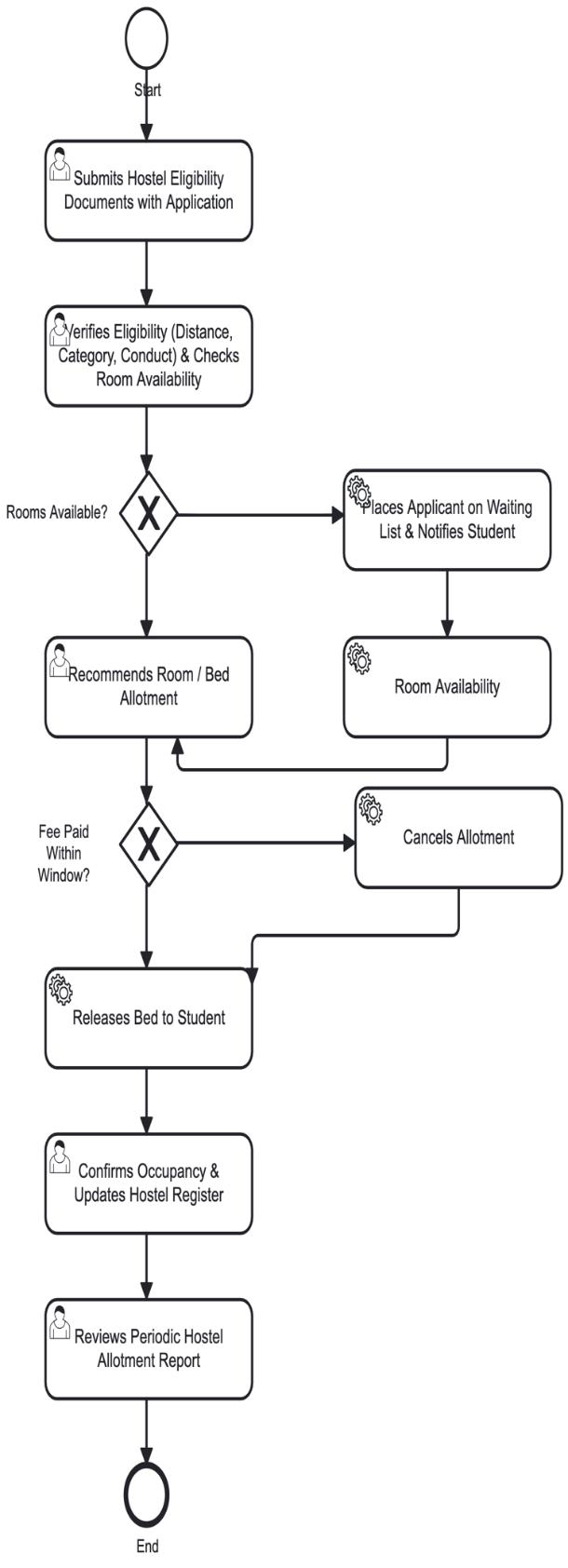
- •Recommends Room / Bed Allotment (Warden)- When rooms are available, the Warden recommends the specific room/bed allotment for the student. They assign a room number, block, and bed number to the applicant. They match the student's category and preferences with the available room type (single occupancy, double sharing, etc.). They allocate the room based on the student's priority and eligibility criteria. They record the allotment details in the hostel management system. They update the room occupancy status to "Allotted" and prepare the allotment letter for the student. They communicate the room allotment details to the student and provide instructions for fee payment.
- ••
Cancels Allotment (System)- When the student fails to pay the hostel fee within the specified time window, the system automatically cancels the allotment. The system sends a notification to the student informing them about the cancellation due to non-payment. It releases the room back to the available room pool.
- •Releases Bed to Student (System)- Upon successful fee payment within the allowed window, the system releases the allotted bed to the student. It updates the room occupancy status from "Allotted" to "Occupied". It generates the official hostel occupancy confirmation and updates the student's status in the central database. The system sends a confirmation notification to the student with the room details, check-in date, and hostel rules. It updates the room/bed inventory to reflect the occupied status. The system also updates the fee payment records and generates a receipt for the student. The bed release confirms the final allocation of hostel accommodation to the student.
OCCUPANCY CONFIRMATION & REPORTING
- •Confirms Occupancy & Updates Hostel Register (Warden)- The Warden confirms the student's physical occupancy by verifying their identity and completing the check-in formalities. They collect the original documents for verification and update the hostel register with the student's details. They record the room number, bed number, date of occupancy, and contact information. They provide the student with hostel rules, key/access card, and other facilities. They conduct a room inspection to ensure the room is in proper condition. They update the official hostel occupancy records and the central dashboard. They confirm the final occupancy status and mark the allotment cycle as complete for this student.
- •Reviews Periodic Hostel Allotment Report (Administrator) - The Administrator reviews the periodic hostel allotment report to monitor the overall hostel occupancy and allotment performance. The periodic review ensures transparency, accountability, and continuous improvement in the hostel allotment system.
3.3.6. Fee ManagementPDF p.22
It integrates with finance systems for reconciliation, generates receipts, and provides real‑time visibility into outstanding balances.
| Inputs | Processes | Outputs |
| Fee structure, payment records, dues list | Automate fee collection, track dues, send reminders | Payment receipts, dues clearance reports |
FEE DEMAND GENERATION
- •Generates Fee Demand as per Approved Fee Structure & Prior Dues (State/UTs)- The State/UT
generates the fee demand for each student based on the approved fee structure and any prior outstanding dues. It calculates the total payable amount including tuition, hostel, and other applicable fees. The demand notice is generated in the system and made available to the student.
PAYMENT REMITTANCE
- •Receives Fee Notice & Remits Payment (Student)- The student receives the fee notice through the portal or email and reviews the payable amount and due date. They remit the payment through available online/offline channels within the stipulated time. The payment reference is captured in the system for reconciliation.
PAYMENT RECONCILIATION
- •Reconciles Payment Against Demand (Fee Section)- The Fee Section reconciles the payment received against the generated demand. They verify the amount paid, payment mode, and date of remittance. They check whether the payment is in full or partial and update the reconciliation status accordingly. Any discrepancies are flagged for follow-up.
- •Updates Ledger & Issues Receipt (State/UTs)- When payment is received in full and on time, the State/UT updates the student's fee ledger. It records the payment entry and adjusts the outstanding dues to zero. An official receipt is generated and issued to the student for their records. The case is marked as "Fee Cleared" and closed.
DEFAULT / PART PAYMENT HANDLING
- •Sends Reminder Notice to Student (Fee Section)- When payment is not received in full or on time, the Fee Section sends a reminder notice to the student. The notice includes the outstanding amount, due date, and consequences of non-payment. It requests the student to clear the dues or request an extension within the grace period.
- •Makes Part-payment or Requests Extension (Student)- The student responds to the reminder by making a part-payment or requesting an extension. There may be an option for part payment of the dues or seek additional time to clear the full amount. The request is recorded in the system for review by the Fee Section.
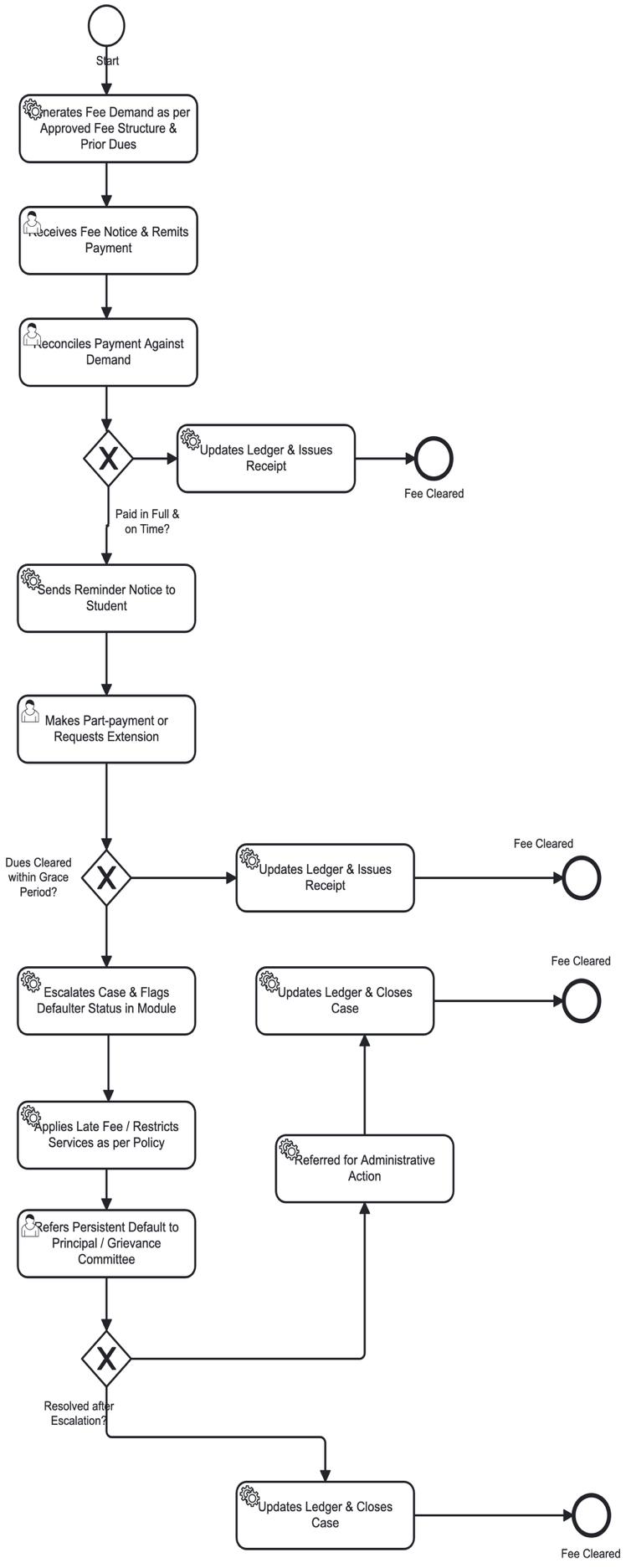
- •Updates Ledger & Issues Receipt (State/UTs)- If the dues are cleared within the grace period, the State/UT updates the ledger and issues a receipt. The outstanding balance is adjusted to zero and the case is marked as "Fee Cleared". The student's record is updated to reflect the cleared status. ESCALATION
- •Escalates Case & Flags Defaulter Status in Module (Fee Section)- If the dues are not cleared within the grace period, the Fee Section escalates the case. The student is flagged as a defaulter in the module. The escalation triggers further action as per the institutional policy. The case is moved to the next level of the escalation matrix.
- •Applies Late Fee / Restricts Services as per Policy (State/UTs)- The State/UT applies a late fee penalty as per the approved policy. It may also restrict certain services such as access to results, library, or hostel facilities. The restrictions remain in place until the dues are cleared. The student is notified about the penalties and restrictions.
- •Updates Ledger & Closes Case (State/UTs)- If the case is resolved after escalation, the State/UT updates the ledger and closes the case. The payment entry is recorded and the outstanding dues are adjusted. The defaulter flag is removed and the case is marked as "Fee Cleared". The student's record is updated accordingly.
- •Referred for Administrative Action (State/UTs) - If the case is not resolved after escalation, it is referred for administrative action. The State/UT initiates disciplinary or legal proceedings as per policy. The case is documented for audit and compliance purposes. The student is informed about the administrative action.
- •Updates Ledger & Closes Case (State/UTs) - After administrative action, the State/UT updates the ledger and closes the case. The final payment entry or write-off is recorded as applicable. The case is marked as closed and archived for future reference. The student's record reflects the final status of the case.
3.3.7. Train the Trainer (ToT) ManagementPDF p.24
Maintains staff profiles, workload distribution, and utilization metrics. It supports performance evaluation, ensures equitable workload assignment, and provides insights into trainer efficiency.
| Inputs | Processes | Outputs |
| Staff profiles, workload data, | Assign workload, monitor utilization, | Staff utilization reports, |
| performance metrics | evaluate performance | Performance records |
Staff profiles, workload data, performance metrics
Assign workload, monitor utilization, evaluate performance
INSTRUCTOR ONBOARDING & PROFILING
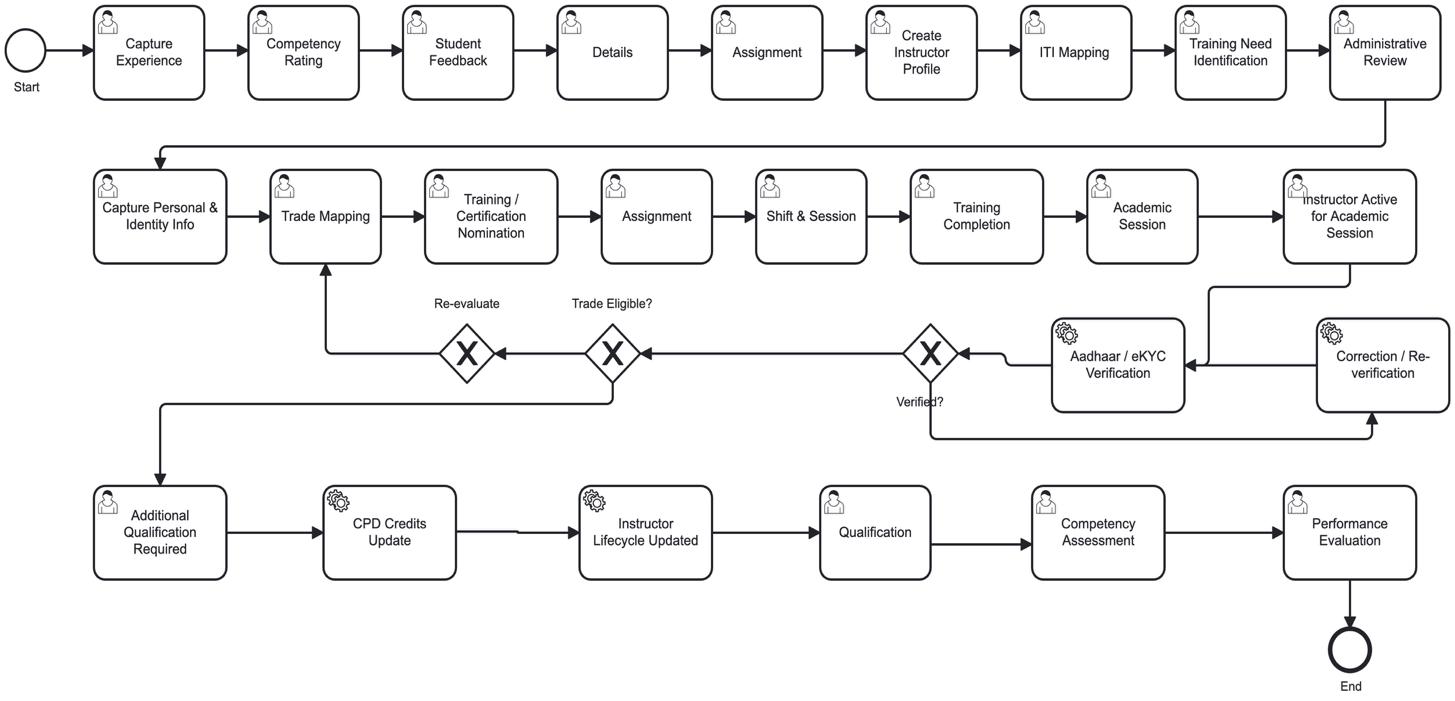
- •Capture Experience (Instructor)- The Instructor initiates the process by capturing their professional experience details. They record past teaching assignments, industry experience, and trade-specific expertise. This information forms the foundation of the instructor's profile. The experience data is used for competency assessment and training need identification.
- •Competency Rating (Instructor)- The Instructor completes a self-assessment of their competencies across various teaching and technical skills. They rate themselves on parameters such as subject knowledge, practical skills, classroom management, and student engagement. This rating helps identify strengths and areas requiring improvement. The competency score is used for further evaluation and training planning.
- •Instructor Mapping – The ITIs head assigns the instructor to a specific department, trade, or academic unit. They map the instructor to the relevant academic hierarchy. This assignment determines the instructor's reporting structure and responsibilities. The assignment is recorded in the system for tracking.
- •Create Instructor Profile (Instructor)- The Instructor creates their official profile in the system with personal, educational, and professional details. They upload supporting documents such as certificates, ID proofs, and experience letters. The profile serves as the single source of truth for all instructor-related information. It is used across all modules for various purposes.
INSTITUTE MAPPING & TRAINING NEED
- •ITI Mapping (Admin Officer)- The Admin Officer maps the instructor to a specific ITI (Industrial Training Institute). They verify the instructor's eligibility for the assigned ITI. They update the mapping details in the system. This ensures the instructor is placed at the correct institute for training delivery.
- •Training Need Identification (ToT)- The Training Coordinator identifies the training needs of the instructor based on competency gaps and trade requirements. They analyse the competency rating and student feedback to determine areas requiring improvement. Prepare a training need plan for the instructor. This plan is used for nominating the instructor for appropriate training programs.
IDENTITY & TRADE MAPPING
- •Capture Personal & Identity Info (Instructor) - The Instructor captures their personal and identity information including Aadhaar number, PAN, contact details, and emergency contacts. They upload identity proofs for verification. This information is used for official records and verification purposes. It ensures the instructor's identity is authenticated.
- •Trade Mapping (Academic Coordinator) - The ITI head maps the instructor to specific trades based on their qualifications and experience. They verify the instructor's trade eligibility as per DGT norms. They update the trade mapping in the system. This ensures the instructor is assigned to the correct trade for training delivery.
- •Training / Certification Nomination - The ITI Head nominates the instructor for required training or certification programs based on identified needs. They select appropriate training providers and schedules. They process the nomination and inform the instructor. This ensures the instructor acquires the necessary skills and certifications.
COMPLETION & On -BOARDING
- •Verification & eligibility- Aadhaar / eKYC Verification (System Admin)- The System Admin performs Aadhaar and eKYC verification of the instructor. They validate the identity documents submitted by the instructor. They check the authenticity of the Aadhaar number and linked details.
- •Training Completion (Training Provider)- The Training Provider delivers the training program and marks it as completed. They update the completion status in the system. They provide feedback on the instructor's performance during training. This completes the training phase of the instructor's lifecycle.
- •Instructor Active for Academic Session (DGT)- The DGT marks the instructor as active for the academic session. They update the instructor's status in the central system. They notify the concerned ITI and students about the instructor's activation. This enables the instructor to begin training delivery.
QUALIFICATION & LIFECYCLE UPDATE
- •Additional Qualification Required- If trade eligible, the Head reviews whether the instructor requires any additional qualification. They identify specific certifications or training needed for the trade. They update the requirement in the system. This ensures the instructor meets all qualification standards.
- •CPD Credits Update - The System Administrator updates the instructor's Continuing Professional Development (CPD) credits. They record the credits earned through training and certifications. They update the CPD status in the system. This tracks the instructor's ongoing professional development.
PERFORMANCE EVALUATION
- •Qualification (Instructor) - The Instructor updates their qualifications and certifications in the system. They upload new certificates or credentials earned. This ensures the instructor's profile remains current. It supports ongoing competency assessment.
- •Performance Evaluation (Principal/HOD) - The Principal or HOD conducts the final performance evaluation of the instructor. They review the competency assessment, student feedback, and training completion. They rate the instructor's overall performance. The evaluation determines the instructor's future deployment and career progression.
- •If the instructor is not trade eligible, the process routes to re-evaluation. The instructor's qualifications and experience are re-examined. Based on the re-evaluation, the instructor may be re-mapped to a different trade or required to complete additional qualifications. This ensures the instructor is placed in the right trade.
3.3.8. Infrastructure and AssetPDF p.27
Infrastructure tracking monitors classrooms, labs, and equipment readiness. It manages asset lifecycles, schedules maintenance, and ensures availability of resources for academic and administrative activities.
| Inputs | Processes | Outputs |
| Asset inventory, | Track asset lifecycle, schedule maintenance, monitor availability Track asset lifecycle, schedule | Asset readiness reports, maintenance alerts Asset readiness reports, |
| maintenance logs, readiness checklists | maintenance, monitor availability | maintenance alerts |
Asset inventory, maintenance logs, readiness checklists
INFRASTRUCTURE CAPTURE
- •Captures Infrastructure Status (ITI)- The ITI staff initiates the infrastructure readiness reporting process by capturing the current infrastructure status of the ITIs. This includes assessing civil works such as buildings, classrooms, workshops, and administrative blocks. Evaluation of machinery and equipment available for various trades, checking the operational status of all tools and machines. Assess utilities including water supply, electricity, sanitation, and fire safety systems. Also evaluate safety measures in place including first aid, fire extinguishers, and emergency exits. The ITI staff documents the current status of all infrastructure components and records any deficiencies or gaps identified during the assessment. This comprehensive infrastructure assessment forms the foundation for the readiness reporting process.
- •Uploads Geo-tagged Evidence & Readiness Checklist (ITI)- The ITI staff uploads geo-tagged photographic evidence of all infrastructure components to the central system. Capture images of civil works including buildings, classrooms, workshops, and laboratories with GPS coordinates embedded in the photos. Document machinery and equipment with geo-tagged images showing the operational status of each item. They provide evidence of utilities such as water supply systems, electrical installations, and sanitation facilities. Upload safety equipment and fire safety installations with geo-tagged photos. Complete the readiness checklist by marking each infrastructure component as available, functional, or requiring attention. It ensure all uploaded evidence is clear, properly labelled, and accurately reflects the current infrastructure status. The geo-tagged evidence provides verifiable proof of infrastructure readiness for audit purposes.
REVIEW & VALIDATION
- •Reviews & Validates ITI Submission, Find Gaps (ITI )- The ITI reviewer examines the ITI's infrastructure submission thoroughly. They verify the completeness of uploaded geo-tagged evidence and check the accuracy of the readiness checklist, identify gaps in infrastructure provision such as missing equipment, inadequate facilities, or non-functional utilities.
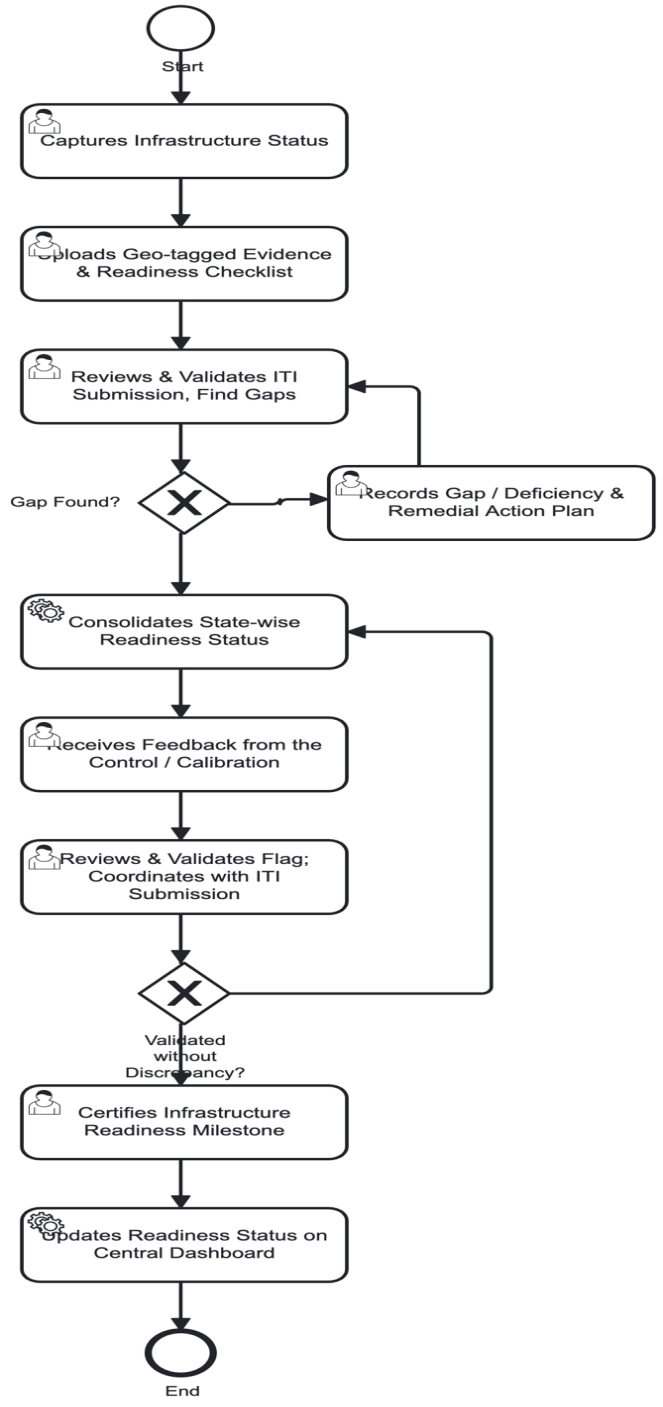
- •Records Gap / Deficiency & Remedial Action Plan (State/UTs) - When gaps are identified in the infrastructure submission, the DOF gap manager records each deficiency in detail along with its severity and impact on training delivery. The recorded gaps and remedial action plan are tracked until all deficiencies are resolved.
CONSOLIDATION & VALIDATION
- •Consolidates State-wise Readiness Status (States/UTs)- The Department consolidates the infrastructure readiness status from all ITIs across the state. Aggregate the data to determine the overall state-level infrastructure readiness. Categorisation ITIs on the basis on their readiness status: fully ready, partially ready, or not ready.
- •Reviews & Validates with ITI Submission- The reviewer the flags raised during the infrastructure assessment process. Examination of Assets of each ITI indicating specific concerns or discrepancies. The review and validation process ensures that only accurate and verified infrastructure status is accepted.
- •Certifies Infrastructure Readiness Milestone- Issuance of the official infrastructure readiness milestone certification for each ITI. Confirm that the ITIs meets all required infrastructure standards for the trades offered. The infrastructure readiness milestone certification serves as official approval for the institute to proceed with training activities.
CENTRAL DASHBIOARD REPORTING
- •DGT receives the updates the infrastructure readiness status on the central dashboard. Display the infrastructure scores and ratings for all ITIs. Readiness reports and summaries available for public viewing. ITIs ensure the dashboard is updated in real-time with the latest information and publish analytics and insights derived from the consolidated readiness data. The central dashboard provides transparency and accountability in the infrastructure readiness reporting process
4. Functional Requirements Specification (FRS)PDF p.28
Functional Capability - The ITI Management System is envisioned as a comprehensive digital framework that supports institutional operations across the entire student and training lifecycle. A broad set of functional capabilities is planned to deliver end-to-end coverage of critical processes, ensuring that core activities are
digitally enabled. The key capabilities, structured around submodules or pillars of the system, provide an indicative scope of functionality, though not exhaustive in nature. These capabilities are designed to function through automated workflows, seamlessly integrated across modules, and fully interoperable with other components of LOMS. The overall system architecture is conceived to be smart, modular, and scalable, thereby driving efficiency, transparency, and accountability across all operational dimensions.
| # | Sub-module / Pillars | Key Capabilities (Indicative) |
| Admissions 1. | Online application intake; document upload & eKYC verification; seat-matrix based eligibility check; merit list/counselling support; seat allotment; enrolment | |
| confirmation | ||
| Student Information System (SIS) 2. | Unified student profile; trade/batch mapping; academic and disciplinary history; transfer/dropout workflow; digital ID (DigiLocker/ABC linkage) | |
| Attendance management 3. | Biometric/app/manual capture; minimum-attendance alerts; leave workflow; consolidated attendance reports | |
| Timetable & scheduling 4. | Trade/batch-wise timetable creation; trainer allocation; workshop/lab scheduling; clash detection | |
| Hostel management 5. | Room inventory and allotment; occupancy tracking; mess management; warden workflows | |
| Fee management 6. | Fee-structure configuration; online/offline collection; receipts; dues and defaulter tracking; scholarship/DBT interface | |
| Instructor Management (ToT) 7. | Instructor master; HR/payroll data interface; performance and utilisation tracking; leave management | |
| Infrastructure & Asset management 8. | Asset/infrastructure register; readiness status; maintenance requests; PM-SETU-specific readiness indicators |
Acceptance Criteria-The ITI Management System shall be accepted for production deployment only after satisfying the following criteria across all sub-modules. These criteria define the minimum functional and operational thresholds that the system must meet to demonstrate readiness for pilot go-live and subsequent scale-up.
Validation rules and Exception-handling -The ITI Management System shall enforce validation rules and exception-handling mechanisms to ensure data integrity, process compliance, and operational resilience. Each rule defines the system's expected behaviour when a validation condition is not met or an exception occurs.
4.1. AdmissionsPDF p.29
4.1.1. Functional CapabilityPDF p.29
The centralise Admission enables ITIs to manage the complete intake process efficiently. It supports application submission, eligibility verification, and document validation. The system provides workflow automation for shortlisting, selection, and communication of admission decisions. Integration with other modules ensures data consistency and initiates the creation of student records.
| Req. No. | Requirement | Functional description |
| ADM- 001 | Online application portal | System shall provide a public-facing online portal for prospective students to apply for admission to a trade/institute of choice, accessible via web and mobile. |
| ADM- 002 | Applicant self-registration | System shall allow an applicant to self-register using mobile number/email with OTP-based verification prior to filling the application form. |
| ADM- 003 | Aadhaar-based eKYC | System shall support Aadhaar-based eKYC verification of applicant identity at the time of application, integrating with the national eKYC service. |
| ADM- 004 | Application form - personal & academic details | System shall capture applicant personal details, qualifying-exam details, category/reservation status and trade preferences (in ranked order) in a structured application form. |
| ADM- 005 | Document upload | System shall allow upload of mandatory supporting documents (qualifying certificate, category certificate, identity proof, photograph, signature) in specified formats and size limits. |
| ADM- 006 | Document checklist validation | System shall validate that all mandatory documents for the applicant's category/trade combination are uploaded before allowing form submission. |
| ADM- 007 | Duplicate application detection | System shall detect and flag duplicate applications from the same applicant based on Aadhaar/identity number and prevent multiple active applications for the same admission cycle. |
| ADM- 008 | Application fee payment | System shall support online payment of the application fee (where applicable) with fee-exemption logic for eligible categories, and issue a digital receipt. |
| ADM- 009 | Seat-matrix configuration | System shall allow authorised State/DGT users to configure the trade-wise, category-wise seat matrix for each institute for an admission cycle. |
| ADM- 010 | Eligibility auto-check | System shall automatically validate applicant eligibility (qualifying- exam criteria, age, category norms) against the configured trade eligibility rules at the time of submission. |
| ADM- 011 | Application status tracking | System shall allow applicants to view real-time status of their application (submitted / under verification / shortlisted / allotted / rejected) through a self-service dashboard. |
| ADM- 012 | Document verification workflow | System shall route submitted applications to designated institute/State verifier(s) with a workflow to mark each document as verified, rejected or query-raised. |
| ADM- 013 | Query/clarification workflow | System shall allow a verifier to raise a clarification request against an application; applicant shall be notified and allowed to respond/re-upload within a defined window. |
| ADM- 014 | Merit list generation | System shall generate a trade-wise, category-wise merit list based on configured ranking criteria (marks, category weightage, tie- breaker rules). |
| ADM- 015 | Counselling round management | System shall support configuration of multiple counselling rounds, each with defined seat availability, applicant response window and choice-locking. |
| Req. No. | Requirement | Functional description |
| ADM- 016 | Seat allotment | System shall auto-allot seats to eligible applicants as per merit, preference order and seat-matrix availability for each counselling round. |
| ADM- 017 | Waitlist management | System shall maintain a trade-wise waitlist and automatically process waitlist movement as seats are vacated (e.g., on non- reporting or cancellation). |
| ADM- 018 | Allotment override (exception) | System shall allow an authorised official to manually override an auto-allotment with a mandatory reason code and approval trail (e.g., for grievance resolution or court/policy directions). |
| ADM- 019 | Allotment letter generation | System shall auto-generate a digitally verifiable seat-allotment letter/offer for each allotted applicant. |
| ADM- 020 | Seat acceptance / reporting | System shall allow the allotted applicant to accept the seat and confirm physical/digital reporting to the institute within a defined deadline. |
| ADM- 021 | Admission fee payment & linkage | System shall enable payment of the admission/enrolment fee and push the fee-collection event to the Financial Management module for reconciliation. |
| ADM- 022 | Enrolment confirmation | System shall confirm enrolment and auto-create the student's core record in the Student Information System (SIS) on successful fee payment and reporting. |
| ADM- 023 | Digital ID / credential linkage | System shall generate/link the enrolled student's digital identity (DigiLocker / Academic Bank of Credits ID) as part of enrolment confirmation. |
| ADM- 024 | Seat cancellation / withdrawal | System shall allow a student to withdraw an accepted seat and shall trigger the applicable refund workflow and release the seat back to the waitlist. |
| ADM- 025 | Category/reservation compliance check | System shall validate that allotments across each round comply with applicable reservation-policy norms and flag any deviation for review. |
| ADM- 026 | Notifications | System shall send automated notifications (SMS/email/app) to applicants at each key stage – submission, verification outcome, allotment, reporting deadline, waitlist movement. |
| ADM- 027 | Grievance/appeal recording | System shall allow an applicant to raise an admission-related grievance/appeal, tracked to resolution with an audit trail. |
| ADM- 028 | Multi-language support | System shall support the admission portal and key notifications in English, Hindi and relevant regional/State languages. |
| ADM- 029 | Institute/State admission dashboard | System shall provide institute and State-level dashboards showing real-time application, verification, allotment and enrolment funnel metrics for the ongoing cycle. |
| ADM- 030 | Admission data feed to Analytics module | System shall push consolidated admission-cycle data (applications, allotments, enrolments, category-wise fill rate) to the Analytics & Dashboard module. |
| Req. No. | Requirement | Functional description |
| ADM- 031 | Audit trail | System shall maintain an immutable audit log of all status changes, verification actions and allotment overrides, including user ID and timestamp. |
| ADM- 032 | Historical admission data archival | System shall archive completed admission-cycle data in a query able form for year-on-year trend reporting and audit purposes. |
Priority: H = High (must-have for pilot go-live), M = Medium, L = Low (can follow in a later release).
4.1.2. Acceptance criteriaPDF p.32
- •An applicant cannot be allotted a seat beyond the approved seat matrix for a trade/ITI.
- •The system shall prevent duplicate applications from the same applicant based on Aadhaar/identity number.
- •Document checklist validation shall be completed before allowing enrolment confirmation.
- •The system shall auto-generate the Permanent Registration Number (PRN) upon confirmed enrolment.
- •Merit list generation shall apply category-wise reservation policies correctly as per configured rules.
- •Admission cycle data (applications, allotments, enrolments, category-wise fill rate) shall be pushed to the Analytics & Dashboard module within the defined integration window.
- •Notifications (SMS/email/app) shall be dispatched at each key stage -submission, verification outcome, allotment, reporting deadline, and waitlist movement.
4.1.3. Validation RulesPDF p.32
- •Duplicate application/Aadhaar detection shall be enforced at the admission stage; multiple active applications for the same cycle shall be prevented.
- •Mandatory document checklist validation shall be completed before enrolment confirmation.
- •Eligibility auto-check (qualifying-exam criteria, age, category norms) shall be validated against configured trade eligibility rules at the time of submission.
- •Application fee payment (where applicable) shall be validated with fee-exemption logic for eligible categories.
- •Seat matrix configuration shall be validated against approved State/DGT norms; deviations shall be flagged for review.
- •Category/reservation compliance shall be validated across each round; any deviation shall be flagged for review.
4.1.4. Exception ManagementPDF p.32
| Exception | System Action |
| Duplicate application detected | Block submission; notify applicant with existing application reference |
| Missing mandatory document | Prevent form submission; display document checklist with pending items |
| Eligibility criteria not met | Flag application as ineligible; route to rejection list with reason |
| Seat matrix exceeded | Prevent allotment beyond approved seats; flag for State/DGT review |
| Payment failure | Retain application in draft; notify applicant for retry |
| Grievance/appeal raised | Route to grievance workflow; track to resolution with audit trail |
4.2. Student Information System (SIS)PDF p.33
4.2.1. Functional CapabilityPDF p.33
The Student Information System is the unified system of record for every enrolled student, consolidating data created at admission and consumed across LMS, Exam Management, Attendance and Analytics. It also captures internal (continuous) assessment records – mid-term/quarter-end exam scores and instructor- assigned marks for assignments and classroom activities.
| Req. No. | Requirement | Functional description |
| SIS- 001 | Unified student profile | System shall maintain a single, unified student profile consolidating personal, academic, trade/batch and contact details for every enrolled student. |
| SIS- 002 | Trade/batch/section mapping | System shall allow assignment and reassignment of students to trades, batches and sections, with history of changes retained. |
| SIS- 003 | Academic history capture | System shall record year-wise academic progress, repeats and trade-change history for each student. |
| SIS- 004 | Student document repository | System shall maintain a secure digital repository of student documents (certificates, ID proofs, category certificates) linked to the student profile. |
| SIS- 005 | Profile update / change- request workflow | System shall allow students/institute staff to raise a profile-change request (e.g., name/category correction) routed for ITI approval before the record is updated. |
| SIS- 006 | Inter-ITI transfer | System shall support transfer of a student's record from one ITI to another with source/destination institute confirmation and audit trail. |
| SIS- 007 | Dropout / withdrawal recording | System shall allow recording of student dropout/withdrawal with reason capture and automatic status update across dependent modules. |
| SIS- 008 | Student search and filter | System shall provide search/filter of student records by trade, batch, institute, status, category and admission year. |
| SIS- 009 | Bulk import/export | System shall support bulk import of legacy student data (for migration) and bulk export of student records in standard formats. |
| SIS- 010 | Student ID card generation | System shall generate a digital/printable student ID card with a unique student ID and QR code for verification. |
| SIS- 011 | Parent/guardian contact management | System shall capture and maintain parent/guardian contact details for notification purposes. |
| SIS- 012 | Disciplinary record tracking | System shall allow authorised staff to record disciplinary actions/notes against a student profile with restricted visibility. |
| SIS- 013 | Student self-service portal | System shall provide students a self-service view of their profile, academic history and downloadable documents. |
| SIS- 014 | Data privacy and consent management | System shall capture and record student/parent consent for data usage and sharing with external DPI systems as required. |
| SIS- 015 | Auto-creation from Admission module | System shall automatically create the student's SIS record on receipt of an Enrolment Confirmation event from the Admission sub- module. (Integration Point) |
| Req. No. | Requirement | Functional description |
| SIS- 016 | Student master feed to LMS | System shall push student master and trade/batch data to the LMS module to enable course enrolment and content access. (Integration Point) |
| SIS- 017 | Eligibility feed to Exam Management | System shall provide student enrolment and status data to the Exam Management module for exam-registration eligibility checks. (Integration Point) |
| SIS- 018 | Attendance status sync | System shall receive and reflect attendance-linked status (e.g., shortfall flag) from the Attendance sub-module on the student profile. (Integration Point) |
| SIS- 019 | Feed to Analytics & Dashboard | System shall push student master and status data to the Analytics & Dashboard module for institute/state/national roll-up reporting. |
| SIS- 020 | Digital credential status sync | System shall sync digital ID / DigiLocker / Academic Bank of Credits credential status from external DPI systems onto the student profile. (Integration Point) |
| SIS- 021 | Internal assessment component configuration | System shall allow institute/State users to configure the internal assessment components applicable to a trade/batch (e.g., mid-term exam, quarter-end exam, assignments, classroom/practical activities) along with their weightage. |
| SIS- 022 | Mid-term / quarter-end exam score entry | System shall allow authorised instructors to enter/upload student scores obtained in mid-term and quarter-end internal examinations, mapped to trade, batch and subject. |
| SIS- 023 | Assignment and classroom- activity score entry | System shall allow instructors to record scores/grades given to students for assignments, practicals and other classroom activities against each defined activity. |
| SIS- 024 | Instructor-wise, subject-wise access control for score entry | System shall restrict internal assessment score entry to the instructor(s) assigned to the specific subject/batch/session, based on roles defined in the Administrator Management System. |
| SIS- 025 | Bulk score upload | System shall allow instructors to upload internal assessment scores in bulk (e.g., via a template) for a batch, with validation against the enrolled student list. |
| SIS- 026 | Score correction / revision workflow | System shall allow correction of an already-submitted internal assessment score only through an approval-based revision workflow, with reason capture and audit trail. |
| SIS- 027 | Consolidated internal assessment view | System shall present a consolidated view of a student's internal assessment performance across all components (exams, assignments, classroom activities) on the student profile. |
| SIS- 028 | Low-performance flag and alerts | System shall flag students whose consolidated internal assessment performance falls below a configurable threshold and notify the instructor/ITIs for early intervention. |
| SIS- 029 | Internal assessment score visibility to student | System shall allow students to view their own internal assessment scores and instructor remarks through the student self-service portal. |
| SIS- 030 | Feed to Exam Management for continuous evaluation | System shall push consolidated internal assessment scores to the Exam Management module where continuous/internal assessment marks contribute to the final result computation. (Integration Point) |
| Req. No. | Requirement | Functional description |
| SIS- 031 | Feed to Analytics & Dashboard | System shall push internal assessment trends (component-wise, batch-wise, instructor-wise) to the Analytics & Dashboard module for learning-outcome and instructor-effectiveness analysis. |
4.2.2. Acceptance criteriaPDF p.35
- •A unified student profile shall be created and maintained for every enrolled student.
- •Trade/batch/section mapping shall be assignable and reassign able with full history retained.
- •Internal assessment scores (mid-term, quarter-end, assignments, classroom activities) shall be captured against configured components and weightages.
- •Consolidated internal assessment view shall be available on the student profile.
- •Low-performance flags and alerts shall be generated when consolidated performance falls below the configurable threshold.
- •Internal assessment scores shall be pushed to the Exam Management module for final result computation.
- •Student status (Continue/Dropout/Pass-out) shall be auto-updated across all dependent modules.
4.2.3. Validation RulesPDF p.35
- •Student profile creation shall require validated enrolment confirmation from the Admission module.
- •Trade/batch/section mapping shall be validated against the approved trade taxonomy.
- •Internal assessment score entry shall be restricted to authorised instructors mapped to the specific subject/batch/session.
- •Bulk score upload shall be validated against the enrolled student list.
- •Score correction/revision shall require approval-based workflow with reason capture and audit trail.
- •Internal assessment component weightages shall sum to 100% for each trade/batch configuration.
4.2.4. Exception ManagementPDF p.35
| Exception | System Action |
| Enrolment confirmation missing | Block SIS record creation; notify admission module |
| Score entry by unauthorised user | Deny access; log attempt; notify administrator |
| Bulk upload validation failure | Reject file; display row-wise error report; allow correction and re- upload |
| Score correction without approval | Block revision; initiate approval workflow with reason capture |
| Low-performance threshold breach | Generate alert to instructor/ITI; flag student for intervention |
| Inter-institute transfer without confirmation | Hold transfer; notify source/destination institutes for confirmation |
4.3. Attendance ManagementPDF p.35
4.3.1. Functional CapabilityPDF p.35
The Attendance sub-module captures student and trainer attendance across theory and practical sessions and drives exam-eligibility criteria.
| Req. No. | Requirement | Functional description |
| ATT-001 | Session-wise attendance capture | System shall allow capture of student attendance at the level of each scheduled theory/practical session. |
| ATT-002 | Biometric device integration | System shall support integration with biometric attendance devices installed at institutes for automated capture. |
| ATT-003 | Mobile app self- attendance | System shall support geo-fenced mobile app-based self-attendance marking where biometric devices are unavailable. |
| ATT-004 | Manual fallback entry | System shall allow trainers to manually mark attendance with a mandatory reason when automated capture fails, flagged for audit. |
| ATT-005 | Minimum attendance threshold configuration | System shall allow configuration of trade-wise/scheme-wise minimum attendance thresholds for exam eligibility. |
| ATT-006 | Attendance shortfall alerts | System shall automatically notify students/parents/trainers when attendance falls below defined warning thresholds. |
| ATT-007 | Leave application and approval | System shall allow students to apply for leave and trainers/institute staff to approve or reject such requests. |
| ATT-008 | Trainer attendance capture | System shall capture trainer/instructor attendance against scheduled sessions. |
| ATT-009 | Attendance correction workflow | System shall allow correction of erroneously marked attendance through an approval-based workflow with audit trail. |
| ATT-010 | Consolidated attendance reports | System shall generate daily, monthly and cumulative attendance reports at student, batch and institute level. |
| ATT-011 | Attendance regularisation | System shall support regularisation of attendance for approved special circumstances (medical leave, industrial visits, competitions). |
| ATT-012 | Academic calendar / holiday management | System shall maintain an institute-wise academic calendar and holiday list used to compute working-day attendance percentage. |
| ATT-013 | Session feed from Timetable module | System shall receive the scheduled session list from the Timetable/Class Scheduling module to structure attendance capture. (Integration point) |
| ATT-014 | Exam-eligibility flag to Exam Management | System shall push an exam-eligibility flag to the Exam Management module based on attendance threshold compliance. (Integration point) |
| ATT-015 | Feed to Analytics & Dashboard | System shall push attendance trends and shortfall data to the Analytics & Dashboard module for institute/state/DGT monitoring. (Integration point) |
| ATT-016 | Trainer attendance to Instructor Management | System shall push trainer attendance and leave data to the Instructor/Staff Management module for HR and payroll processing. (Integration point) |
4.3.2. Acceptance criteriaPDF p.36
- •Session-wise attendance capture shall be enabled at the level of each scheduled theory/practical session.
- •Biometric device integration shall be functional, with mobile app self-attendance and manual fallback supported.
- •Attendance shortfall beyond the defined threshold shall automatically flag a student as exam-ineligible (subject to Exam Management module rules).
- •Attendance shortfall alerts shall be automatically sent to students/parents/trainers.
- •Consolidated attendance reports (daily, monthly, cumulative) shall be generated at student, batch, and institute levels.
- •Attendance trends and shortfall data shall be pushed to the Analytics & Dashboard module.
- •Trainer attendance and leave data shall be pushed to the Instructor/Staff Management module for HR and payroll processing.
4.3.3. Validation RulesPDF p.37
- •Session-wise attendance capture shall be validated against the scheduled session list received from the Timetable module.
- •Biometric attendance shall be validated against the enrolled student/trainer master.
- •Mobile app self-attendance shall be geo-fenced and validated against the institute location.
- •Manual fallback entry shall require a mandatory reason and shall be flagged for audit.
- •Minimum attendance threshold shall be configurable trade-wise/scheme-wise for exam eligibility.
- •Attendance regularisation shall be permitted only for approved special circumstances (medical leave, industrial visits, competitions).
4.3.4. Exception ManagementPDF p.37
| Exception | System Action |
| Biometric device failure | Enable manual fallback with mandatory reason; flag for audit |
| Geo-fence violation in mobile attendance | Reject attendance; notify student and trainer |
| Attendance below warning threshold | Generate alert to student/parent/trainer |
| Attendance below exam-eligibility threshold | Flag student as exam-ineligible; push flag to Exam Management module |
| Attendance correction request | Route through approval-based workflow with audit trail |
| Device/connectivity outage | Support offline capture with sync-on-reconnect; flag for audit |
4.4. Class Scheduling (Timetable)PDF p.37
4.4.1. Functional CapabilityPDF p.37
The Timetable / Class Scheduling sub-module manages trade/batch-wise session planning, trainer allocation and room/lab booking.
| Req. No. | Requirement | Functional description |
| TT- 001 | Trade/batch-wise timetable creation | System shall allow ITI staff to create weekly timetables for each trade/batch covering theory and practical sessions. |
| TT- 002 | Trainer allocation to sessions | System shall allow assignment of trainers to specific sessions with workload visibility to avoid overload. |
| TT- 003 | Room/workshop/lab booking with clash detection | System shall allow booking of rooms, workshops and labs for sessions and automatically detect and prevent scheduling clashes. |
| Req. No. | Requirement | Functional description |
| TT- 004 | Recurring weekly schedule template | System shall allow definition of a recurring weekly template that can be cloned across terms/batches. |
| TT- 005 | Ad-hoc change / substitution workflow | System shall support ad-hoc rescheduling or trainer substitution with automatic notification to affected students/trainers. |
| TT- 006 | Timetable publishing | System shall publish the finalised timetable to students and trainers through the self-service portal/app. |
| TT- 007 | Session rescheduling with notification | System shall allow rescheduling of a session (date/time/room) with automatic notification to all stakeholders. |
| TT- 008 | Multi-shift scheduling support | System shall support scheduling across multiple shifts where an institute runs more than one shift. |
| TT- 009 | Trainer allocation sync with Instructor Management | System shall sync trainer allocation and availability data with the Instructor/Staff Management module. (Integration point) |
| TT- 010 | Session feed to Attendance module | System shall push the scheduled session list to the Attendance sub-module to structure session-wise attendance capture. (Integration point) |
| TT- 011 | Room/lab utilisation feed to Infrastructure module | System shall push room/lab/workshop booking and utilisation data to the Infrastructure/Asset Management module. (Integration point) |
| TT- 012 | Academic calendar sync with Exam Management | System shall sync the academic calendar with the Exam Management module to avoid scheduling conflicts with examination periods. (Integration point) |
| TT- 013 | Feed to Analytics & Dashboard | System shall push timetable adherence and utilisation data to the Analytics & Dashboard module. (Integration point) |
4.4.2. Acceptance criteriaPDF p.38
- •Trade/batch-wise weekly timetables shall be created covering theory and practical sessions.
- •Trainer allocation to sessions shall be completed with workload visibility to avoid overload.
- •Room/workshop/lab booking with automatic clash detection shall prevent scheduling conflicts.
- •Recurring weekly schedule templates shall be definable and cloneable across terms/batches.
- •Multi-shift scheduling support shall be functional for institutes running more than one shift.
- •Timetable publishing shall be completed to students and trainers through the self-service portal/app.
- •Session feed shall be pushed to the Attendance module to structure session-wise attendance capture.
- •Room/lab utilisation feed shall be pushed to the Infrastructure/Asset Management module.
- •Academic calendar sync with Exam Management shall avoid scheduling conflicts with examination periods.
4.4.3. Validation RulesPDF p.38
- •Timetable creation shall be validated against the approved trade/batch master and academic calendar.
- •Trainer allocation shall be validated against trainer availability and workload norms.
- •Room/workshop/lab booking shall be validated against availability; clashes shall be automatically detected and prevented.
- •Recurring weekly template shall be validated for completeness (session durations, breaks, resource allocations).
- •Multi-shift scheduling shall be validated for separate resource pools per shift.
- •Academic calendar sync with Exam Management shall block session scheduling during examination periods.
4.4.4. Exception ManagementPDF p.39
| Exception | System Action |
| Room/lab booking clash detected | Prevent booking; alert staff; suggest alternative slots/resources |
| Trainer workload exceeds configured norm | Flag overload; suggest alternative trainer allocation |
| Session scheduled during exam period | Block scheduling; notify staff; suggest alternative dates |
| Ad-hoc change/substitution request | Initiate notification to affected students/trainers; update timetable |
| Session rescheduling without notification | Block rescheduling; require notification dispatch confirmation |
| Multi-shift resource pool overlap | Prevent cross-shift resource allocation; flag for review |
4.5. Hostel ManagementPDF p.39
4.5.1. Functional CapabilityPDF p.39
The Hostel Management sub-module covers hostel admission, room allotment, occupancy, mess and warden workflows for resident students.
| Req. No. | Requirement | Functional description |
| HOS- 001 | Hostel/room inventory master | System shall maintain a master of hostel blocks, rooms and bed capacity for each ITI. |
| HOS- 002 | Hostel admission application | System shall allow eligible students to apply for hostel accommodation with eligibility check against defined criteria. |
| HOS- 003 | Room allotment | System shall support auto and manual allotment of rooms/beds to eligible applicants basis vacancy and eligibility criteria. |
| HOS- 004 | Occupancy tracking | System shall maintain real-time occupancy status of every room/bed across all hostels. |
| HOS- 005 | Mess management | System shall support mess menu planning, mess attendance capture and mess-fee billing linked to actual usage. |
| HOS- 006 | Warden check-in/check-out workflow | System shall allow the warden to record student check-in, check- out and overnight-leave events. |
| HOS- 007 | Maintenance/complaint registration | System shall allow students/wardens to log hostel maintenance complaints and track resolution status. |
| HOS- 008 | Hostel fee configuration | System shall allow configuration of hostel and mess fee structures, including category-based concessions. |
| HOS- 009 | Visitor and leave register | System shall maintain a digital visitor log and student leave register for hostel residents. |
| HOS- 010 | Vacate / withdrawal workflow | System shall support a formal hostel-vacate workflow including clearance checklist and deposit refund trigger. |
| Req. No. | Requirement | Functional description |
| HOS- 011 | Fee dues feed to Financial Management | System shall push hostel and mess fee dues to the institute Financial Management sub-module for collection and reconciliation. (Integration Point) |
| HOS- 012 | Eligibility sync with SIS | System shall validate hostel-application eligibility against the student's current enrolment status in the SIS. (Integration Point) |
| HOS- 013 | Occupancy feed to Infrastructure module | System shall push hostel infrastructure condition and occupancy data to the Infrastructure/Asset Management module. (Integration Point) |
| HOS- 014 | Feed to Analytics & Dashboard | System shall push hostel occupancy and maintenance-turnaround data to the Analytics & Dashboard module. (Integration Point) |
4.5.2. Acceptance criteriaPDF p.40
- •Hostel allotment cannot exceed room capacity.
- •Real-time occupancy status of every room/bed shall be maintained across all hostels.
- •Hostel admission application shall include eligibility check against defined criteria.
- •Room allotment (auto and manual) shall be supported based on vacancy and eligibility.
- •Warden check-in/check-out workflow shall record student check-in, check-out, and overnight-leave events.
- •Hostel and mess fee dues shall be pushed to the Financial Management sub-module for collection and reconciliation.
- •Hostel occupancy and maintenance-turnaround data shall be pushed to the Analytics & Dashboard module.
4.5.3. Validation RulesPDF p.40
- •Hostel allotment shall be validated against room/bed capacity; allotment cannot exceed capacity.
- •Hostel application eligibility shall be validated against the student's current enrolment status in SIS.
- •Distance criteria, category status, and conduct certificate shall be validated before allotment.
- •Waiting list placement shall be validated against priority category and application date.
- •Fee payment within the specified window shall be validated before bed release.
- •Occupancy tracking shall be updated in real-time against check-in/check-out events.
4.5.4. Exception ManagementPDF p.40
| Exception | System Action |
| Room capacity exceeded | Prevent allotment; place applicant on waiting list |
| Fee not paid within window | Cancel allotment; release room to available pool; notify student |
| Eligibility criteria not met | Reject application; notify student with reason |
| Maintenance complaint beyond SLA | Escalate to warden/administrator; track to resolution |
| Vacate request without clearance | Hold deposit refund; notify student for clearance completion |
| Occupancy mismatch | Flag discrepancy; require warden verification and correction |
4.6. Fee ManagementPDF p.40
4.6.1. Functional CapabilityPDF p.41
This sub-module covers institute-level fee configuration, collection and dues tracking for students, other student/staff service charges, and payroll-processing support for staff. It operates at the ITI level and consolidates upward into the central LOMS Financial Management System.
| Req. No. | Requirement | Functional description |
| FIN- 001 | Fee-structure configuration | System shall allow configuration of trade-wise, category-wise tuition and other fee structures for each admission cycle. |
| FIN- 002 | Online/offline fee collection | System shall support fee collection through online payment gateway and offline (cash/challan) modes with reconciliation. |
| FIN- 003 | Receipt generation | System shall auto-generate a digitally verifiable receipt for every fee transaction. |
| FIN- 004 | Dues and defaulter tracking | System shall track outstanding dues per student and flag defaulters as per configured escalation rules. |
| FIN- 005 | Scholarship / DBT linkage | System shall support linkage of eligible students to scholarship schemes and Direct Benefit Transfer disbursement tracking. |
| FIN- 006 | Fee waiver / concession workflow | System shall support an approval-based workflow for fee waivers/concessions for eligible categories. |
| FIN- 007 | Refund processing | System shall support processing of fee refunds arising from seat cancellation, hostel vacate or overpayment, with an approval trail. |
| FIN- 008 | Other service-charge management | System shall support configuration and collection of other institute service charges (e.g., duplicate certificate, exam re-evaluation, ID- card reissue fees). |
| FIN- 009 | Staff payroll processing support | System shall support generation of staff salary computation inputs (attendance, leave, allowances/deductions) for payroll processing. |
| FIN- 010 | Institute-level financial reports | System shall generate institute-level fee collection, dues and scholarship disbursement summary reports. |
| FIN- 011 | Consolidation feed to LOMS Financial Management module | System shall push consolidated ITI-level fee-collection and dues data to the central LOMS Financial Management System (Integration point) |
| FIN- 012 | DBT/PFMS sync | System shall sync scholarship and DBT disbursement status with external DBT/PFMS government payment systems. (Integration point) |
| FIN- 013 | Dues pull from Hostel and Exam Management | System shall pull hostel fee dues from the Hostel sub-module and examination fee dues from the Exam Management module for unified fee tracking. (Integration point) |
| FIN- 014 | Feed to Analytics & Dashboard | System shall push financial KPIs (collection efficiency, dues ageing, scholarship coverage) to the Analytics & Dashboard module. (Integration point) |
4.6.2. Acceptance criteriaPDF p.41
- •Fee receipt shall be auto-generated and reconciled against the Financial Management module within a defined SLA.
- •Fee-structure configuration shall support trade-wise, category-wise tuition and other fee structures per admission cycle.
- •Online/offline fee collection modes shall be supported with reconciliation.
- •Dues and defaulter tracking shall be enabled with automated reminder generation.
- •Scholarship/DBT interface shall be functional for eligible categories.
- •Fee-collection and student-count data shall be pushed to the Fiduciary Management module.
4.6.3. Validation RulesPDF p.42
- •Fee demand generation shall be validated against the approved fee structure and prior dues.
- •Payment reconciliation shall be validated against the generated demand (amount, mode, date).
- •Part-payment shall be tracked; outstanding balance shall be computed automatically.
- •Late fee/penalty shall be applied as per approved policy.
- •Scholarship/DBT eligibility shall be validated against category and scheme norms.
- •Fee receipt shall be auto-generated and reconciled against the Financial Management module.
4.6.4. Exception ManagementPDF p.42
| Exception | System Action |
| Payment not received in full/on time | Send reminder notice; offer grace period/extension request |
| Dues not cleared within grace period | Escalate case; flag defaulter status in module |
| Persistent default | Apply late fee/restrict services; refer to Principal/Grievance Committee |
| Unresolved after escalation | Refer for administrative action; document for audit |
| Payment gateway failure | Retain transaction in pending state; notify student for retry |
| Scholarship/DBT disbursement delay | Flag exception; notify State/UT for follow-up |
4.7. Train The Trainer (ToT) ManagementPDF p.42
4.7.1. Functional CapabilityPDF p.42
The Instructor Management sub-module covers the trainer/staff lifecycle – master records, allocation, performance, leave and professional development – for institute trainers and administrative staff.
| Req. No. | Requirement | Functional description |
| INS- 001 | Trainer/staff master profile | System shall maintain a master profile for every trainer/staff member covering qualification, designation, trade specialisation and service history. |
| INS- 002 | Recruitment and onboarding workflow | System shall support a structured workflow for trainer/staff recruitment request, approval and onboarding. |
| INS- 003 | Qualification and certification tracking | System shall track trainer qualifications, certifications and their validity/renewal status. |
| INS- 004 | Trainer allocation and workload tracking | System shall track trainer allocation across batches/trades and flag workload beyond configured norms. |
| INS- 005 | Performance appraisal workflow | System shall support a periodic performance appraisal workflow linked to defined evaluation parameters. |
| INS- 006 | Leave management | System shall support staff leave application, approval and balance tracking. |
| Req. No. | Requirement | Functional description |
| INS- 007 | Continuous professional development (CPD) record | System shall maintain records of trainer training/upskilling programmes attended. |
| INS- 008 | Staff document repository | System shall maintain a secure repository of staff service documents (appointment letters, certificates, ID proofs). |
| INS- 009 | Staff transfer/relieving workflow | System shall support inter-institute staff transfer and relieving workflow with handover checklist. |
| INS- 010 | Trainer allocation sync with Timetable module | System shall sync trainer master and availability data with the Timetable/Class Scheduling module for session allocation. (Integration Point) |
| INS- 011 | Attendance/leave data exchange with Attendance module | System shall exchange trainer attendance and leave data with the Attendance sub-module. (Integration Point) |
| INS- 012 | Payroll data sync with Financial Management | System shall sync trainer/staff attendance, leave and allowance data with the Financial Management sub-module for payroll processing. (Integration Point) |
| INS- 013 | Trainer master feed to LMS | System shall push trainer master data to the LMS module for content-authoring and course-facilitation role assignment. (Integration Point) |
| INS- 014 | Performance feed to Analytics & Dashboard | System shall push trainer performance and utilisation data to the Analytics & Dashboard module. (Integration Point) |
4.7.2. Acceptance criteriaPDF p.43
- •Trainer/staff master profile shall be maintained with qualification, designation, trade specialisation, and service history.
- •Qualification and certification tracking shall include validity/renewal status.
- •Trainer allocation and workload tracking shall flag workload beyond configured norms.
- •Performance appraisal workflow shall be linked to defined evaluation parameters.
- •Continuous Professional Development (CPD) records shall be maintained for all training/upskilling programmes attended.
- •Trainer master and availability data shall be synced with the Timetable/Class Scheduling module.
- •Trainer attendance, leave, and allowance data shall be synced with the Financial Management sub- module for payroll processing.
4.7.3. Validation RulesPDF p.43
- •Trainer/staff master profile shall be validated against qualification, designation, and trade specialisation norms.
- •Qualification and certification validity/renewal shall be tracked; expired certifications shall be flagged.
- •Trainer allocation shall be validated against workload norms; overload shall be flagged.
- •Performance appraisal shall be validated against defined evaluation parameters.
- •CPD records shall be validated against attended training/upskilling programmes.
- •Aadhaar/eKYC verification shall be completed before instructor activation.
4.7.4. Exception ManagementPDF p.43
| Exception | System Action |
| Aadhaar/eKYC verification failure | Route to correction/re-verification workflow; notify DGT Team |
| Trade eligibility not met | Route to re-evaluation; re-map to different trade or require additional qualification |
| Certification expired | Flag for renewal; restrict deployment until renewed |
| Workload exceeds configured norm | Flag overload; suggest reallocation |
| CPD credits not updated | Notify System Administrator; flag for compliance review |
| Performance below threshold | Initiate counselling/intervention; record action plan |
4.8. Infrastructure / Asset ManagementPDF p.44
4.8.1. Functional CapabilityPDF p.44
The Infrastructure/Asset Management sub-module tracks ITI infrastructure and equipment, their readiness status, maintenance and procurement, with specific readiness indicators for PM-SETU-funded institutes.
| Req. No. | Requirement | Functional description |
| AST- 001 | Asset/infrastructure register | System shall maintain a register of institute infrastructure and assets (buildings, workshops, labs, machinery, equipment, IT assets). |
| AST- 002 | Asset categorisation and tagging | System shall support categorisation and unique tagging (e.g., barcode/QR) of assets for tracking. |
| AST- 003 | Maintenance request and tracking | System shall allow logging of maintenance requests against an asset and track status through to resolution. |
| AST- 004 | Asset condition / readiness status | System shall capture and display the operational-readiness status of key infrastructure and equipment. |
| AST- 005 | Procurement request workflow | System shall support a workflow for raising and approving new asset/equipment procurement requests. |
| AST- 006 | Depreciation / lifecycle tracking | System shall track asset age, expected lifecycle and depreciation for planning replacement. |
| AST- 007 | PM-SETU infrastructure readiness indicators | System shall capture PM-SETU-specific infrastructure readiness indicators as defined by the scheme guidelines. |
| AST- 008 | Physical verification / asset audit | System shall support periodic physical verification of assets with discrepancy flagging. |
| AST- 009 | Readiness feed to PM-SETU Monitoring | System shall push institute-level infrastructure readiness status to the PM-SETU Monitoring module. (Integration Point) |
| AST- 010 | Room/lab availability sync with Timetable module | System shall sync room/lab/workshop availability with the Timetable/Class Scheduling module for booking and clash detection. (Integration Point) |
| AST- 011 | Capital expenditure feed to Financial Management | System shall push asset procurement and maintenance expenditure data to the Financial Management sub-module for capital-expenditure tracking. (Integration Point) |
| Req. No. | Requirement | Functional description |
| AST- 012 | Feed to Analytics & Dashboard | System shall push infrastructure readiness and utilisation KPIs to the Analytics & Dashboard module. (Integration Point) |
4.8.2. Acceptance criteriaPDF p.45
- •Asset/infrastructure register shall be maintained for buildings, workshops, labs, machinery, equipment, and IT assets.
- •Asset categorisation and unique tagging (barcode/QR) shall be supported.
- •Maintenance request and tracking shall be enabled through to resolution.
- •Asset condition/readiness status shall be captured and displayed.
- •PM-SETU-specific infrastructure readiness indicators shall be captured as per scheme guidelines.
- •Room/lab availability shall be synced with the Timetable/Class Scheduling module for booking and clash detection.
- •Institute-level infrastructure readiness status shall be pushed to the PM-SETU Monitoring module.
4.8.3. Validation RulesPDF p.45
- •Asset/infrastructure register shall be validated against categorisation and unique tagging (barcode/QR) norms.
- •Maintenance request shall be validated against asset master; status shall be tracked to resolution.
- •Asset condition/readiness status shall be validated against PM-SETU-specific indicators.
- •Physical verification/asset audit shall be validated with discrepancy flagging.
- •Room/lab availability shall be validated against Timetable module for booking and clash detection.
- •Capital expenditure feed shall be validated against approved budget lines.
4.8.4. Exception ManagementPDF p.45
| Exception | System Action |
| Asset not found during physical verification | Flag discrepancy; initiate investigation; notify administrator |
| Maintenance request beyond SLA | Escalate to higher authority; track to resolution |
| Readiness indicator below threshold | Flag for remedial action; notify State/DGT |
| Room/lab availability mismatch with Timetable | Prevent booking; alert staff for reconciliation |
| Procurement request beyond approved budget | Route through approval workflow; block until approved |
| Asset lifecycle/depreciation threshold reached | Flag for replacement planning; notify administrator |
4.9. Cross-Cutting areasPDF p.45
Acceptance Criteria
- •Role-based access control shall be enforced across all modules aligned to Administrator Management System roles.
- •Student, staff Aadhaar/identity data shall be encrypted at rest and in transit.
- •Aadhaar data handling shall comply with applicable regulations (data minimisation, consent capture).
- •Immutable audit logs shall be maintained for all record-altering actions.
- •The system shall support peak-load usage during admission season across all onboarded ITIs with sub-3-second response for common transactions.
- •High availability shall be maintained during academic-year critical windows (admissions, exams).
Cross-Cutting Exception Management
| Exception | System Action |
| Role/permission violation attempt | Deny access; log attempt; notify administrator |
| PII data breach attempt | Block action; log incident; notify security officer |
| Audit log tampering attempt | Block action; generate security alert; notify administrator |
| System unavailability during critical window | Activate DR/BCP procedures; notify stakeholders |
| Integration failure (LMS/Exam/Financial/Analytics) | Log failure; retry automatically; notify administrator |
| Data quality/duplication detected | Flag record; require manual review and correction |
5. Software Requirements Specification (SRS – High level)PDF p.46
5.1. Solution Architecture (Conceptual Block Diagram)PDF p.46
The ITI Management System will be built as a modular service within the overall LOMS architecture, consuming shared platform layers (identity, workflow, notification, credentialing) rather than duplicating them. Indicative layering:
- •Presentation layer: Web portal (ITIs/state/DGT roles) and mobile-friendly interfaces for trainers/students;
role-based dashboards
- •Business application layer: IMS microservices – admissions, SIS, attendance, timetable, hostel, fee,
trainer, infrastructure
- •Shared digital services layer: Single sign-on (SSO), workflow/approval engine, notification engine,
document/credential services – shared across all LOMS modules
- •Data and interoperability layer: APIs, master data management (MDM), data lake feed for analytics,
external integrations
- •Governance and analytics layer: Feeds the Analytics & Dashboard module and PM-SETU Monitoring
module.
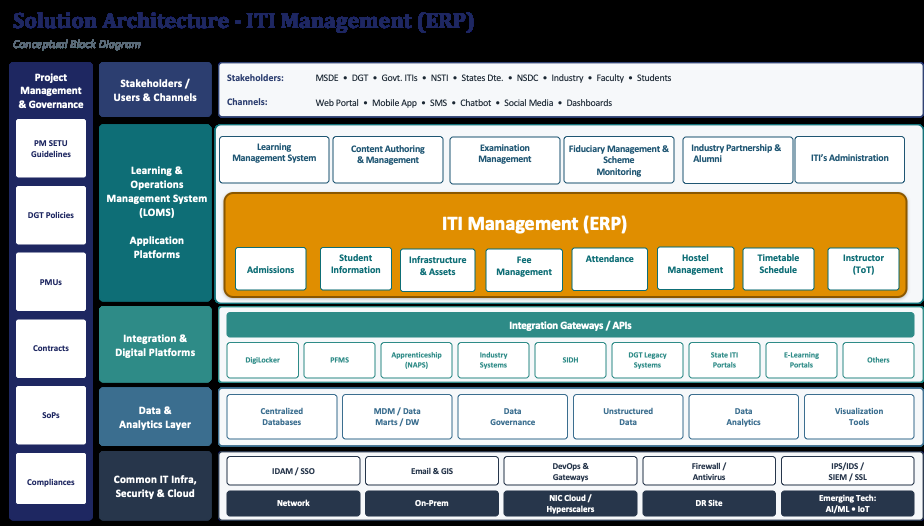
5.2. API requirements (indicative)PDF p.47
- •Student create/update/fetch APIs (for LMS, Exam Management, Analytics consumption)
- •Attendance push API (real-time or batch) to Analytics module
- •Fee-collection event API to Financial Management module
- •ITI /infrastructure status API to PM-SETU Monitoring module
- •eKYC/Digi Locker verification API (external DPI)
- •Single sign-on / identity token validation API (shared LOMS service)
5.3. Integration pointsPDF p.47
5.3.1. Integration with other LOMS modulesPDF p.47
| LOMS module | Nature of integration with ITI Management System |
| Learning Management System (LMS) | Shared learner identity and trade/batch taxonomy; learner progress context |
| Exam Management System | Student eligibility (attendance/enrolment) feed for exam registration |
| Industry Management System | ITI/trade profile feed for apprenticeship and placement matching |
| Fiduciary Management System | Fee collection and dues data for reconciliation and fund-utilisation reporting |
| PM-SETU Monitoring System | ITI level status (admissions, infrastructure readiness, attendance trends) for scheme monitoring |
| Analytics & Dashboard | Consolidated student, attendance, infrastructure and staff KPIs |
| Administrator Management System | Shared user/role/permission provisioning and governance |
5.3.2. External linkages with Digital Public Infrastructure (DPI)PDF p.48
| External system / DPI | Purpose of linkage |
| Aadhaar / eKYC | Identity verification at admission and enrolment |
| Digi Locker / Academic Bank of Credits (ABC) | Secure storage and verification of certificates/credentials; credit accumulation and transfer |
| SIDH (Skill India Digital Hub) | Interoperability with national skilling records, cross-linking of learner ID across schemes |
| National Career Service (NCS) / state employment exchanges | Feed of ITI /trade data for employment-linked services (owned functionally by Industry Management module) |
| State MIS / legacy systems | One-time and incremental data migration from existing state-level systems |
Reference: SIDH already demonstrates Aadhaar-based eKYC, biometric attendance and DBT-linked disbursement patterns that IMS can draw on; DIKSHA demonstrates DigiLocker-based credentialing patterns relevant to student records.
5.4. User Access LayerPDF p.48
The User Access Layer in the ITI Management System shall authenticate each user, resolve their role and entity, and then constrain both navigation and data accordingly. A student/trainee is scoped only to their own record. A trainer is scoped to the assigned institution, batches, and trainees. Admission staff, the ITI Principal, and the hostel warden are scoped to their assigned institution and the admission, attendance, scheduling, fee, hostel, and infrastructure records belonging to it. An SPV or Anchor Industry Partner is scoped to its Hub-Spoke cluster, while a connected LOMS module or external DPI system is limited to the interface and records exchanged under its integration contract. State Directorate and DGT/PM-SETU programme-team users may hold governance and monitoring access where formally provisioned, but programme-wide monitoring is consumed through the Analytics & Dashboard / PM-SETU Monitoring System rather than a duplicate dashboard within system.
| Stakeholder | Workspace and Access | Data Scope |
| Student / trainee | Student workspace: application and admission status, timetable and class schedule, attendance visibility, fee dues and payment status, hostel allotment and mess status, notifications | The student's own active and historical record |
| Trainer | Teaching workspace: assigned batch timetable and trainee list, attendance marking, session/room and clash visibility | Assigned ITIs batches, and trainees |
| Admission staff | Admission workspace: application intake, eKYC verification, document checks, seat allotment and enrolment workflow | Applications and admissions for the assigned ITI and intake cycle |
| ITI Principal (Head) | Institution workspace: consolidated dashboard of admissions, attendance, staff, timetable, hostel, fee, and | The ITI and all admission, attendance, fee, hostel, and |
| infrastructure status; approval workflows and exception handling | infrastructure records belonging to it | |
| Hostel warden | Hostel workspace: room allotment, occupancy, mess-management workflow, hostel-fee status | Hostel residents and rooms of the assigned ITI |
| SPV / Anchor Industry Partner | Cluster workspace: Hub-Spoke institution mapping, cluster-level delivery coordination, reconciliation | Assigned cluster and its constituent ITIs |
| Connected LOMS module (LMS, Exam Management System, Industry Management System, Fiduciary Management System) | Partner integration console: connector health, mapping, and exception management | The module’s own connector, mappings, and exchanged records under the agreed data contract |
| State Directorate official | Approved monitoring access where formally provisioned: ITI-wise view of admissions, attendance, and infrastructure readiness | Role and entity scoped to the State’s ITIs; programme-wide monitoring remains in the Analytics & Dashboard rather than a duplicate view within IMS |
| DGT / PM-SETU programme team | Approved governance access where formally provisioned: national roll-up view across ITIs, exception/risk flags | Role and entity scoped; programme-wide monitoring consumed through the Analytics & Dashboard / PM-SETU Monitoring System rather than a duplicate dashboard |
| Integration administrator | Partner integration console, connector configuration, exception queue | Connector, mapping, and exchange-log records for the connectors under their administration |
5.5. Application & Technology PrinciplesPDF p.49
ITI Management System should be developed based on certain application and technology principles ensures scalability, interoperability, and standardisation across diverse State/UT platforms. These principles enable seamless integration of modules, structured data management, and secure access, reducing manual inefficiencies. The purpose is to create a centralised, unified system that enhances transparency, improves resource utilisation, and supports digital governance for ITIs nationwide.
Application Principles
| Principle | Requirement |
| Single Source of Truth | Each data element (Trainee identity, Student enrolment, ITIs, Instructors etc. has one authoritative system of record; all other views derived/cached. |
| Principle | Requirement |
| Role-Based Least-Privilege Access | Access governed by role (Trainee, Trainer, Principal, State Directorate, DGT, NCVET, Assessor, Inspector, Partner, Auditor) with least-privilege defaults, segregation of duties, full audit trails. |
| Configurable, Not Custom-Coded | Scheme rules, eligibility criteria, inspection checklists, assessment patterns, workflow approvals configurable via metadata/rules engines not hard-coded. |
| Privacy by Design | Personal data minimized, purpose-limited, consented where required, encrypted in transit and at rest, retained per PM- SETU/DPDP rules. Aadhaar/APAAR use per UIDAI and MoE guidelines. |
| Auditability & Non-Repudiation | Every consequential action (approval, rejection, certification, inspection, AI-assisted decision) logged with actor, timestamp, reason, before/after state; logs tamper-evident. |
| Performance & Equity | Acceptable performance on low-bandwidth, low-end devices, intermittent connectivity typical of ITIs and rural learners; performance budgets defined and monitored. |
| Backward Compatibility & Versioning | APIs, events, and schemas versioned; breaking changes follow deprecation policy with advance notice to all consumers (States, partners). |
| Reusability Across States & Schemes | Components reusable across States, ITI types (Government, Private, PPP), and related skill schemes; no State-specific forks. |
| Data Quality & Validation at Source | Data validated at point of capture (format, range, cross-field, duplicate checks); errors surfaced to the user with corrective guidance; master data governed. |
| Interoperable Identity & Consent | Trainee/ITI identity anchored to APAAR/Aadhaar (per applicable guidelines) with consent-based linking; single identity across LOMS modules and partner systems. |
| Business Continuity & Disaster Recovery | Defined RPO/RTO; geo-redundant backup within India; periodic DR drills; documented recovery runbooks. |
| Grievance, Feedback & Continuous Improvement | Built-in grievance and feedback capture with SLA tracking, root- cause analysis, and closed-loop reporting to ITI/State/DGT levels. |
Technology principles
| Principle | Requirement |
| API-First & Contract-Driven | Every capability (including AI) exposed as documented OpenAPI 3.1 service. UIs consume the same APIs available to partners. No screen-only capability. |
| Modular, Independently Deployable Services | Functional components (Enrolment, Attendance, Assessment, Certification, Inspection, Placement, Finance, Analytics) as separable services with defined interfaces; scalable/replaceable without full redeployment. |
| Event-Driven Record | All significant activity (enrolment, attendance, assessment, certification, inspection, grievance, placement, AI interaction) published to a durable event bus + event/learning record store. Immutable, time-stamped, idempotent events. |
| Cloud-Native & Horizontally Scalable | Containerized and orchestrated; scales under admission/assessment peaks. Hosted on MeitY-empanelled cloud or NIC; all data resident in India (DPDP-compliant). |
| Standards-Based Interoperability | Integration via published standards — SCORM/xAPI, OneRoster, LTI, DigiLocker, Aadhaar/APAAR, UDISE+, NCVET/DGT standards, OpenAPI — not bespoke per-partner interfaces. |
| Responsible AI | Every AI capability versioned, explainable, human-overridable, subject to bias/disparity review; governed by LOMS/PM- SETU AI Governance framework with monitoring and rollback. |
| Multilingual & Accessible by Design | Language and accessibility as content/interface metadata, not parallel builds. Regional languages, assistive technology, WCAG 2.1 AA and GIGW compliance, including AI capabilities. |
| Observability & Traceability | Distributed tracing, structured logging, service-level monitoring; single learner/AI event traceable end-to-end via correlation IDs. Dashboards at ITI, district, State, national levels. |
| Data Portability & Exit | Export complete learner, ITI, course, content, assessment, certification, and AI audit records in open formats(JSON/CSV/XML/xAPI). No data reconstruction on platform change. |
5.6. Data model (High level entities)PDF p.51
- •IITI (ITI master, affiliation, seat matrix, infrastructure register)
- •Student (profile, enrolment, trade/batch, attendance, fee, hostel linkage)
- •Trainer/Staff (profile, role, allocation, performance, leave)
- •Trade/Course reference (shared with LMS taxonomy)
- •Attendance record (student/trainer, date, session, mode)
- •Fee transaction (fee head, amount, mode, status)
- •Hostel (room, allotment, occupancy)
- •Infrastructure asset (category, status, readiness indicator)
5.7. Reports and DashboardsPDF p.51
- •ITI-level: admission Seats, daily attendance summary, fee-collection status, hostel occupancy,
infrastructure readiness
- •State-level: ITI wise comparison, seat-matrix utilisation, defaulter/dropout trends
- •DGT/national-level: PM-SETU Cluster readiness roll-up, cross-state benchmarking (feeds Analytics &
Dashboard module)
5.8. Master Data structure and Data OwnershipPDF p.52
| Master data | Owning entity |
| ITI master, seat matrix | DGT /State Directorate |
| Trade/course taxonomy | DGT (shared with LMS module) |
| Student master | ITI (created), State/DGT (governed) |
| Instructor master | ITI Head (created), State (governed) |
| Fee structure | State Subject, ITI (applied) |
6. Non-functional RequirementsPDF p.52
The PM-SETU ITI Management System is envisioned as a large-scale, multi-stakeholder digital platform serving aspirants, ITI instructors, ITI staff, State and Central officers, and connected partners PAN India. It will be accessed frequently and concurrently for core ITI operations and student-related information management. The system’s non-functional design emphasizes learning-state integrity, security of personal and academic records, and high availability during training and assessment periods. It ensures accessibility across diverse devices and connectivity conditions, supports complete auditability of all changes to course, assessment, progress, and credential data, and introduces in this version a dedicated governance framework for every artificial intelligence capability integrated within the platform, establishing trust, transparency, and accountability at scale and frequently under constrained campus connectivity. Its non-functional requirements therefore address responsive interaction for daily administrative and student-facing use, reliable capture of admission, attendance, scheduling, fee, and hostel transaction state, security of student personal data, staff records, and financial data, availability during admission and academic-year critical windows, accessibility across device and connectivity conditions typical of ITI campuses, and complete auditability of changes to admission, enrolment, attendance, fee, and infrastructure/asset records.
6.1. Performance requirementsPDF p.52
The platform shall provide a responsive and reliable experience across all stakeholder groups and shall support concurrent access without degradation, including during the admission season when transaction volumes peak across all onboarded ITIs. The table below sets out the are indicative performance parameters under normal and peak operating conditions. Parameters and limits may be defined as part of SLA.
| Performance Parameter | Minimum Requirement |
| Page and module load | Core admission, attendance, scheduling, hostel, and fee pages shall respond within 3 seconds for at least 90% of requests under normal load and within 5 seconds under peak (admission-season) load. |
| Transaction commit | A validated attendance, fee, or hostel transaction entry shall update the operational record within 2 seconds for at least 95% of requests. |
| API and integration response | Synchronous platform interfaces shall respond within 500 milliseconds at the 95th percentile. Latency from external DPI systems (Aadhaar/eKYC, DigiLocker/ABC) and other LOMS modules shall be isolated from the user interface through asynchronous processing where a synchronous response is not required for immediate action. |
| Concurrent usage | The platform should support a minimum of 10,000 concurrent user sessions (staff, students, and guardians where applicable), scalable to 30,000 during peak periods such as the admission window, with no more than 20% response-time degradation. |
| Transaction throughput | The platform shall sustain a minimum of 200 transactions per second, scalable to 600 transactions per second during peak admission processing. |
| LOMS-module and DPI synchronization | Events received from a connected LOMS module or DPI system shall be validated and reflected in the student/staff record within 15 minutes of receipt, with end-of-day reconciliation completed by 08:00 hours on T+1. |
| Low-bandwidth usability | The platform shall remain usable at the minimum supported connectivity profile typical of ITI campuses, supporting offline data capture (for example, attendance) with deferred synchronization on reconnection. |
| Notifications | System-generated notifications application status, fee-due reminders, attendance alerts, hostel allotment shall be dispatched within stipulated time limit of the triggering event. |
| Report generation | Standard operational reports and consolidated ITI, cluster, or State-level reports shall be generated within stipulated time Limit, say within 60 seconds. Large scheduled reports shall execute asynchronously and complete within given time frame without impacting online transaction processing. |
| Bulk data processing | Bulk uploads or migrations of data (for example, legacy student, staff, or asset data) shall be validated and processed within Limited time duration. |
| System availability | The platform shall provide a minimum of 99.5% monthly availability, excluding pre-notified planned maintenance scheduled outside business hours, and 99.9% during declared admission and academic-year critical windows. |
| Scalability headroom | The architecture shall support at least 30% year-on-year growth in ITIs, students, staff, transaction volumes, and integrations over a 5-year horizon through horizontal scaling, without architectural redesign. |
| Data currency | Every externally sourced status displayed to a user an eKYC verification result, a DBT disbursement confirmation, an exam-eligibility feed shall expose the time or version of its last successful synchronization. |
| Recovery objectives | Critical functions shall meet a recovery time objective of 4 hours and a recovery point objective of 15 minutes, as further detailed under availability and disaster recovery requirements. |
6.2. Security requirementsPDF p.54
The platform shall implement a comprehensive security framework to protect student personal data, staff records, financial/fee data, and partner integration data. Authentication shall be integrated with the approved government identity and access management or single sign-on mechanism. Role-based access control shall be enforced across all components so that users access only the information and functionality relevant to their designated responsibilities, and the platform shall maintain strict segregation between students, ITIs, clusters, and partners. The table below describes the security standards and frameworks required for the platform.
| Security Framework / Standard | Application to the Platform |
| ISO/IEC 27001:2022 | The platform and its hosting operations shall implement an Information Security Management System certified to ISO/IEC 27001:2022, with the Statement of Applicability covering all student and staff data processing environments. |
| CERT-In Directions and Guidelines (2022) | Cyber security incidents shall be reported to CERT-In within 6 hours of detection; security and system logs shall be retained for a minimum of 180 days within India; system clocks shall be synchronized with NIC or NPL network time servers. |
| IT Act, 2000 and DPDP Act, 2023 (Legal Requirement) | The platform shall comply with the Information Technology Act, 2000, including reasonable security practices, and with the Digital Personal Data Protection Act, 2023, and the Digital Personal Data Protection Rules 2025, covering lawful processing, purpose limitation, data minimization, student/staff rights, and breach notification obligations. Care shall apply where a student is a minor, including the prohibition on behavioural monitoring, tracking, and profiling of children, and the requirement for verifiable parental/guardian consent where applicable. |
| MeitY empanelled cloud / GI Cloud (MeghRaj) | The solution shall be hosted on a MeitY-empanelled cloud service provider or National Informatics Centre infrastructure, with all data, including backups and disaster recovery copies, residing within Indian territory. |
| Security audit and certification | A CERT-In empanelled agency shall conduct Vulnerability Assessment and Penetration Testing prior to go-live, after every major release, and at least half-yearly thereafter. Security audit clearance shall be obtained before production deployment. |
| OWASP ASVS / Top 10 and secure SDLC | Application development shall follow secure coding practices aligned to OWASP ASVS Level 2 and OWASP Top 10 mitigation, with static and dynamic security testing integrated into the delivery pipeline. |
| Encryption standards | Data in transit shall be protected using TLS 1.2 or higher, with TLS 1.3 preferred. Data at rest, including databases, student and staff records, financial data, and backups, shall be encrypted using AES-256, with keys managed through a dedicated key management service and defined rotation policies. |
| Identity, access, and authentication | Authentication shall integrate with the approved government single sign-on or identity provider. Multi-factor authentication shall be mandatory for administrative, fee-approval, and hostel/infrastructure-configuration roles. Role-based access with segregation of duties shall be enforced and supported by quarterly access reviews. |
| Student data isolation | A student shall retrieve only the student’s own records. Trainer, ITI, and hostel access shall be limited to assigned students and institutional scope, enforced at the service layer rather than at screen rendering. |
| Records and transaction integrity | Admission, attendance, fee, and hostel records shall be protected at rest and in transit, with access logged. Approvals, corrections, and status changes shall be attributable and protected from unauthorized change. |
| Partner and LOMS-module integration security | Each LOMS-module and DPI interface shall use approved authentication, scoped credentials, payload validation, rate limiting, and complete integration logging, with credentials rotated on the agreed schedule. |
| Security monitoring (SIEM / SOC) | Security events shall be aggregated into a security information and event management platform with round-the-clock monitoring, defined incident response runbooks, and tamper-evident log storage. |
| GIGW 3.0 and e-Governance standards | Interfaces shall conform to the Guidelines for Indian Government Websites 3.0, including accessibility and quality requirements applicable to government digital platforms. |
| Reference architecture alignment | Security architecture shall be benchmarked against the NIST Cybersecurity Framework 2.0 as the governing reference model for security controls and maturity assessment. |
6.3. Availability and disaster recovery requirementsPDF p.55
The platform should be designed for high availability during normal academic-year operations and declared admission and examination-linked windows. A disaster recovery environment shall be maintained at a geographically separate location to ensure continuity of critical IMS operations in the event of infrastructure failure, cyber incident, natural disaster, or another disruptive event. The disaster recovery environment shall maintain synchronized copies of application data, configuration, master data, student and staff records, fee and financial records, infrastructure/asset records, and audit logs.
Recovery procedures shall be documented, periodically tested, and governed through defined operational protocols. Recovery priorities shall place student and staff access, admission and enrolment-state integrity, fee- transaction integrity, and identity resolution ahead of non-critical administrative and reporting views. Records committed before a service failure shall not be lost or silently duplicated on recovery. Connected LOMS-module and DPI integrations may be temporarily unavailable without preventing access to unaffected functionality; where an external source is unavailable, the platform shall continue to serve the last confirmed status with an indication of staleness while preventing actions that require fresh confirmation such as a fee-payment or eKYC status from completing incorrectly.
6.4. Backup and data retention requirementsPDF p.55
The platform shall implement automated backup mechanisms covering application databases, student and staff master data, admission and enrolment records, attendance and scheduling records, fee and financial
transaction records, hostel records, infrastructure/asset records, configuration settings, and system logs. Backups shall be performed at scheduled intervals and stored securely in accordance with government data protection guidelines. The solution shall maintain multiple backup copies to support operational recovery, disaster recovery, and regulatory compliance. Backup files shall be encrypted and protected against unauthorized access or alteration, and periodic restoration testing shall be conducted to validate recoverability and data integrity.
The platform shall preserve historical admission, attendance, scheduling, fee, hostel, and infrastructure/asset information for the duration prescribed under applicable government record-retention policies and PM-SETU programme governance requirements. Archived data shall remain searchable and auditable throughout the retention period. Personal data shall be retained only for as long as the stated purpose requires, in accordance with the Digital Personal Data Protection Act, 2023, and shall follow the same retention regime as other institutional records rather than a separate policy.
6.5. Audit logging and monitoring requirementsPDF p.56
Given the administrative and financial significance of the records held, comprehensive audit logging shall be a mandatory platform capability. The system shall capture authentication events, admission-application status changes, seat allotment and enrolment, attendance and scheduling changes, fee assessment, collection, and waiver approvals, etc. along with partner and LOMS-module synchronization, denied access attempts, configuration changes, and administrative actions.
All logs shall include user or source identification, timestamp, action performed, affected student, staff member, or asset, previous value, updated value, and the origin of the transaction where applicable. Audit logs should be tamper-resistant and accessible only to authorized administrators and auditors. The platform shall support centralized log monitoring, exception detection, activity tracing, and forensic investigation. Log retention periods shall align with programme audit requirements and statutory governance obligations.
6.6. Accessibility and inclusion requirementsPDF p.56
Because the platform is used directly by students and staff rather than only by administrators, accessibility is a functional requirement rather than a compliance formality. All learner- and staff-facing interfaces shall conform to WCAG 2.1 Level AA and to the Guidelines for Indian Government Websites 3.0. Interfaces shall support keyboard navigation, screen-reader compatibility, sufficient colour contrast, resizable text, and predictable navigation.
The platform shall support regional-language interfaces appropriate to the deployment States. It shall be usable on the low-cost mobile devices commonly available to students and staff, accessible via web and mobile as set out in Section 5, and shall operate under intermittent connectivity through offline activity capture and deferred synchronization, reflecting the connectivity conditions typical of ITI campuses. Where a student or staff member requires an accessible alternative to a screen or document, the platform shall present the alternative in place of, rather than in addition to, an inaccessible one.
Where an applicant declares a disability at the point of admission, the platform shall support recording the applicable disability certificate and any associated reservation category or accommodation, and shall carry this information forward consistently to attendance, hostel, and fee-concession workflows so that the applicant is not required to re-establish the same entitlement in each module.
6.7. Compliance requirementsPDF p.56
The platform shall adhere to the governance principles and operational controls defined under the PM-SETU programme and shall support compliance with Government of India digital governance standards, approved cybersecurity guidelines, data protection requirements, and applicable DGT/NCVT skilling and certification
regulations. The platform shall maintain the source and authority of admission, attendance, fee, and certification-eligibility records so that a platform workflow does not supersede statutory academic or certification governance.
The platform shall maintain immutable audit trails for all administrative decisions and institutional transactions to support internal audit, external audit, and independent verification. All workflows related to admission approval, fee assessment and waiver, hostel allotment, infrastructure/asset changes, and instructor/ToT assignment shall be digitally recorded and retained to ensure accountability and transparency across the PM- SETU ecosystem. Where a multilateral development partner has fiduciary or reporting requirements bearing on programme outcomes, the platform shall provide evidence-based reporting sufficient to satisfy them.
A Data Protection Impact Assessment shall be conducted prior to large-scale processing of student personal data under this platform, with particular attention to processing involving minors, consistent with the Digital Personal Data Protection Act 2023 and the Digital Personal Data Protection Rules, 2025. The assessment shall be completed and reviewed before production go-live and revisited whenever a material change to data collection or a new integration is introduced.
Consistent with the Digital Personal Data Protection Act, 2023, an adult student or staff member shall be able to request access to, correction of, and erasure of their own personal data held by the platform, and to register a grievance, through a defined process. Where a student is a minor, the same rights shall be exercisable by a parent or lawful guardian on the student’s behalf.
7. Testing Strategy and DeploymentPDF p.57
The ITI Management System shall adopt a structured testing and deployment framework to ensure that all ITI related functionalities and integration operates as intended prior to production rollout. Testing is directed at three things in particular: the integrity of the student/trainee journey from application to enrolment, attendance, fee status and, where applicable, hostel residence; the separation of authority between system and the other LOMS modules and Digital Public Infrastructure (DPI) systems connected to it; and the correct, auditable operation of every approval and reconciliation step against the non-functional requirements in Section 6. The solution shall be considered ready for production only when the same student, trade/batch, fee, and infrastructure-allotment state can be reconciled across the screens, operational records, and external integrations that contribute to it, and when each role can see and act only within its permitted scope.
7.1. Testing strategyPDF p.57
The testing lifecycle shall include Unit Testing, System Integration Testing, User Acceptance Testing, Performance Testing, Security Testing, Accessibility Testing, Data Migration Testing, and Production Validation Testing.
- •Functional and journey testing. End-to-end scenarios shall cover application intake, eKYC-based identity verification, seat allotment and enrolment, trade/batch-wise timetable creation with trainer and room allocation, daily/session-wise attendance capture, hostel room allotment and occupancy, fee assessment, collection and dues tracking, instructor/ToT profile and training-cycle tracking, infrastructure and asset registration and maintenance tracking, and consolidated reporting to the State Directorate and DGT/PM-SETU programme team. Negative cases shall confirm that an incomplete application, an unverified eKYC status, an unresolved room or trainer clash, or an outstanding mandatory fee prevents the corresponding downstream step, for example, no attendance capture without confirmed enrolment, and no seat confirmation without a completed eKYC check.
- •Integration and reconciliation testing. Integration with the other LOMS modules- Learning Management System, Exam Management System, Industry Management System, Fiduciary Management System, PM-SETU Monitoring System, Analytics & Dashboard, and Administrator
Management System and with external DPI systems Aadhaar/eKYC, DigiLocker/Academic Bank of Credits, Skill India Digital Hub (SIDH), and National Career Service/state employment exchanges shall be tested for identifier mapping, duplicate handling, retries, stale data, correction, and source lineage. A student record shared with the Exam Management System or the Fiduciary Management System shall reconcile to the same student, trade, and batch without duplicate entry.
- •Access-control and privacy testing. ITI Principal (Head), Admission staff, Trainer, Student/Trainee, Hostel warden, State Directorate official, and DGT/PM-SETU programme team roles shall be tested against permitted data scopes. Tests shall include direct service/API invocation and address manipulation attempts, not only screen navigation, and shall confirm that denied access is logged. Aadhaar/eKYC and other PII fields shall be confirmed as encrypted and visible only to authorised roles.
- •Data migration testing. One-time and incremental migration of existing student, staff, infrastructure, and fee records from State MIS and other legacy systems shall be validated for record-count completeness, mandatory-field integrity, and duplicate or orphan-record detection prior to go-live. Migrated records shall reconcile against source-system counts and remain traceable to the originating ITI.
- •Approval-workflow integrity testing. Admission approval, seat allotment, fee waiver/concession approval, and hostel-allotment approval shall be validated under normal and interrupted sessions. Concurrent submission shall not create a duplicate seat or room allotment, an externally authoritative status (for example, a DBT disbursement confirmation) shall not be overwritten locally, and every approval step shall require and log an identified, authorised approver.
- •Accessibility and device testing. Student, trainer, and administrative journeys shall be tested on the supported mobile and desktop profiles, with keyboard navigation and screen-reader paths, and under low-bandwidth and offline scenarios covering data-entry fallback, resume, and deferred synchronisation reflecting the connectivity conditions typical of ITI campuses.
- •Performance, security, and resilience testing. Load testing shall simulate peak admission-season usage across all onboarded ITIs against the response-time targets at Section 6. Backup, restore, and failover scenarios shall be executed against the defined RPO/RTO. Vulnerability Assessment and Penetration Testing shall be completed by a CERT-In empanelled agency before production go-live.
User Acceptance Testing shall be conducted with nominated representatives from the State Directorate, DGT/PM-SETU programme team, pilot ITIs, admission staff, trainers, hostel wardens, and students, validating actual business scenarios including ITI Management System Sub- modules and partner/module reconciliation. Successful completion of User Acceptance Testing shall constitute formal business sign-off for production deployment.
7.2. Acceptance criteriaPDF p.58
Production deployment approval shall be granted only after successful completion of all planned testing activities and satisfaction of the following criteria.
- •All critical student/trainee journeys pass end to end, with admission, enrolment, attendance, fee, and hostel status reconciling to the underlying operational records.
- •Role and entity access tests pass for every stakeholder persona, including prevention and logging of unauthorised student-data access.
- •Connected LOMS-module and DPI interfaces including the Exam Management System, Industry Management System, Fiduciary Management System, PM-SETU Monitoring System, Aadhaar/eKYC,
Digi Locker/ABC, SIDH, and identifier mapping, retry, duplicate, correction, and stale-data scenarios, with conformance demonstrated for each interface in scope.
- •A representative pilot ITI has been onboarded end to end including data migration, user provisioning, and module configuration in a pre-production environment.
- •No critical or high-severity defect remains open in student identity, seat/room-allotment integrity, fee reconciliation, attendance accuracy, or data isolation.
- •Data migration from State MIS/legacy systems is validated with zero unresolved record-count or duplicate discrepancies for the in-scope pilot ITIs.
- •Performance, accessibility, and security requirements at Section 6 are met under the agreed test load and supported device profiles, including low-bandwidth conditions.
- •All application security findings categorised as critical or high risk are closed and retested.
- •User Acceptance Testing sign-off is obtained from nominated ITI Principals, admission staff, trainers, hostel wardens, students, and State Directorate/integration representatives.
- •Specific numeric acceptance thresholds response-time targets, RPO/RTO, and data-migration accuracy not already fixed in Section 6 are to be defined during solution design, prior to User Acceptance Testing, and recorded in the test plan.
7.3. CI/CD and deployment approachPDF p.59
The solution shall adopt a continuous integration and continuous delivery approach to support controlled, repeatable, and auditable software releases. Source code repositories, automated build pipelines, quality checks, automated test suites, security scanning, and deployment workflows shall be integrated into a centralised DevSecOps framework.
The deployment lifecycle shall follow a phased environment promotion model comprising Development, Testing, User Acceptance Testing, Pre-Production, and Production environments, together with a pilot sandbox in which an onboarding ITI or State system can be validated before production activation. All releases shall pass through automated code validation, build verification, security scanning, and testing gates before promotion. ITI, trade, and batch master data, student identity and eKYC mappings, and integration configuration required for the initial rollout shall be validated before production activation, and interfaces to external systems including the other LOMS modules and DPI linkages shall be enabled by environment and by ITI, so that a failed integration does not block independent testing.
Production rollout shall be phased according to the agreed PM-SETU implementation plan (pilot → scale-up → full deployment), beginning with the initial Hub-and-Spoke ITI clusters and expanding after reconciliation, user support, and performance are proven. Each release shall support controlled rollback of application code and configuration without rolling back valid student, fee, or attendance transactions already committed. Post- deployment validation shall confirm login, module access, data capture across admission, attendance, fee, and hostel workflows, external LOMS/DPI synchronisation, and audit logging before the release is declared live. This approach will ensure minimal deployment risk, faster release cycles, improved software quality, and complete traceability of changes throughout the lifecycle of the platform.
7.4. Product Development MethodologyPDF p.59
The platform shall be developed using an iterative, sprint-based methodology, with each module Admission, Student Information System, Attendance Management, Class Scheduling, Hostel Management, Fee
Management, Instructor/ToT Management, and Infrastructure Management delivered and validated before dependent downstream functionality is built on top of it. A product roadmap shall be maintained and reviewed by the SPMU and State Directorate with each review assessing module-readiness against the completion and reliability thresholds recorded in the test plan, rather than against elapsed time alone.
8. Process Designs and Mock-upsPDF p.60
This section presents the core business processes of the ITI Management System covering data collection, processing, and report generation through BPMN 2.0 process designs for each functional module. Each subsection pairs a process diagram with its corresponding illustrative screen mock-up, so that the process flow and the resulting user interface can be read together. These diagrams, the process descriptions in Section 3, the solution architecture in Section 5, and the functional requirements in Section 4 describe a single, consistent system: no mock-up introduces a capability, field, or workflow step that is not already specified in those sections. The screens are illustrative in nature, intended to convey layout and flow rather than final visual design and this same requirement, that every screen remain consistent with the specifications elsewhere in this document, applies to all screens produced during subsequent solution design, including each mock-up presented in this section.
8.1. AdmissionPDF p.60
- •Application Form →Student details, eligibility, document upload, fee payment.
- •Seat Allotment Dashboard→ Merit list, counselling choices, allotment letter generation.
- •Enrolment Confirmation → Document verification, PRN generation, student ID card.
BPMN Diagram
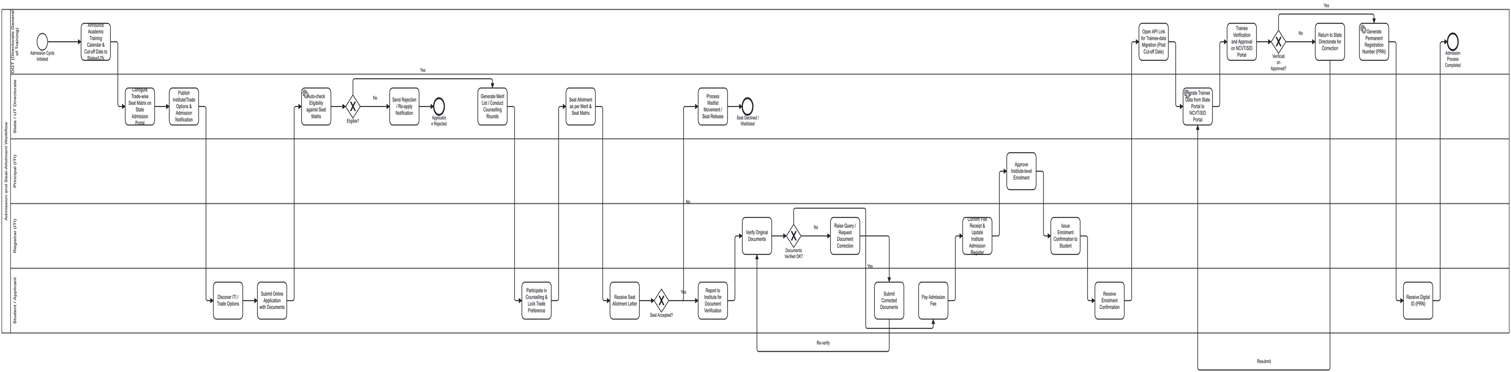
Illustrative Screen Mock-up - Admission
The mock-up below shows the resulting admission workflow, including the application form for student details and document uploads, the merit‑based seat allotment dashboard, and the enrolment confirmation screen that finalizes verification and ID generation within the same unified interface.
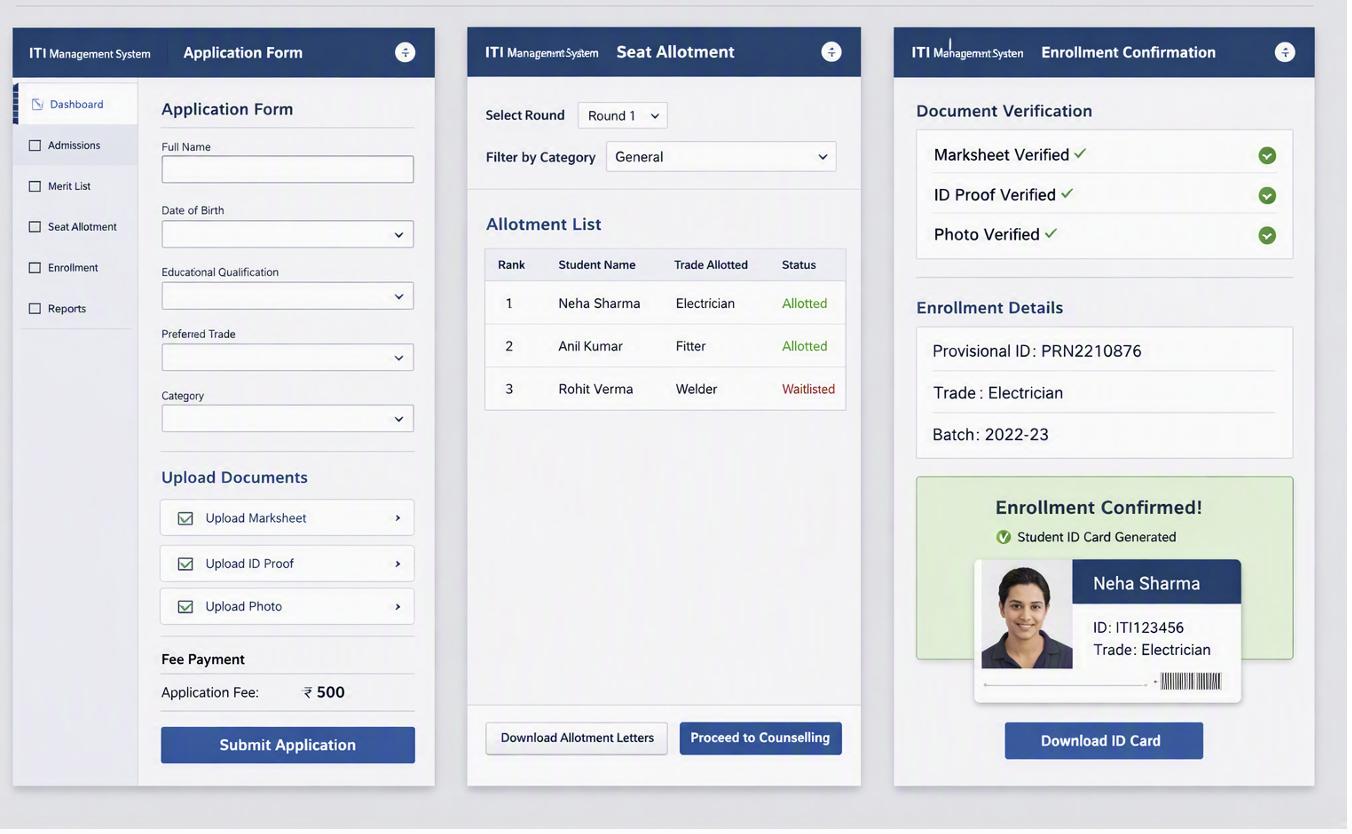
8.2. Student Information SystemPDF p.61
- •Unified Student Profile → Personal info, academic history, trade/batch mapping.
- •Transfer/Dropout Form → Status update, migration records.
- •Student Lifecycle Dashboard →Progression tracking, alumni records.
BPMN Diagram

Illustrative Screen Mock-up - SIS
The mock-up below shows the resulting student record interface, featuring the unified profile view, transfer and dropout management form, and lifecycle dashboard that visualize academic progression and alumni transitions in a single connected layout.
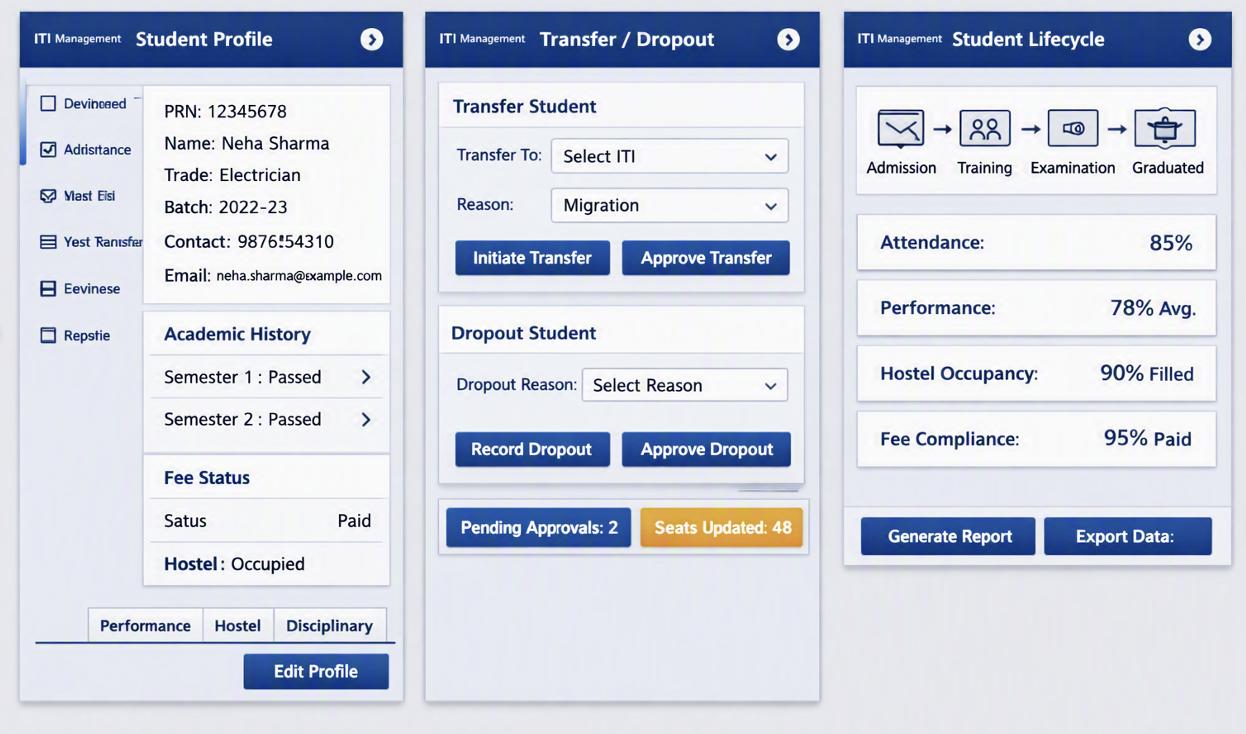
8.3. Attendance Management SystemPDF p.62
- •Biometric/App Attendance Capture →Daily logs for students and trainers.
- •Leave Request Form → Student/trainer leave workflow.
- •Attendance Report Dashboard → Compliance and participation analytics.
BPMN Diagram
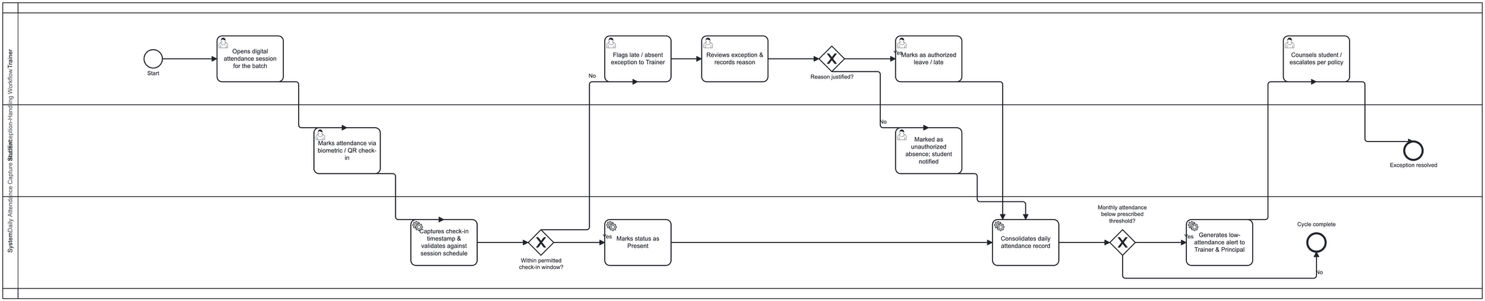
Illustrative Screen Mock-up
The mock-up below shows the resulting attendance control panel, combining biometric capture, leave request workflow, and compliance dashboard grounded in daily participation data for both students and trainers.
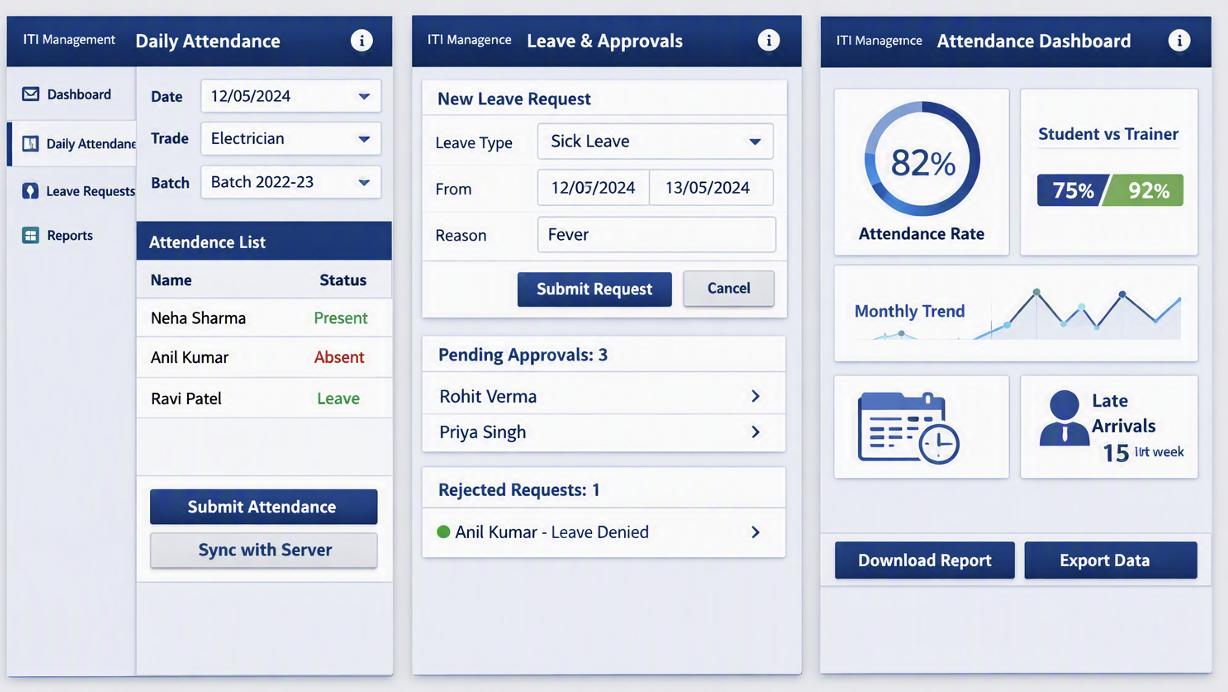
8.4. Class Scheduling SystemPDF p.63
- •Timetable Generator →Trade-wise, batch-wise scheduling with trainer allocation.
- •Resource Allocation Form→ Classroom/lab booking, conflict resolution.
- •Schedule Dashboard → Optimized timetable and utilization reports.
BPMN Diagram
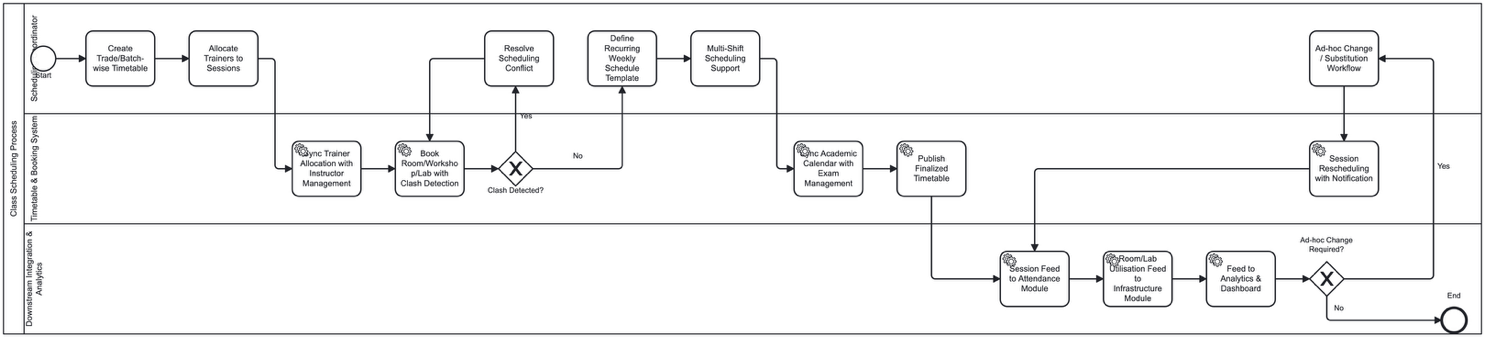
Illustrative Screen Mock-up
The mock-up below shows the resulting scheduling workspace, including the timetable generator, resource allocation form, and schedule dashboard, all aligned under the same visual theme to optimize classroom and trainer utilization.
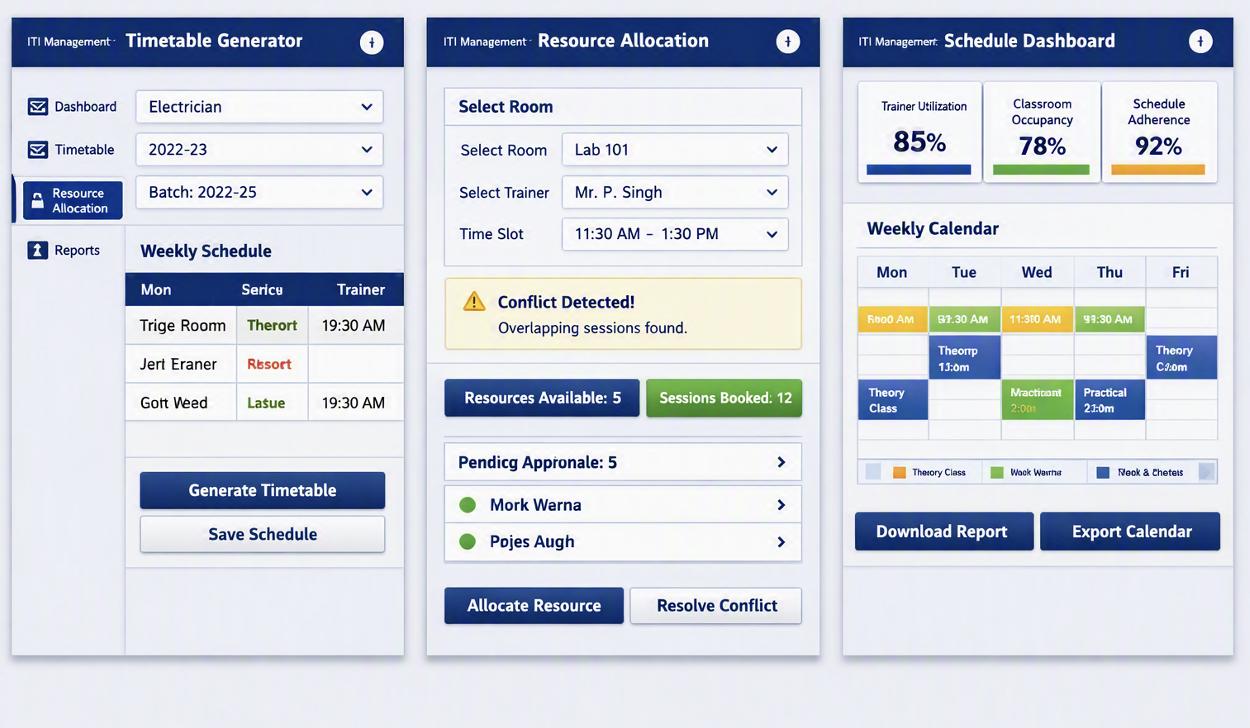
8.5. Hostel ManagementPDF p.64
- •Hostel Application Form → Eligibility documents, preferences, fee payment.
- •Room Allotment Form →Bed/room assignment, occupancy status.
- •Hostel Occupancy Dashboard →Waiting list, occupancy reports, complaints tracking.
BPMN Diagram

Illustrative Screen Mock-up
The mock-up below shows the resulting hostel administration view, integrating the application form for eligibility and fee payment with the room allotment interface and occupancy dashboard, maintaining continuity across student accommodation workflows.
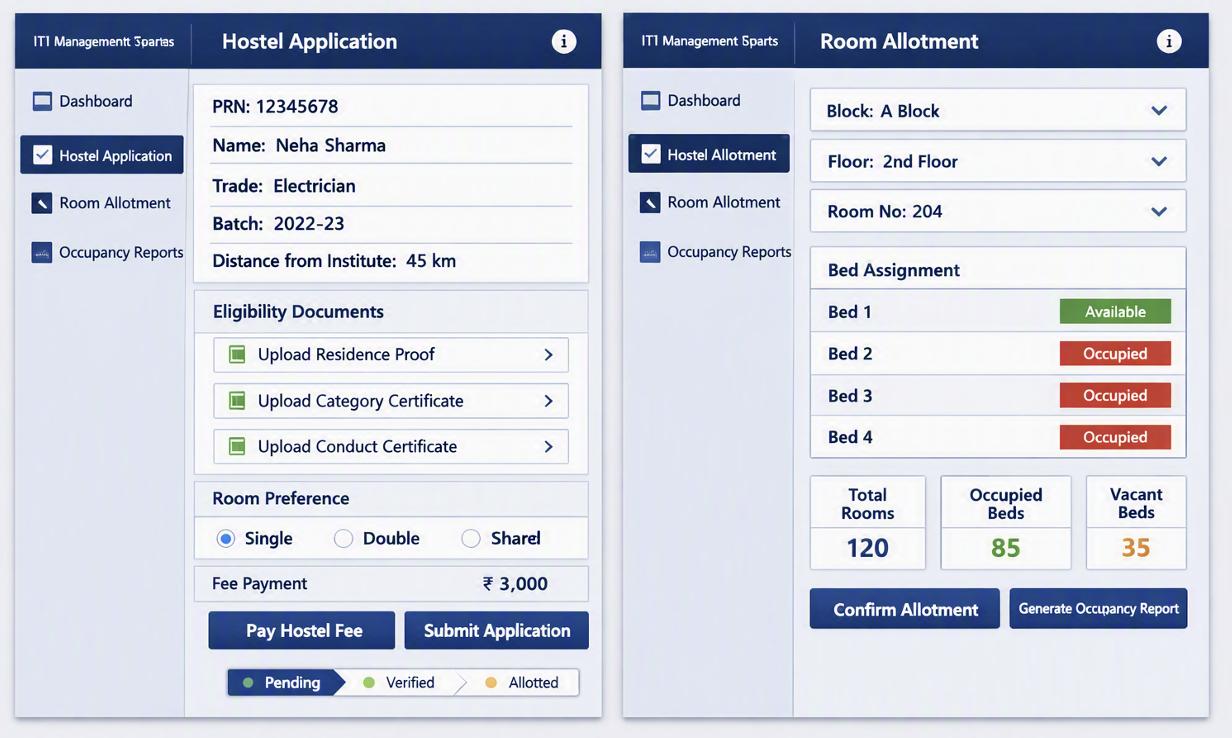
8.6. Fee Management SystemPDF p.65
- •Fee Collection Form →Payment records, receipts, dues tracking.
- •Scholarship/DBT Linkage Form →Student eligibility, fund disbursement.
- •Fee Dashboard →Outstanding balances, reconciliation reports.
BPMN Diagram
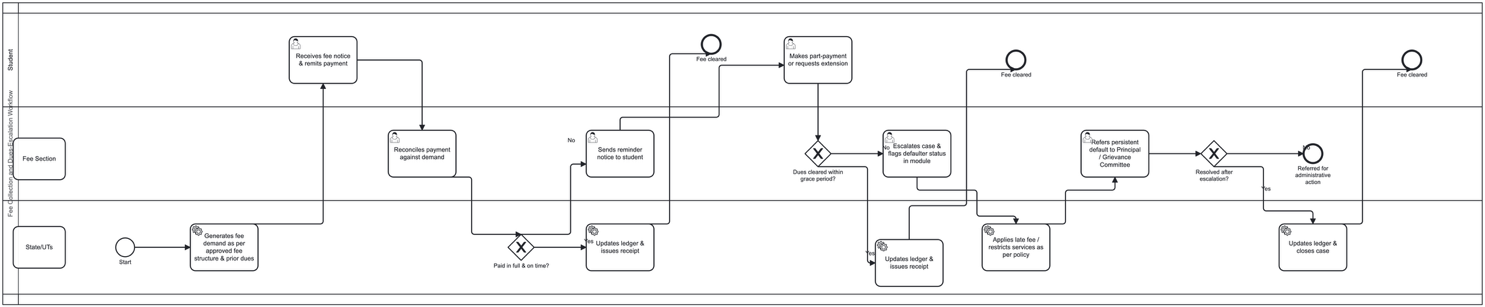
Illustrative Screen Mock-up
The mock-up below shows the resulting financial operations screen, featuring the fee collection and tracking form, scholarship linkage interface, and reconciliation dashboard all grounded in the same structured layout for transparency and control.
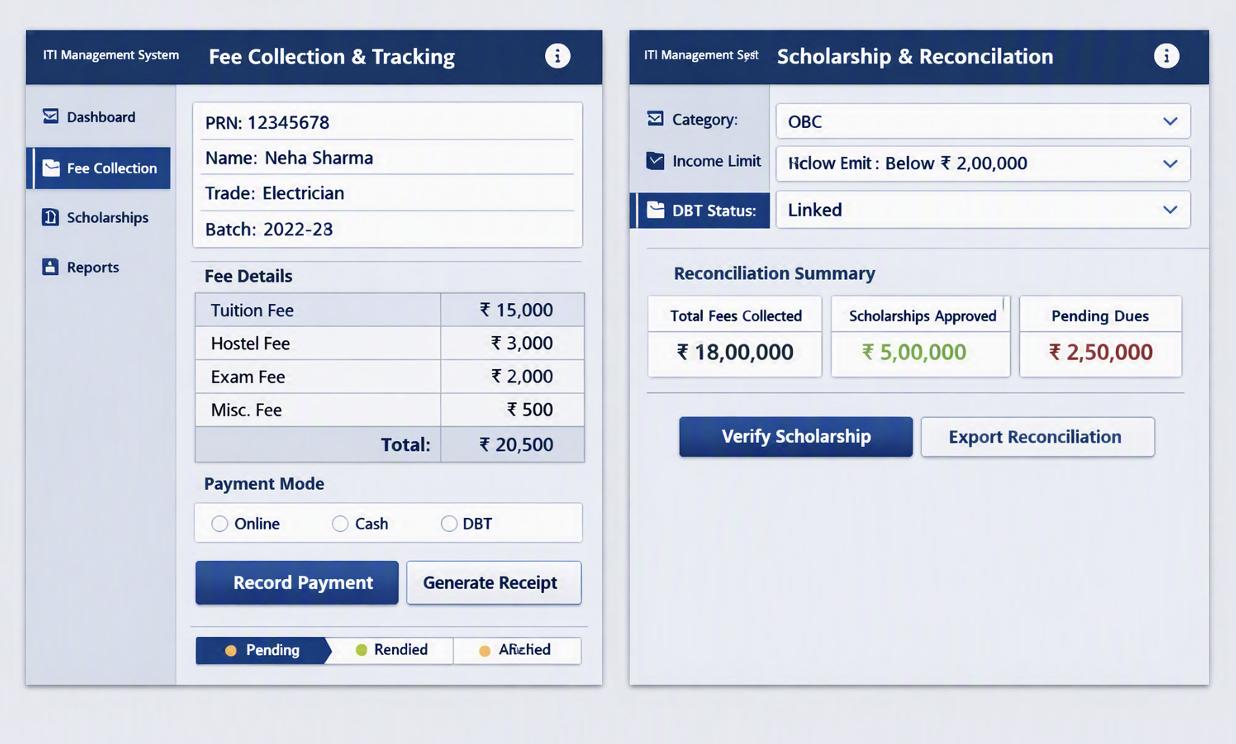
8.7. Instructor Management SystemPDF p.66
- •Instructor Profile Form→ Qualifications, induction details, workload.
- •Performance Evaluation Form→ Utilization metrics, appraisal records.
- •Instructor Dashboard → Workload distribution, efficiency insights.
BPMN Diagram
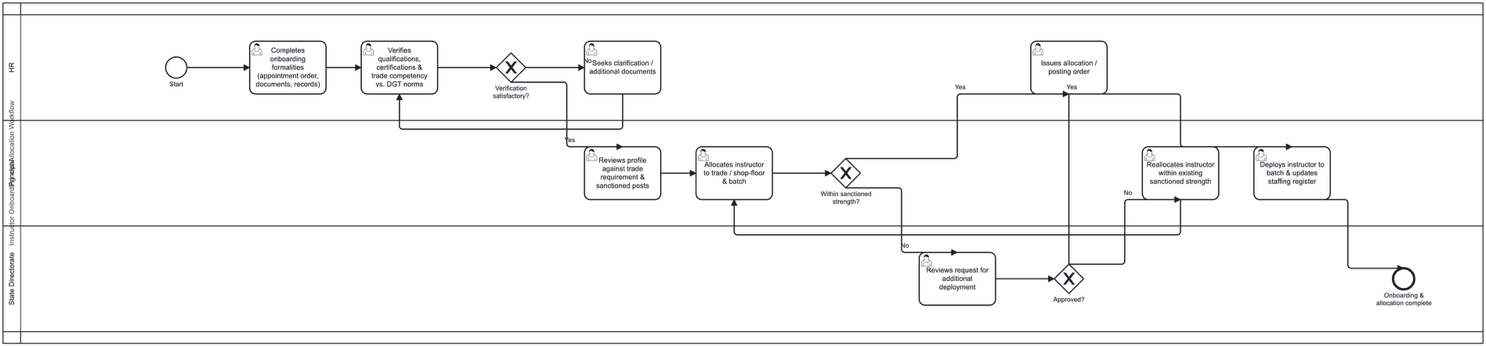
Illustrative Screen Mock-up
The mock-up below shows the resulting instructor administration panel, including the profile and workload form, performance evaluation interface, and analytics dashboard that visualize utilization and efficiency metrics in a cohesive design.
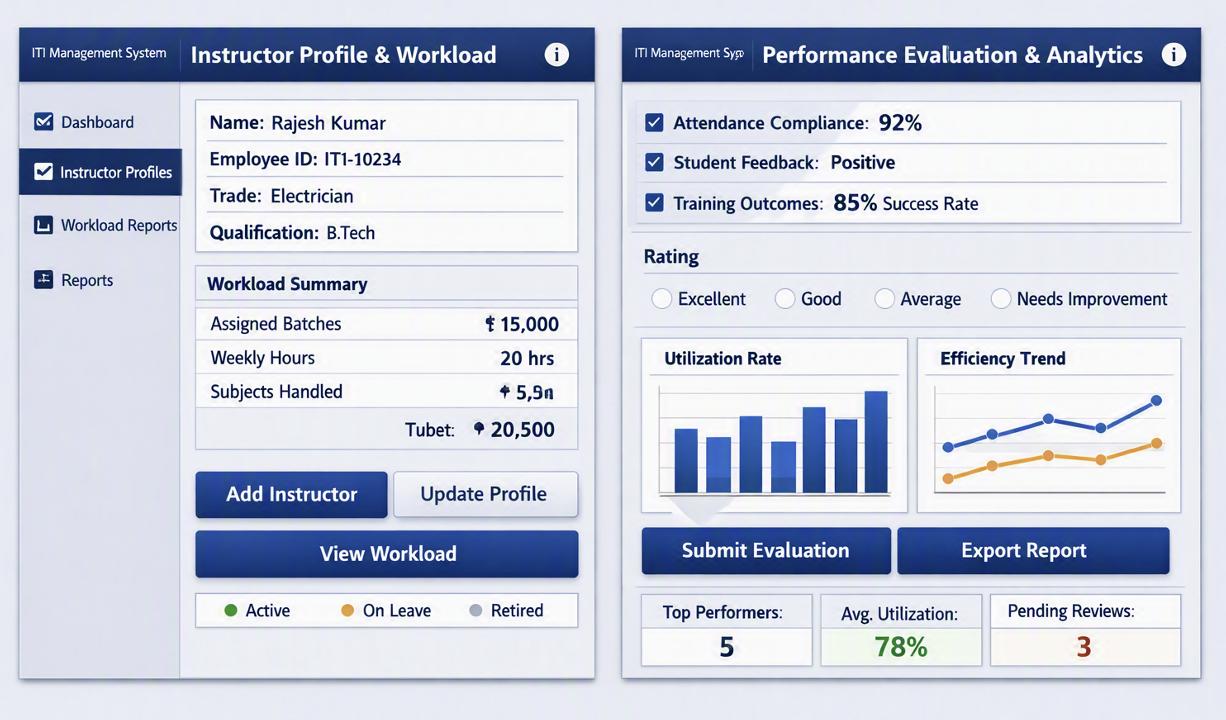
8.8. Infrastructure Management SystemPDF p.67
- •Infrastructure Readiness Form → Civil works, labs, equipment, utilities.
- •Geo-tagged Evidence Upload. → Photos, readiness checklist.
- •Asset Lifecycle Dashboard → Maintenance alerts, availability reports
BPMN Diagram
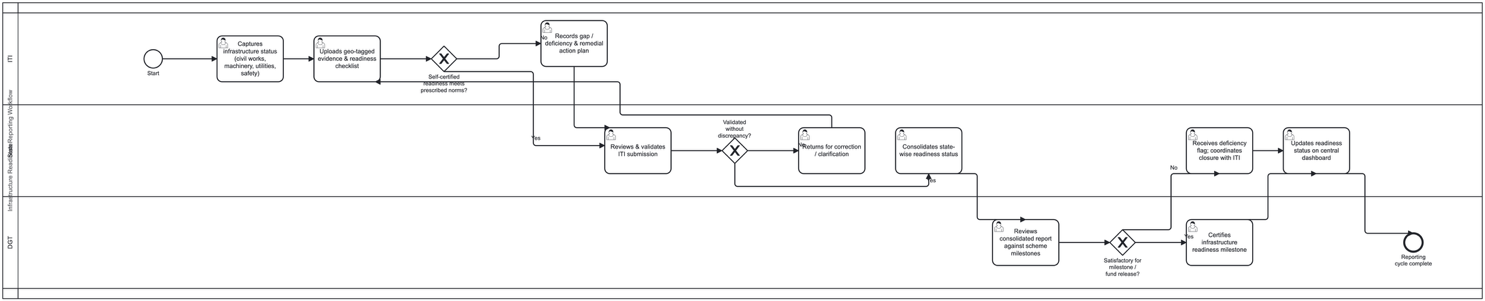
Illustrative Screen Mock-up
The mock-up below shows the resulting infrastructure readiness and asset lifecycle screens, combining verification checklists, geo‑tagged evidence uploads, and maintenance dashboards within the same consistent visual framework.