View a dashboard for my role
← All tasks · Analytics, alerts and reports
Roles named in these sections:State / State DirectorateSPV / AIPLearner / Student / CandidateCentre / Senior DGTAuditor / IMA
Where the DPR describes it
2.2. Centre User JourneyAnalytics · PDF p.5
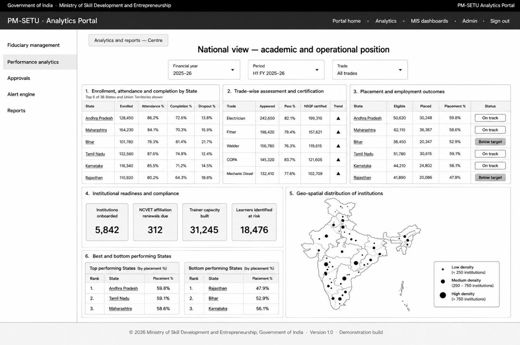
The journeys below trace each stakeholder from onboarding through to the information presented within each pillar. The pillars follow the order established at Section 3, and only departures from the Centre journey are stated for the remaining stakeholders. The Centre holds the widest scope, seeing the national position across all five pillars.Read the full section (1 diagrams) →
2.3. State, User JourneyAnalytics · PDF p.7
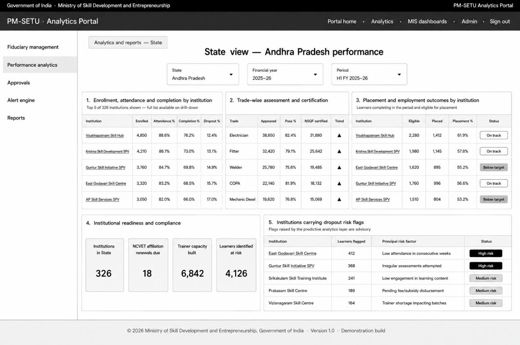
The State stakeholder sees the same five pillars as the Centre, scoped on authentication to the State concerned, and exercises delegated approval authority within that scope.Read the full section (1 diagrams) →
2.4. SPV, User JourneyAnalytics · PDF p.9
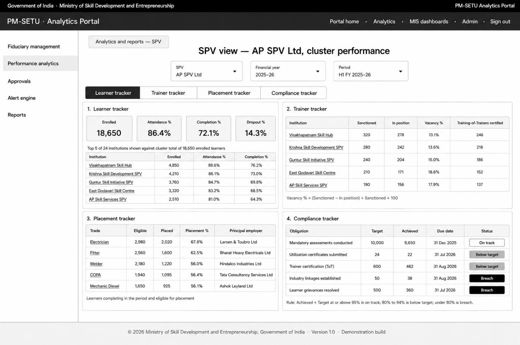
The SPV is the only stakeholder that both reads from and submits into the Fiduciary Management pillar and holds scope over its own cluster and the institutions within it. Onboarding: The SPMU registers the SPV on creation, recording its State, cluster, Industry Anchor Partner and approved funding structure, and nominates the SPV's authorized representative. The Centre administrator approves the nomination, and the Portal registers the representative against the Government Identity and Access Management framework, with the SPV recorded as the entity. The representative completes first-time verification, sets multi-factor authentication, and …Read the full section (1 diagrams) →
2.5. Auditor, User JourneyAnalytics · PDF p.11
The Auditor holds verification scope over assigned States and SPVs and is the only stakeholder with routine access to procurement contract records. Onboarding: The SPMU records the appointment of the auditor or Independent Monitoring Agency, naming the firm, the engagement period and the States and SPVs assigned. The Centre administrator approves the appointment, and the Portal registers the representative against the Government Identity and Access Management framework, with the assigned States and SPVs recorded as the entity. The representative completes first-time verification, sets multi-factor authentication, and the account goes live. …Read the full section (1 diagrams) →
2.6. ITI, User JourneyAnalytics · PDF p.13
The ITI holds scope over a single institution and is presented with three pillars rather than five, the Fiduciary Management and Approvals pillars not being applicable.Read the full section (2 diagrams) →
2.7. Student, User JourneyAnalytics · PDF p.16
The student is presented with a single pillar, scoped to the learner's own record alone. Onboarding: The institution enrols the learner in the source system, which generates the enrolment number. The Portal issues an activation link to the learner's registered mobile number or email, and the learner verifies identity through electronic Know Your Customer against that enrolment record. On successful verification the account goes live. No separate application or approval is required, enrolment itself being the basis of access.Read the full section →
2.8. MDB, User JourneyAnalytics · PDF p.16
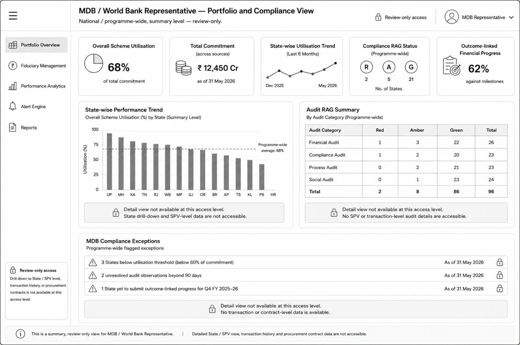
The MDB Representative holds a programme-wide overview scope, equivalent in breadth to the Centre view, but without the Centre's operational and approval controls; the stakeholder's access is confined to monitoring, review and reporting. Onboarding: The Centre administrator raises the MDB Representative's access on formal nomination by the multilateral development bank, naming the officer, designation and engagement period. The Portal registers the representative against the Government Identity and Access Management framework, with programme-wide scope recorded as the entity. The representative completes first-time verification, setsRead the full section (1 diagrams) →
7.2. Fiduciary and performance presentation process designAnalytics · PDF p.43
This process diagram depicts how the fiduciary and academic positions are assembled and presented at the level appropriate to each stakeholder. In the Fiduciary Management process, the sequence begins when a stakeholder selects the pillar. The Portal determines the presentation level from the resolved entity and assembles the view from the reconciled position: inflow, outflow and utilization by source from the Fund Flow Tracker, capital and operating expenditure against approved allocations from Budget and AOP Management, audit opinions and observation closure from the Audit module, and contract records with debarment screening results from …Read the full section (11 diagrams) →
1. Who does what: user journey
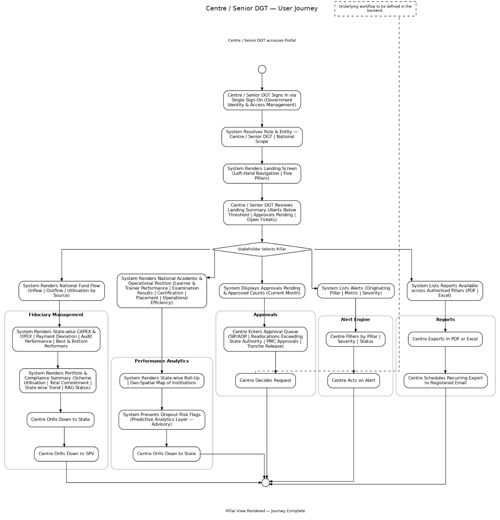
Analytics · PDF p.72. Business Requirements > 2.2. Centre User JourneyOpen in document →
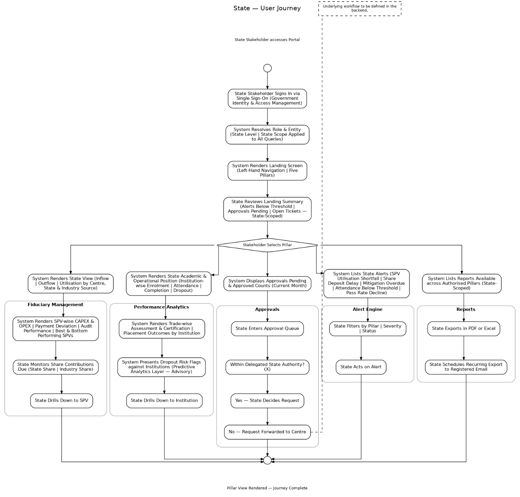
Analytics · PDF p.92. Business Requirements > 2.3. State, User JourneyOpen in document →
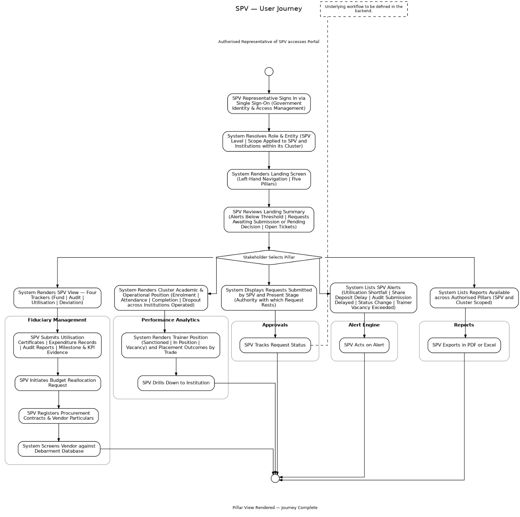
Analytics · PDF p.112. Business Requirements > 2.4. SPV, User JourneyOpen in document →
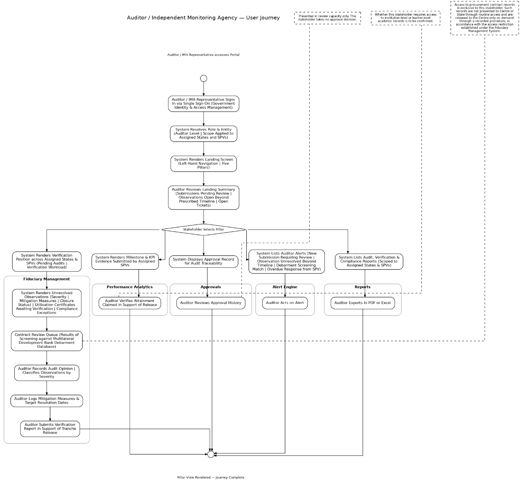
Analytics · PDF p.132. Business Requirements > 2.5. Auditor, User JourneyOpen in document →
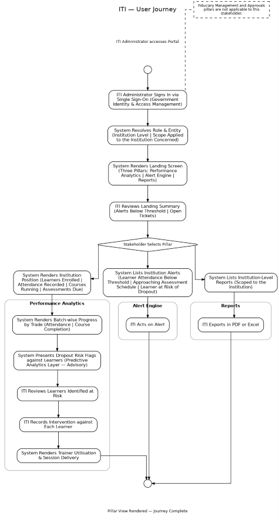
Analytics · PDF p.15 ↓2. Business Requirements > 2.6. ITI, User JourneyOpen in document →
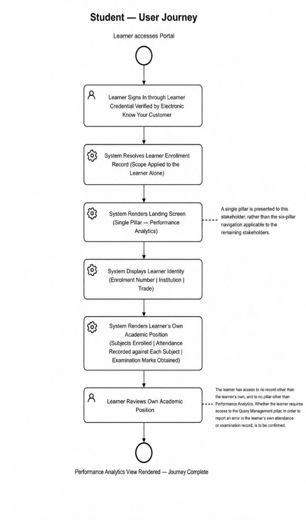
Analytics · PDF p.162. Business Requirements > 2.6. ITI, User JourneyOpen in document →
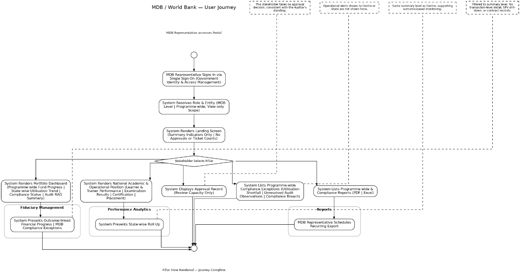
Analytics · PDF p.182. Business Requirements > 2.8. MDB, User JourneyOpen in document →
2. The steps and decisions: BPMN process flow
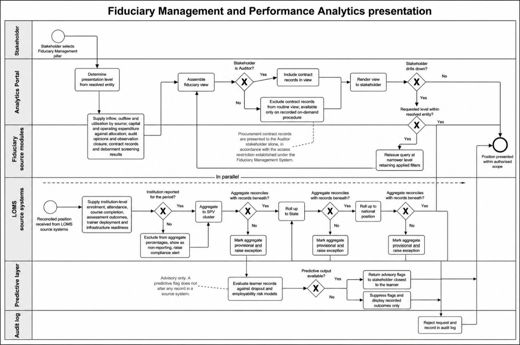
Analytics · PDF p.447. Process Designs and Mockups > 7.2. Fiduciary and performance presentation process designOpen in document →
3. Where to do it: screens
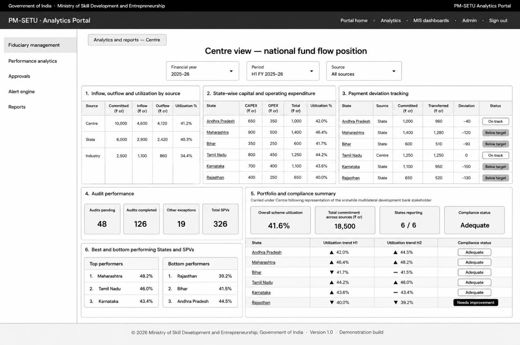
Analytics · PDF p.457. Process Designs and Mockups > 7.2. Fiduciary and performance presentation process designOpen in document →
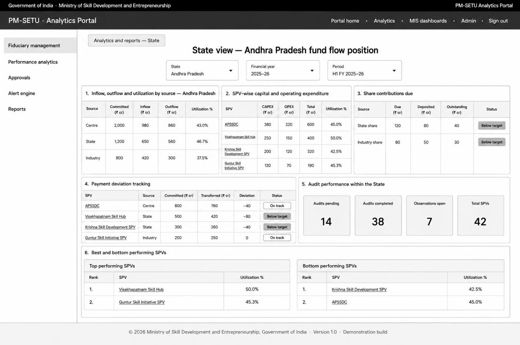
Analytics · PDF p.457. Process Designs and Mockups > 7.2. Fiduciary and performance presentation process designOpen in document →
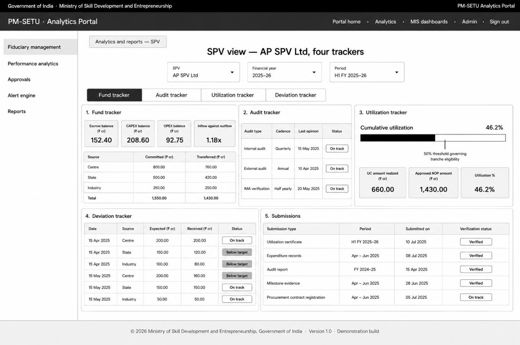
Analytics · PDF p.467. Process Designs and Mockups > 7.2. Fiduciary and performance presentation process designOpen in document →
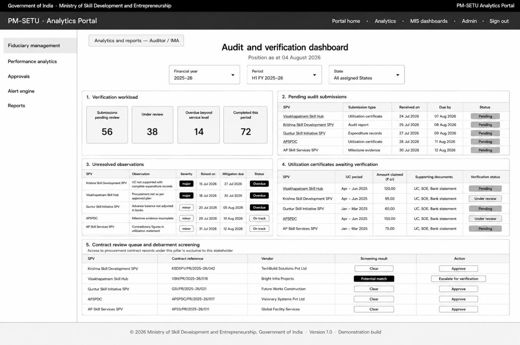
Analytics · PDF p.467. Process Designs and Mockups > 7.2. Fiduciary and performance presentation process designOpen in document →
Analytics · PDF p.477. Process Designs and Mockups > 7.2. Fiduciary and performance presentation process designOpen in document →
Analytics · PDF p.487. Process Designs and Mockups > 7.2. Fiduciary and performance presentation process designOpen in document →
Analytics · PDF p.487. Process Designs and Mockups > 7.2. Fiduciary and performance presentation process designOpen in document →
Analytics · PDF p.497. Process Designs and Mockups > 7.2. Fiduciary and performance presentation process designOpen in document →
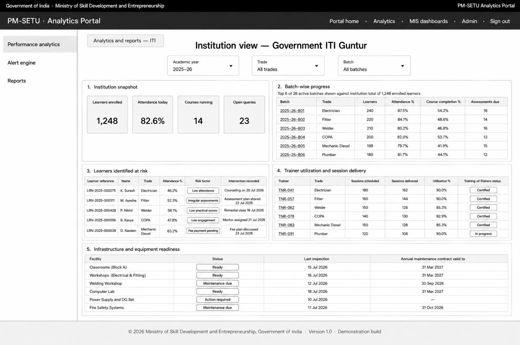
Analytics · PDF p.497. Process Designs and Mockups > 7.2. Fiduciary and performance presentation process designOpen in document →
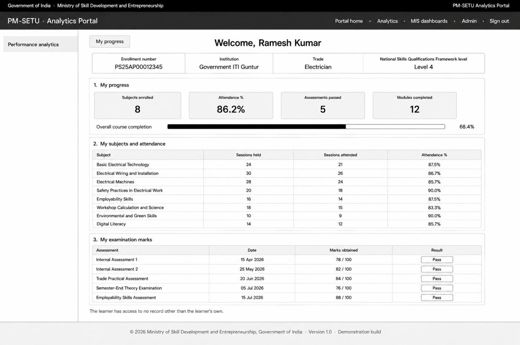
Analytics · PDF p.507. Process Designs and Mockups > 7.2. Fiduciary and performance presentation process designOpen in document →