On this page — jump to a section
- 1. Overview
- 1.1. Scope
- 1.2. Key Assumptions
- 2. Business Requirements
- 2.1. Portal Access & Login
- 2.2. Centre User Journey
- 2.3. State, User Journey
- 2.4. SPV, User Journey
- 2.5. Auditor, User Journey
- 2.6. ITI, User Journey
- 2.7. Student, User Journey
- 2.8. MDB, User Journey
- 3. Functional System Requirements
- 3.1. Pillar 1: Fiduciary Management Pillar
- Functional Capabilities
- Data Sources
- Acceptance Criteria
- Validation Rules
- Exception Management
- 3.2. Pillar 2: Performance Analytics Pillar
- Functional Capabilities
- Data Sources
- Acceptance Criteria
- Validation Rules
- Exception Management
- 3.3. Pillar 3: Approvals Pillar
- Functional Capabilities
- Approval Types
- Data Sources
- Acceptance Criteria
- Validation Rules
- Exception Management
- 3.4. Pillar 4: Alert Engine Pillar
- Functional Capabilities
- Data Sources
- Acceptance Criteria
- Validation Rules
- Exception Management
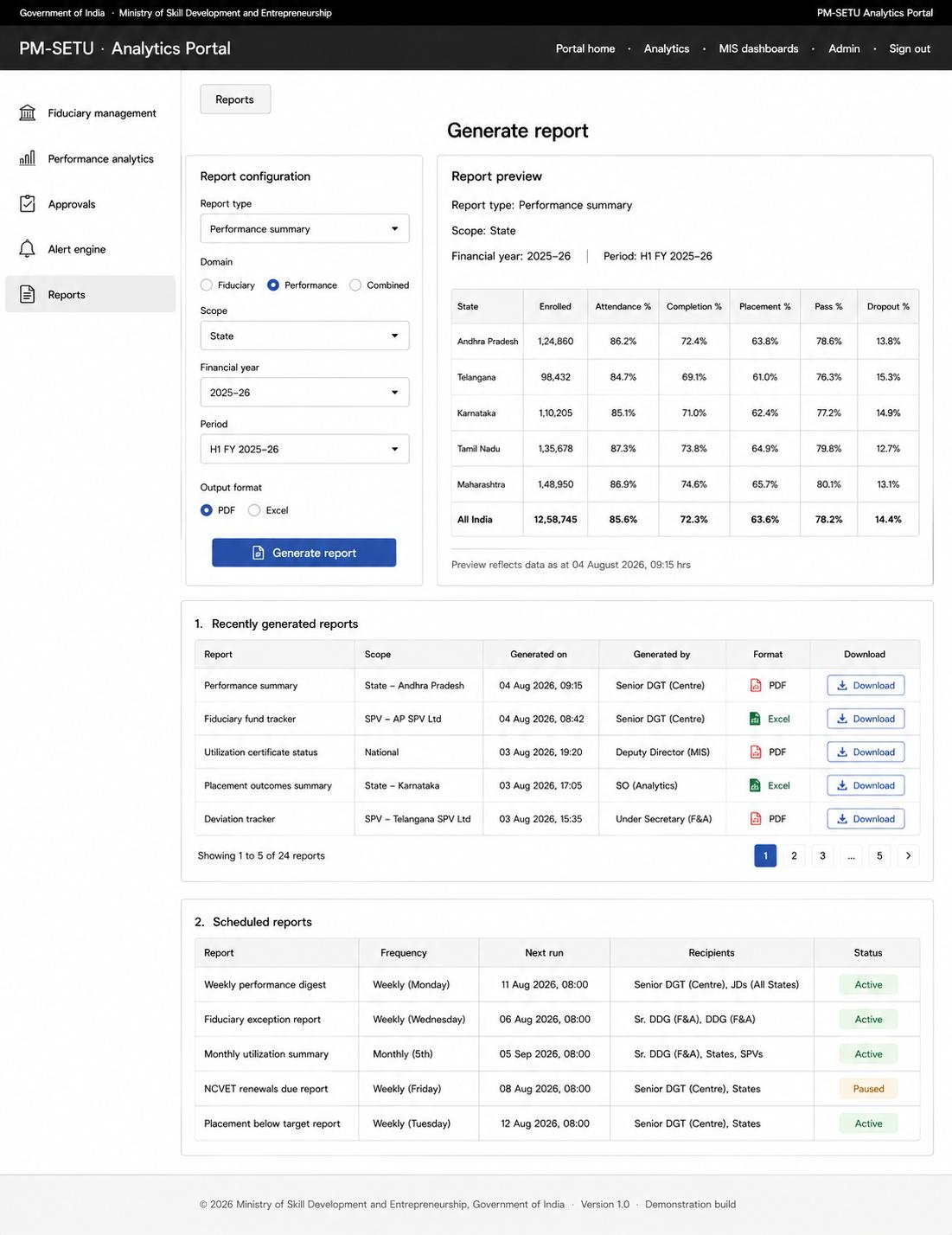
- 3.5. Pillar 5: Reports Pillar
- Functional Capabilities
- Data Sources
- Acceptance Criteria
- Validation Rules
- Exception Management
- 4. Solution Architecture
- 4.1. Data Layer
- 4.1.1 Sources of Inflow
- 4.1.2 Data Storage
- 4.1.4 Refresh Cycle
- 4.1.5 Interoperability Principles
- 4.2. Platform Layer
- 4.3. User Access Layer
- 5. Nonfunctional Requirements
- 5.1. Performance
- 5.2. Security
- 5.3. Availability and Disaster Recovery
- 5.4. Audit Logging
- 5.5. Compliance
- 6. Testing Strategy and Deployment Approach
- 6.1. Testing Strategy
- 6.2. Acceptance Criteria for Go-Live
- 6.3. Deployment Approach
- 7. Process Designs and Mockups
- 7.1. Access and data acquisition process design
- 7.2. Fiduciary and performance presentation process design
- 7.3. Approval routing process design
- 7.4. Alert Engine process design
- 7.5. Report generation process design


Detailed Project Report for Analytics Portal
Source document table of contents (as printed)
1. Overview
This section for the PM-SETU Analytics Portal defines the business, functional and implementation requirements for establishing a unified analytics and access platform across the PM-SETU ecosystem. The Portal is envisaged as the common point of access through which every stakeholder of the Hub-and- Spoke ITI Cluster Scheme obtains the financial, academic and operational information relevant to their role, structured around five functional pillars, namely Fiduciary Management, Performance Analytics, Approvals, Alert Engine and Reports, presented through a common left-hand navigation upon a single sign-on.
The primary purpose of the Portal is to establish role-appropriate visibility across the whole of the programme, drawing together the fiduciary position administered within the Fiduciary Management System and the academic and operational position administered within the systems constituting LOMS. The Portal does not itself administer the scheme; it reads from the source systems after entry and validation, evaluates the resulting position against defined thresholds, and renders it to each stakeholder within the scope that stakeholder's role and entity permit. The Fiduciary Management pillar draws upon the Fund Flow Tracker, Budget and AOP Management, Audit and Contract Management modules documented under the Fiduciary Management System. The Performance Analytics pillar draws upon the Learning Management System, Exam Management System, ITI Management System, PM-SETU Monitoring System, Financial Management System and Industry and Alumni Management System that together constitute LOMS.
In line with the Ministry's broader digital governance direction, the Portal has been designed to align with the interoperability and federated-architecture principles articulated under the National Digital Education Architecture (NDEAR). Adopting its design tenets of open APIs, federated data ownership and consent- based data exchange will enable the Portal to draw upon adjacent national platforms for learner, trainee and credential data as the skilling ecosystem's digital backbone matures.
1.1. Scope
The Portal will serve six stakeholders, namely Centre and Senior DGT, State, Special Purpose Vehicle, Auditor and Independent Monitoring Agency, Industrial Training Institute, and Student. For each, this document specifies the onboarding and access journey, the pillars rendered upon the left-hand navigation, and the information presented within each pillar.
The system will include a Fiduciary Management pillar presenting fund flow, utilization, deviation, audit and contract position at national, State, SPV and audit scope; a Performance Analytics pillar presenting enrolment, attendance, assessment, certification, placement and institutional readiness at national, State, cluster, institution and learner scope; an Approvals pillar routing SIP, AOP, reallocation, Project Management Consultant and tranche release requests by delegated authority; an Alert Engine generating and escalating threshold exceptions arising in the academic and operational domain; and a Reports pillar consolidating export and scheduling. Additional capabilities will include role-based scoping enforced at the point of query and audit logging of every access, export and denied request. The functional design of the source systems is addressed under their respective Detailed Project Reports, this document being concerned with the presentation of information already captured within them. The workflow underlying the Approvals pillar remains to be defined in the backend and is presented here in outline only.
1.2. Key Assumptions
Single Sign-On through the Government Identity and Access Management framework will be operational prior to rollout, returning for each authenticated user the role and organization attributes sufficient to resolve that user to a stakeholder role and a data entity. Learner authentication through a credential verified by electronic Know Your Customer will be available for the student stakeholder.
2. Business Requirements
2.1. Portal Access & Login
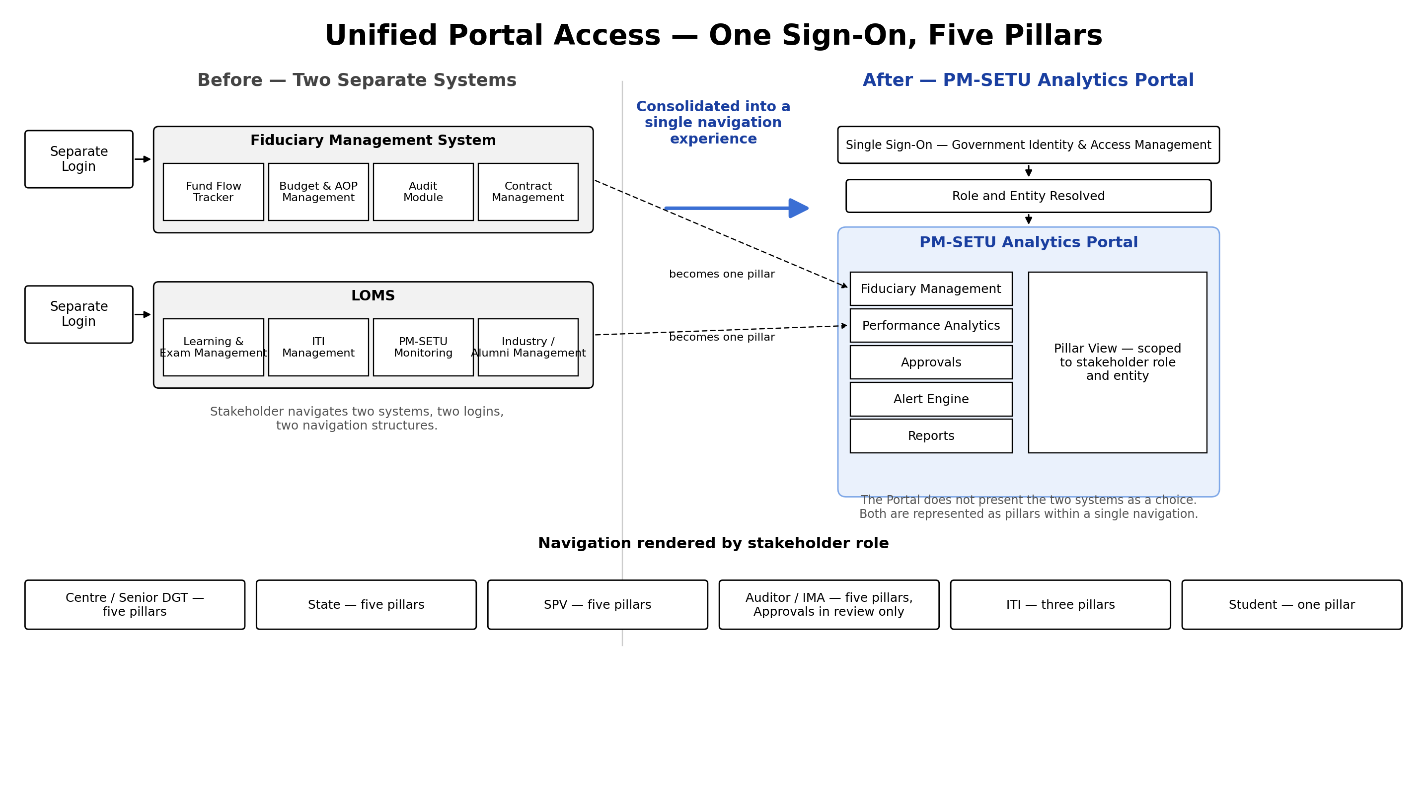
Every stakeholder of the Portal authenticates through Single Sign-On via the Government Identity and Access Management framework. Upon successful authentication, the Portal identifies the stakeholder's role and renders a left-hand navigation panel comprising the five pillars: Fiduciary Management, Performance Analytics, Approvals, Alert Engine and Reports. The stakeholder proceeds by selecting a pillar from this panel. The Portal does not present the erstwhile Fiduciary Management System and LOMS as a choice between two separate systems; both are represented as pillars within a single navigation experience.
2.2. Centre User Journey
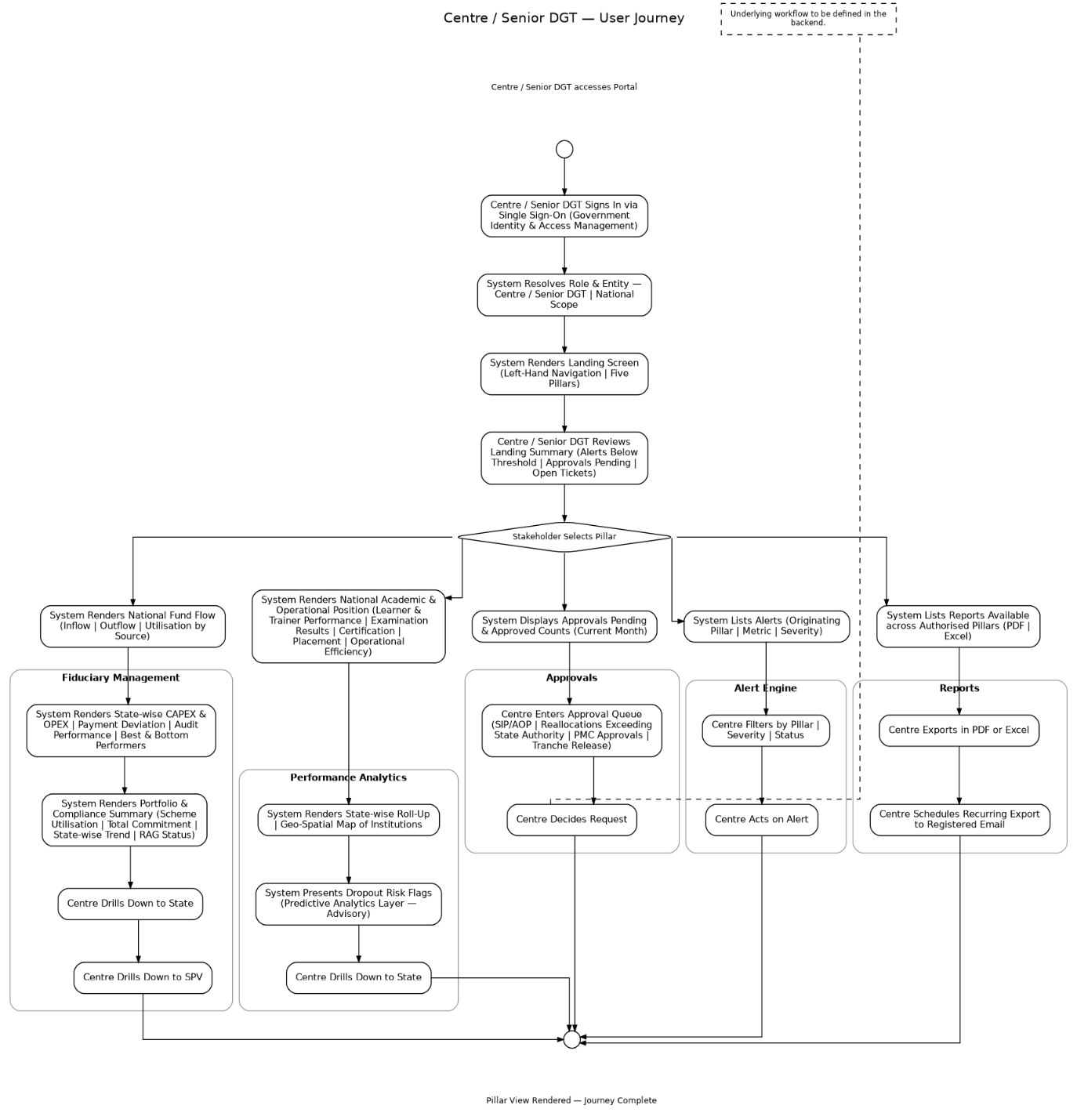
The journeys below trace each stakeholder from onboarding through to the information presented within each pillar. The pillars follow the order established at Section 3, and only departures from the Centre journey are stated for the remaining stakeholders. The Centre holds the widest scope, seeing the national position across all five pillars.
Onboarding: The SPMU raises an onboarding request naming the officer, designation and role. The Centre administrator approves it against the sanctioned post. The Portal registers the officer against the Government Identity and Access Management framework the Government of India's central login service, so no separate Portal password is created. The officer completes first-time verification, sets multi-factor authentication, and the account goes live.
- •Login: The officer signs in through the Government Identity and Access Management framework. The framework returns role and office; the Portal applies national scope to every query.
- •Landing screen: The Portal renders the five-pillar navigation and a summary showing alerts below threshold, approvals awaiting decision, and open tickets.
- •Fiduciary Management: The Portal presents the national fund flow position inflow, outflow and utilization by source, State-wise CAPEX and OPEX, payment deviation, audit performance, utilization against allocation, and best and bottom performing States and SPVs. It also presents the Portfolio and Compliance summary covering scheme utilization, total commitment, State-wise trend and RAG status the same summary is presented independently to the MDB Representative under that stakeholder's own view. The officer drills down to any State, and from a State to any SPV.
- •Performance Analytics: The Portal presents the national academic and operational position learner and trainer performance, examination results, certification issued, placement outcomes, operational efficiency indicators and a State-wise roll-up, with a geo-spatial map of institutions. Dropout risk flags raised by the predictive layer are advisory. The officer drills down to any State.
- •Approvals: The Portal displays items awaiting decision and those approved this month, with an entry point to the queue. The queue carries SIP and AOP approvals, reallocations exceeding State authority, PMC approvals and tranche releases. The underlying workflow is to be defined in the backend.
- •Alert Engine: The Portal lists notifications raised where a metric has crossed its threshold, each naming the pillar the metric belongs to, the metric, and its severity. The officer filters by pillar, severity and status, and acts on any alert directly.
- •Reports: The Portal lists reports available for export in PDF and Excel across every pillar the officer can access and offers scheduled recurring export to the registered email address.
2.3. State, User Journey
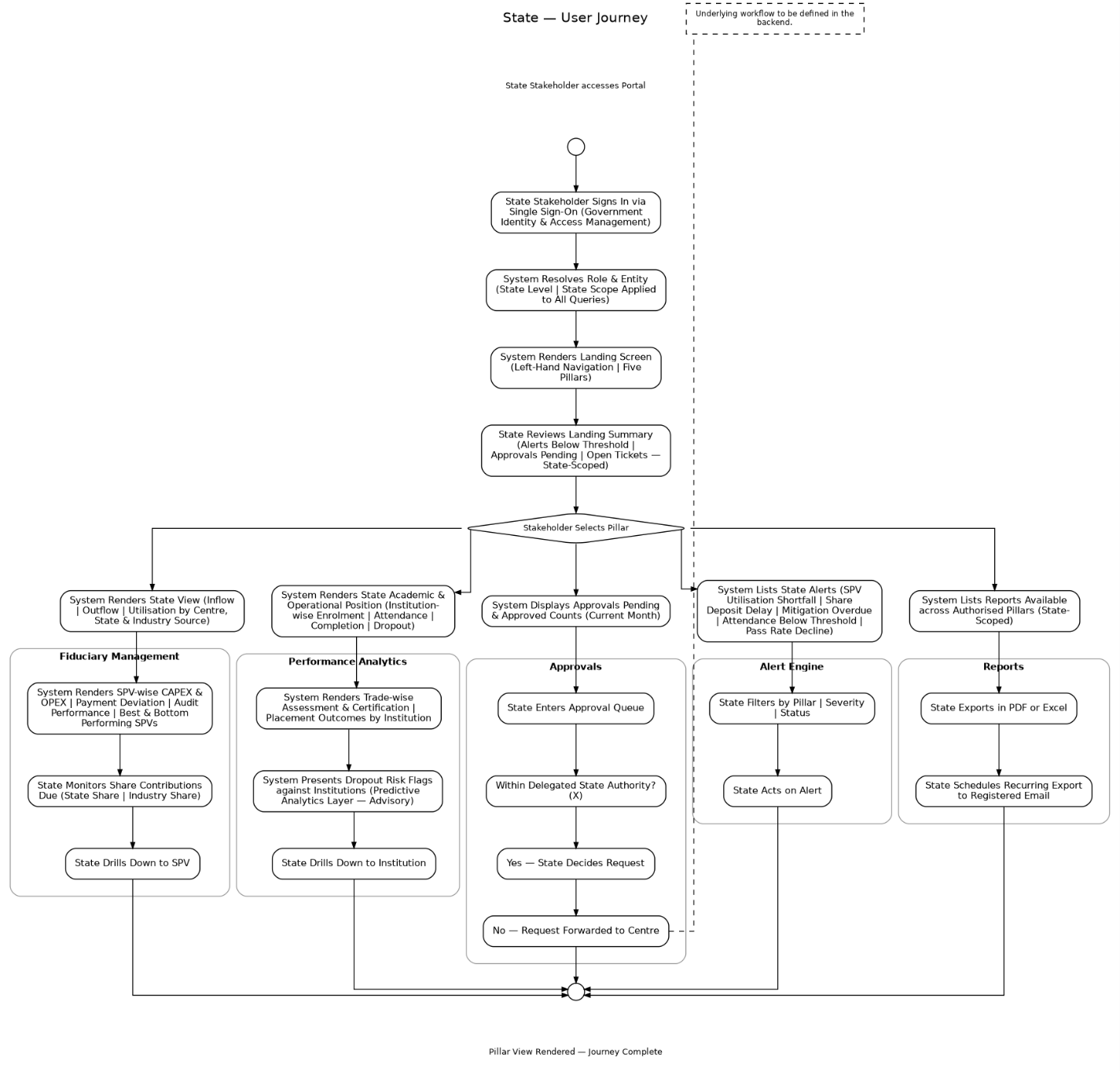
The State stakeholder sees the same five pillars as the Centre, scoped on authentication to the State concerned, and exercises delegated approval authority within that scope.
Onboarding: The State Skill Development Mission raises an onboarding request naming the officer, designation and role. The Centre administrator approves it and the Portal registers the officer against the Government Identity and Access Management framework, with the State recorded as the officer's entity. The officer completes first-time verification, sets multi-factor authentication, and the account goes live.
- •Login: The officer signs in through the Government Identity and Access Management framework. The framework returns role and office; the Portal identifies the officer as State level and scopes every query to that State.
- •Landing screen: The Portal renders the five-pillar navigation and a summary showing alerts below threshold, approvals awaiting decision, and open tickets, each scoped to the State.
- •Fiduciary Management: The Portal presents the State View carried forward from the Fiduciary Management System inflow, outflow and utilization by Centre, State and Industry source, SPV- wise CAPEX and OPEX, payment deviation, audit performance within the State, utilization against allocation, and best and bottom performing SPVs. The officer monitors State share and industry share contributions due, and drills down to any SPV within the State.
- •Performance Analytics: The Portal presents the State academic and operational position institution-wise enrolment, attendance, course completion and dropout, trade-wise assessment and certification, and placement outcomes by institution. Dropout risk flags raised by the predictive layer are advisory and are shown against the institutions concerned. The officer drills down to any institution within the State.
- •Approvals: The Portal displays items awaiting decision and those approved this month, with an entry point to the queue. The queue carries SIP and AOP approvals, budget reallocations, PMC approvals and other requests raised within the State. The officer decides requests within delegated State authority and forwards those exceeding it to the Centre. The underlying workflow is to be defined in the backend.
- •Alert Engine: The Portal lists notifications arising within the State institution attendance below threshold and decline in trade-wise pass rate. Each entry names the pillar the metric belongs to, the metric, and its severity. The officer filters by pillar, severity and status.
- •Reports: The Portal lists reports available for export in PDF and Excel across every pillar the officer can access, scoped to the State, and offers scheduled recurring export to the registered email address.
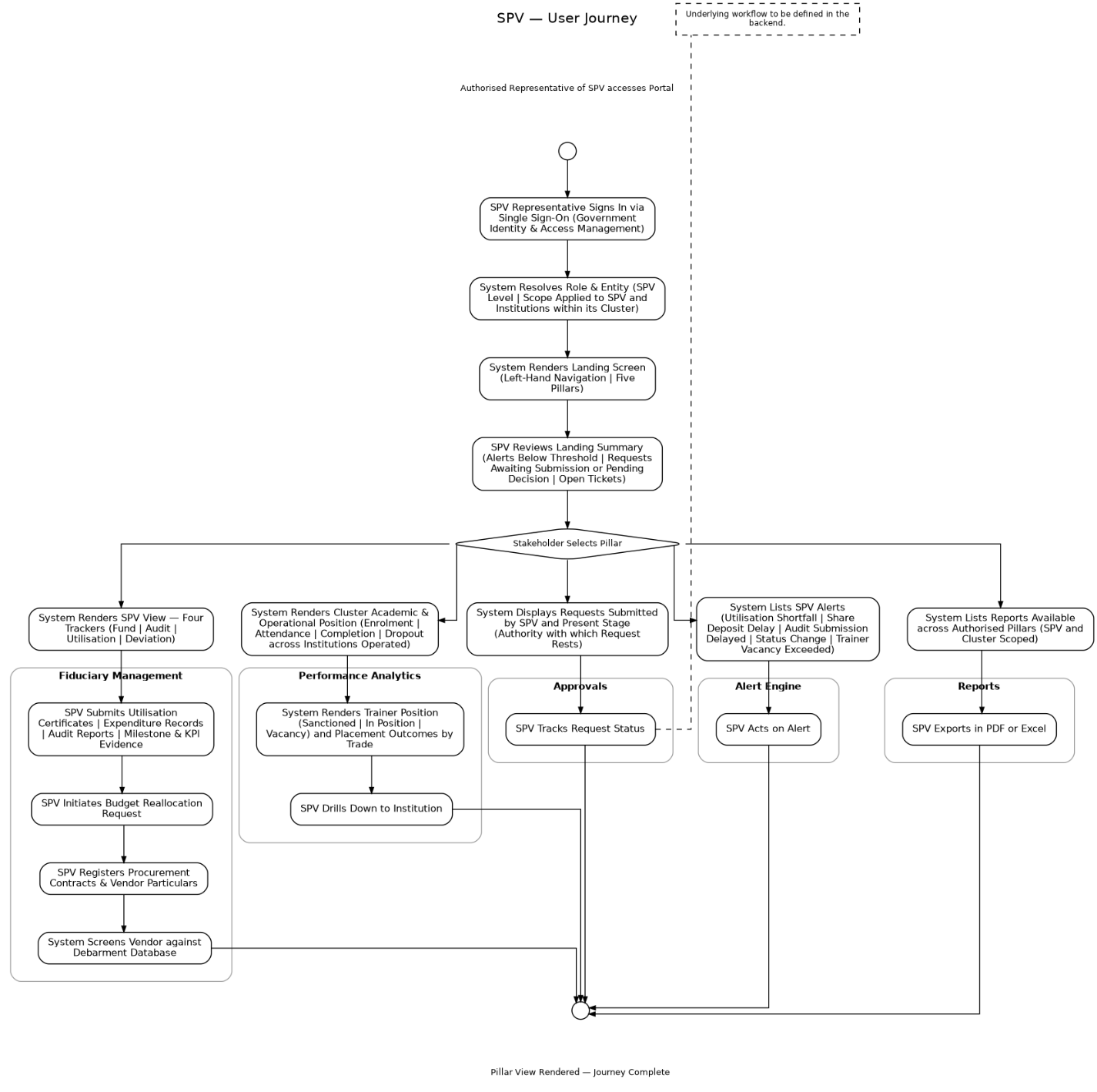
2.4. SPV, User Journey
The SPV is the only stakeholder that both reads from and submits into the Fiduciary Management pillar and holds scope over its own cluster and the institutions within it. Onboarding: The SPMU registers the SPV on creation, recording its State, cluster, Industry Anchor Partner and approved funding structure, and nominates the SPV's authorized representative. The Centre administrator approves the nomination, and the Portal registers the representative against the Government Identity and Access Management framework, with the SPV recorded as the entity. The representative completes first-time verification, sets multi-factor authentication, and the account goes live.
- •Login: The authorized representative signs in through the Government Identity and Access Management framework. The Portal identifies the representative as SPV level and scopes every query to that SPV and the institutions within its cluster.
- •Landing screen: The Portal renders the five-pillar navigation and a summary showing alerts below threshold, requests awaiting submission or pending decision elsewhere, and open tickets.
- •Fiduciary Management: The Portal presents the SPV View, Four Trackers, carried forward from the Fiduciary Management System the Fund Tracker showing Escrow, CAPEX and OPEX balances with inflow and outflow; the Audit Tracker showing audit type, cadence, last opinion and status; the Utilisation Tracker showing cumulative utilization against the threshold governing tranche eligibility; and the Deviation Tracker showing expected against received amounts by source. The representative submits Utilisation Certificates, expenditure records, audit reports and milestone and KPI evidence, initiates budget reallocation requests, and registers procurement contracts and vendor particulars for screening against the multilateral development bank debarment database.
- •Performance Analytics: The Portal presents the cluster academic and operational position learner enrolment, attendance, completion and dropout across the institutions operated, trainer sanctioned, in-position and vacancy status, and placement outcomes by trade. The representative drills down to any institution operated by the SPV.
- •Approvals: The Portal displays request the SPV has submitted and their present stage, together with the authority with which each rest. The queue carries SIP and AOP submissions, budget reallocation requests, PMC approvals and tranche release requests. The underlying workflow is to be defined in the backend.
- •Alert Engine: The Portal lists notifications arising within the SPV attainment of the utilization threshold governing tranche eligibility, deviation flags, approaching audit submission deadlines, change in the status of a submitted request, and trainer vacancy exceeding the permitted level. Each entry names the pillar the metric belongs to, the metric, and its severity.
- •Reports: The Portal lists reports available for export in PDF and Excel across every pillar the representative can access, scoped to the SPV and its cluster.
2.5. Auditor, User Journey
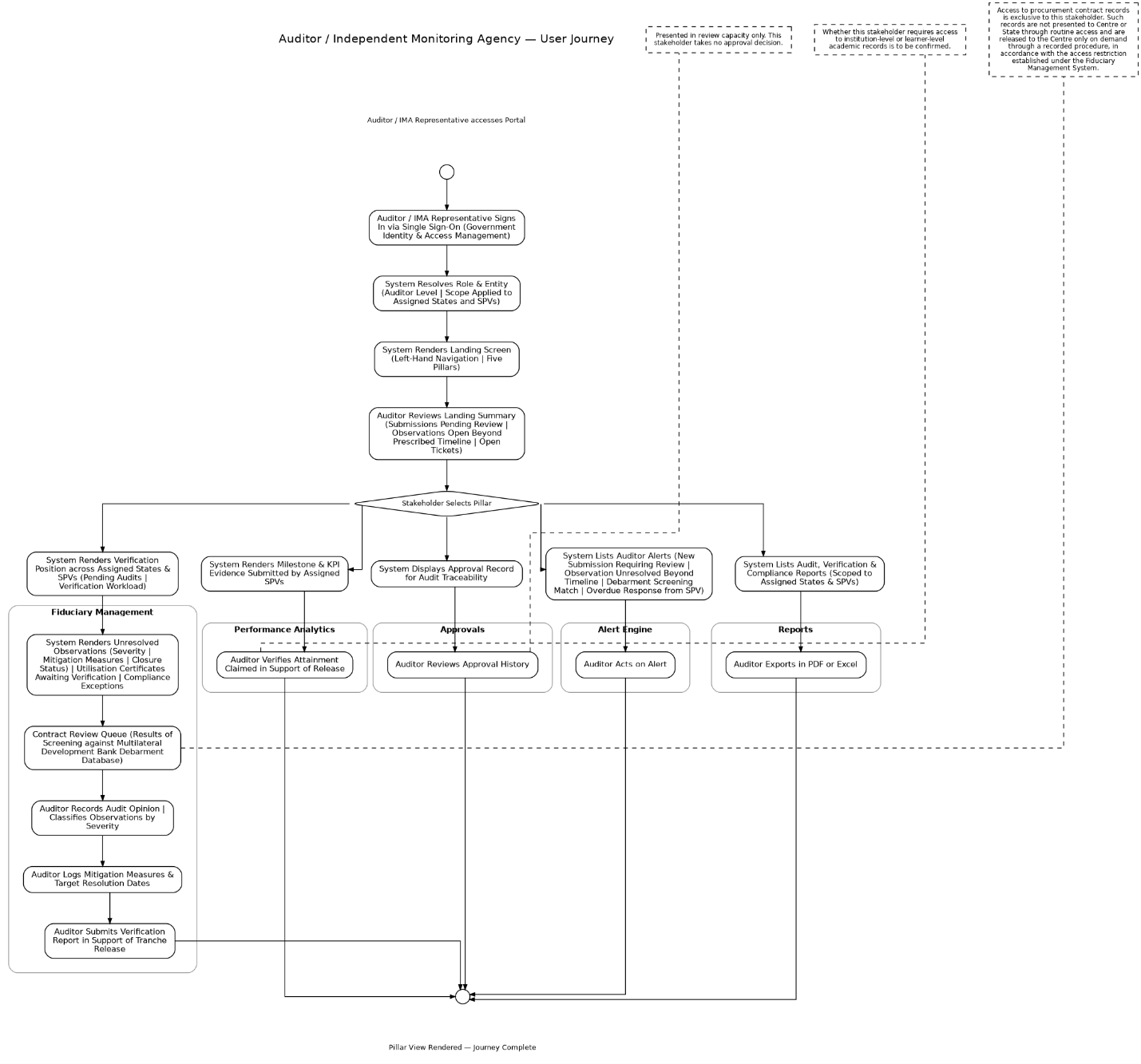
The Auditor holds verification scope over assigned States and SPVs and is the only stakeholder with routine access to procurement contract records. Onboarding: The SPMU records the appointment of the auditor or Independent Monitoring Agency, naming the firm, the engagement period and the States and SPVs assigned. The Centre administrator approves the appointment, and the Portal registers the representative against the Government Identity and Access Management framework, with the assigned States and SPVs recorded as the entity. The representative completes first-time verification, sets multi-factor authentication, and the account goes live. Access lapses automatically on expiry of the engagement period.
- •Login: The auditor or IMA representative signs in through the Government Identity and Access Management framework. The Portal identifies the representative as auditor level and scopes every query to the assigned States and SPVs.
- •Landing screen: The Portal renders the navigation and a summary showing submissions pending review, observations open beyond their prescribed timeline, and open tickets.
- •Fiduciary Management: The Portal presents the verification position across the assigned States and SPVs pending audits and verification workload, unresolved observations classified by severity with mitigation measures and closure status, Utilisation Certificates awaiting verification, compliance exceptions, and the contract review queue with debarment screening results. The Portal draws this position from the submissions the SPV makes under this pillar, namely the Utilisation Certificate and its supporting expenditure records, the internal and external audit reports, and the milestone and KPI evidence, each read from the Audit and Fund Flow Tracker modules after the SPV has submitted it. The representative records audit opinions, classifies observations, logs mitigation measures and target resolution dates, and submits verification reports in support of tranche release. Access to procurement contract records is exclusive to this stakeholder; such records are not presented to Centre or State through routine access and are released to the Centre only on demand through a recorded procedure, in accordance with the access restriction established under the Fiduciary Management System.
- •Performance Analytics: The Portal presents the milestone and KPI evidence submitted by the assigned SPVs, for the purpose of verifying attainment claimed in support of a release. Whether this stakeholder requires access to institution-level or learner-level academic records is to be confirmed.
- •Approvals: The Portal presents the approval record in review capacity only, for the purpose of audit traceability. This stakeholder takes no approval decision.
- •Alert Engine: The Portal lists notifications comprising receipt of a new submission requiring review, an observation unresolved beyond its prescribed timeline, a debarment screening match requiring escalation, and an overdue response from an SPV. Each entry names the pillar the metric belongs to, the metric, and its severity.
- •Reports: The Portal lists audit, verification and compliance report available for export in PDF and Excel, scoped to the assigned States and SPVs.
2.6. ITI, User Journey
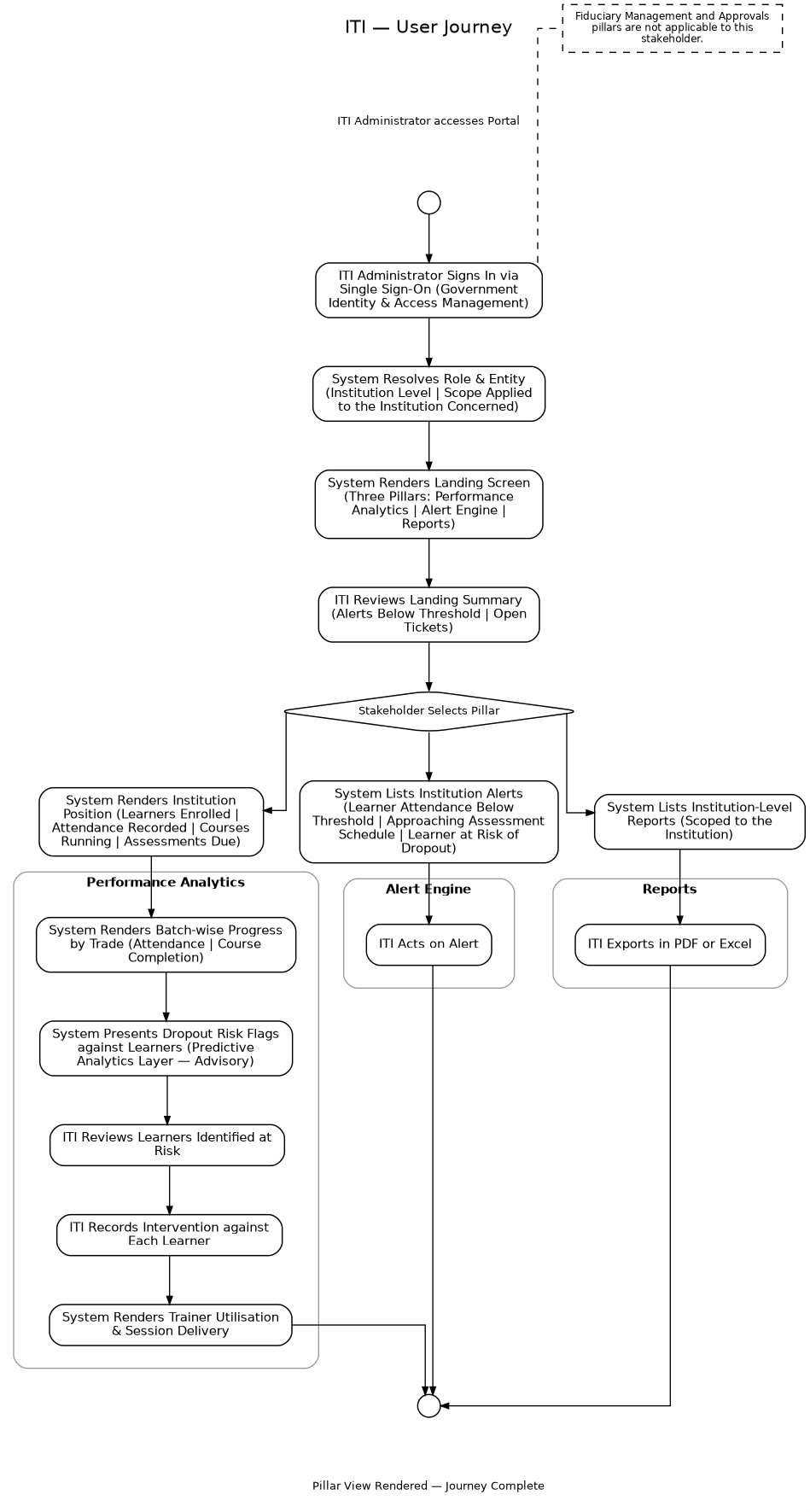
The ITI holds scope over a single institution and is presented with three pillars rather than five, the Fiduciary Management and Approvals pillars not being applicable. Onboarding: The SPV nominates the institution's administrator on registering the ITI within its cluster, recording the institution code, the trades offered and the sanctioned intake. The State approves the nomination, and the Portal registers the administrator against the Government Identity and Access Management framework, with the institution recorded as the entity. The administrator completes first-time verification, sets multi-factor authentication, and the account goes live.
- •Login: The administrator signs in through the Government Identity and Access Management framework. The Portal identifies the administrator as institution level and scopes every query to that institution.
- •Landing screen: The Portal renders a three-pillar navigation comprising Performance Analytics, Alert Engine and Reports, with a summary showing alerts below threshold and open tickets. The Fiduciary Management and Approvals pillars are not applicable to this stakeholder.
- •Performance Analytics: The Portal presents the institution position learners enrolled, attendance recorded, courses running and assessments due, batch-wise progress by trade with attendance and course completion, learners identified at risk of dropout with the intervention recorded against each, and trainer utilization and session delivery. Dropout risk flags raised by the predictive layer are advisory and do not alter any learner record.
- •Alert Engine: The Portal lists notifications comprising learner attendance falling below the prescribed threshold, an approaching assessment schedule, and identification of a learner at risk of dropout. Each entry names the metric concerned and its severity.
- •Reports: The Portal lists institution-level reports available for export in PDF and Excel, scoped to the institution.
2.7. Student, User Journey
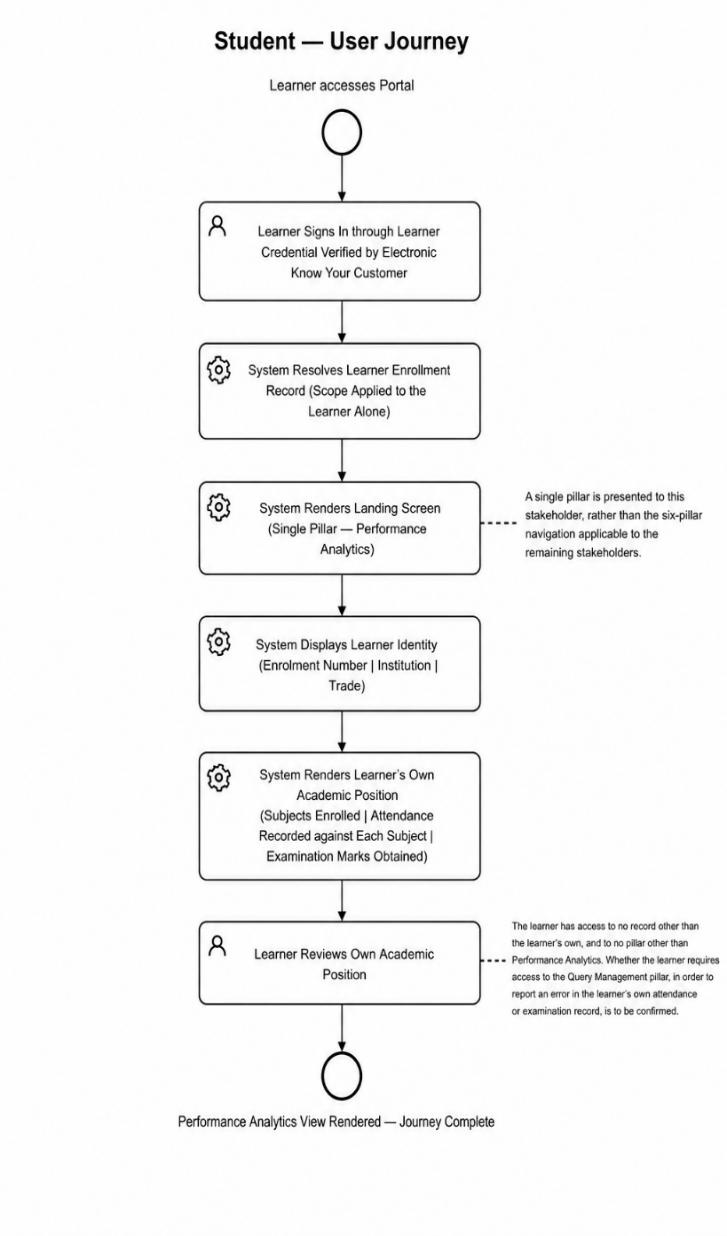
The student is presented with a single pillar, scoped to the learner's own record alone. Onboarding: The institution enrols the learner in the source system, which generates the enrolment number. The Portal issues an activation link to the learner's registered mobile number or email, and the learner verifies identity through electronic Know Your Customer against that enrolment record. On successful verification the account goes live. No separate application or approval is required, enrolment itself being the basis of access.
- •Login: The learner signs in through a learner credential verified by electronic Know Your Customer. The Portal resolves the learner's enrolment record and scopes every query to that learner alone.
- •Landing screen: The Portal renders a single pillar, namely Performance Analytics, rather than the five-pillar navigation applicable to the remaining stakeholders, and displays the learner's enrolment number, institution and trade.
- •Performance Analytics: The Portal
presents the learner's own academic position the subjects enrolled, the attendance recorded against each, and the examination marks obtained. The learner sees no record other than their own, and no pillar other than Performance Analytics.
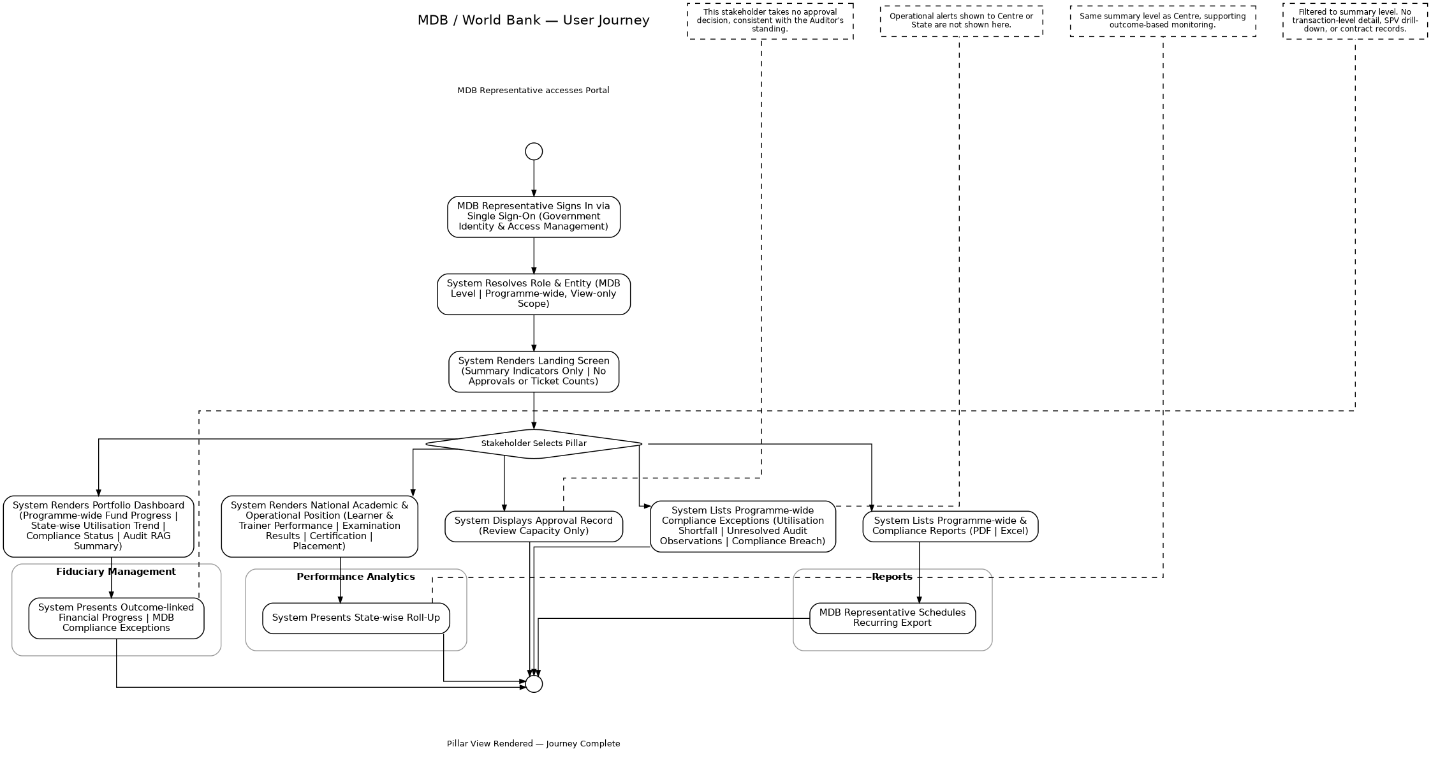
2.8. MDB, User Journey
The MDB Representative holds a programme-wide overview scope, equivalent in breadth to the Centre view, but without the Centre's operational and approval controls; the stakeholder's access is confined to monitoring, review and reporting. Onboarding: The Centre administrator raises the MDB Representative's access on formal nomination by the multilateral development bank, naming the officer, designation and engagement period. The Portal registers the representative against the Government Identity and Access Management framework, with programme-wide scope recorded as the entity. The representative completes first-time verification, sets
multi-factor authentication, and the account goes live. Access lapses automatically on expiry of the nomination period, in the same manner as the Auditor's engagement.
- •Login: The MDB Representative signs in through the Government Identity and Access Management framework. The framework returns programme-wide, view-only scope; the Portal applies this to every query and suppresses all action controls.
- •Landing screen: The Portal renders a summary limited to programme-wide indicators overall scheme progress, State-wise performance trend, and open compliance exceptions. No approvals-pending or ticket-action counts are shown, consistent with the stakeholder's review- only standing.
- •Fiduciary Management: The Portal presents the portfolio-level dashboard set out in the Fiduciary Management System programme-wide fund progress, State-wise utilization trend, high-level compliance status, audit RAG summary, MDB-specific compliance exceptions, and outcome-linked financial progress, drawn from the same Fund Flow Tracker, Budget and AOP Management, and Audit module positions presented to the Centre, filtered to summary level. The representative does not see transaction-level detail, individual SPV drill-down, or procurement contract records.
- •Performance Analytics: The Portal presents the national academic and operational position learner and trainer performance, examination results, certification issued, placement outcomes and a State-wise roll-up at the same summary level as presented to Centre, supporting the disbursement-linked and outcome-based monitoring the Bank's financing agreement requires.
- •Approvals: The Portal presents the approval record in review capacity only, for the purpose of programme transparency. This stakeholder takes no approval decision, consistent with the Auditor's standing under this pillar.
- •Alert Engine: The Portal lists notifications limited to programme-wide compliance exceptions and risk indicators utilization shortfalls against the tranche eligibility threshold, unresolved audit observations beyond prescribed timelines, and compliance breaches without the operational alerts shown to Centre or State.
- •Reports: The Portal lists programme-wide and compliance report available for export in PDF and Excel, scoped to summary level, with the same scheduled recurring export facility offered to other stakeholders.
3. Functional System Requirements
This section sets out the functional requirements of each of the five pillars comprising the Portal. The pillars are presented in the order a stakeholder encounters them: Fiduciary Management and Performance Analytics, which present the fiduciary and academic position; Approvals, which routes the decisions arising from that position; and the Alert Engine and Reports, which operate across both domains, raising exceptions and consolidating export.
Each pillar is specified in the same form. The description states what the pillar does and which stakeholders it serves. The functional capabilities state what the Portal shall provide. The data sources state where the information presented is drawn from, the Portal reading from the source systems after entry and validation rather than capturing data of its own. The acceptance criteria, validation rules and exception management then state the conditions the pillar must satisfy, the constraints it must enforce, and the treatment of conditions under which it cannot operate normally.
3.1. Pillar 1: Fiduciary Management Pillar
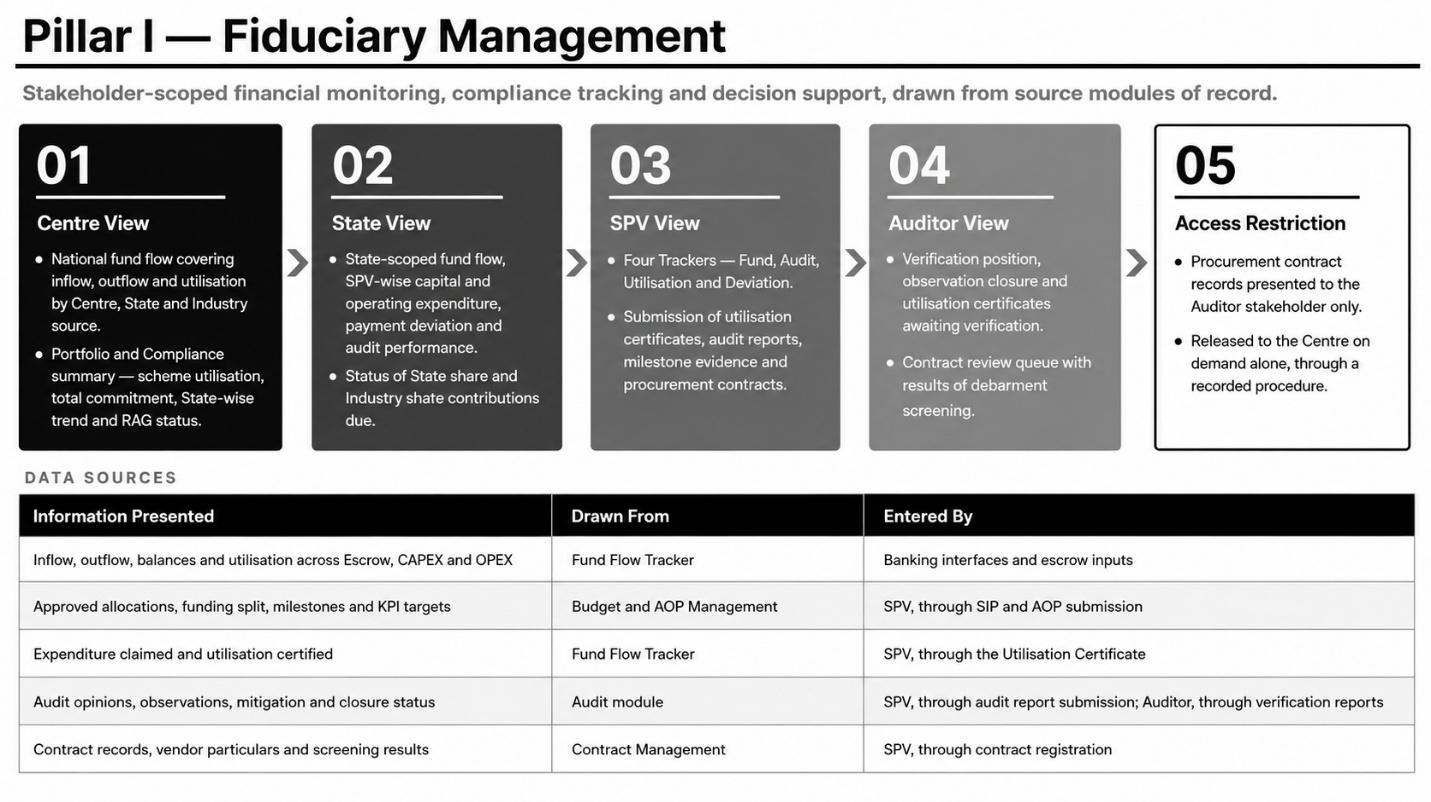
The Fiduciary Management pillar presents the financial position of the programme to each stakeholder at the scope of their role and entity permit, supporting monitoring, compliance tracking and decision support.
The pillar is available to Centre, State, SPV, Auditor and the MDB Representative. The Centre, State and SPV views are carried forward from the Fiduciary Management System. The Auditor's access comprises the verification position, observation closure, utilization certificates awaiting verification and the contract review queue. The MDB Representative's access is limited to the Portfolio and Compliance summary at national scope, in review-only form, without drill-down to individual SPV transaction records or contract access. It is not applicable to the ITI or the Student. All this fiduciary pillar is in fiduciary management platform in PM-SETU.
.
Functional Capabilities
The Portal shall:
- •Present fund flow inflow, outflow and utilization by Centre, State and Industry source at national, State or SPV scope as the stakeholder's entity permits.
- •Present capital and operating expenditure against approved allocations, with payment deviation flagged where it exceeds the configured threshold.
- •Present audit performance, comprising audits pending and completed, opinions recorded, and observations open by severity.
- •Present the ranked position of best and bottom performing States and SPVs, and the Portfolio and Compliance summary to the Centre.
- •Present the Four Trackers to the SPV Fund, Audit, Utilization and Deviation together with the facility to submit Utilization Certificates, expenditure records, audit reports, milestone evidence, reallocation requests and contract registrations.
- •Present the Portfolio and Compliance summary, in review-only form and without transaction-level drill-down, to the MDB Representative.
- •Present the verification position to the Auditor, comprising pending audits, unresolved observations, certificates awaiting verification, and the contract review queue with debarment screening results.
- •Permit drilldown from national scope to a State and from a State to an SPV, retaining the filters applied, and filtering by financial year and period throughout.
- •Enforce the contract access restriction, presenting procurement contract records to the Auditor alone.
Data Sources
The Portal captures no financial data of its own. The position presented is read from the source modules after entry and validation within them.
| Information presented | Drawn from | Entered by |
| Inflow, outflow, balances and utilization across Escrow, CAPEX and OPEX | Fund Flow Tracker | Banking interfaces and escrow inputs |
| Approved allocations, funding split, milestones and KPI targets | Budget and AOP Management | SPV, through SIP and AOP submission |
| Expenditure claimed and utilization certified | Fund Flow Tracker | SPV, through the Utilization Certificate |
| Audit opinions, observations, mitigation and closure status | Audit module | SPV, through audit report submission; Auditor, through verification reports |
| Contract records, vendor particulars and screening results | Contract Management | SPV, through contract registration |
Acceptance Criteria
- •The stakeholder sees only the data their role and entity are authorized for.
- •Every figure reconciles its source transaction data on request.
- •Drilldown from Centre to State to SPV retains the filters already applied.
- •Every view displays the time of last successful refresh.
Validation Rules
- •Every figure traces back to the Fund Flow Tracker, Budget and AOP Management, the Audit module or Contract Management. No value is calculated or entered within this pillar.
- •A stakeholder cannot view data belonging to another State or SPV outside their own entity.
- •Procurement contract records are presented to the Auditor alone and are released to the Centre only on demand through a recorded procedure, in accordance with the access restriction established under the Fiduciary Management System.
- •The MDB Representative cannot access procurement contract records or transaction-level detail; access is limited to summary and State-wise trend data.
- •Utilization percentage is computed only from approved expenditure records.
Exception Management
- •Where source data has not yet synchronized, the affected metric is shown as provisional with the time of last successful refresh.
- •Where a source module is unavailable, the pillar serves the last known position with a visible indication of staleness.
- •Where a stakeholder attempts to access a contract record outside the permitted access, the request is denied and an audit log entry created.
- •Where a figure does not reconcile with its source records, it is flagged provisional and an exception raised to the administrator.
3.2. Pillar 2: Performance Analytics Pillar
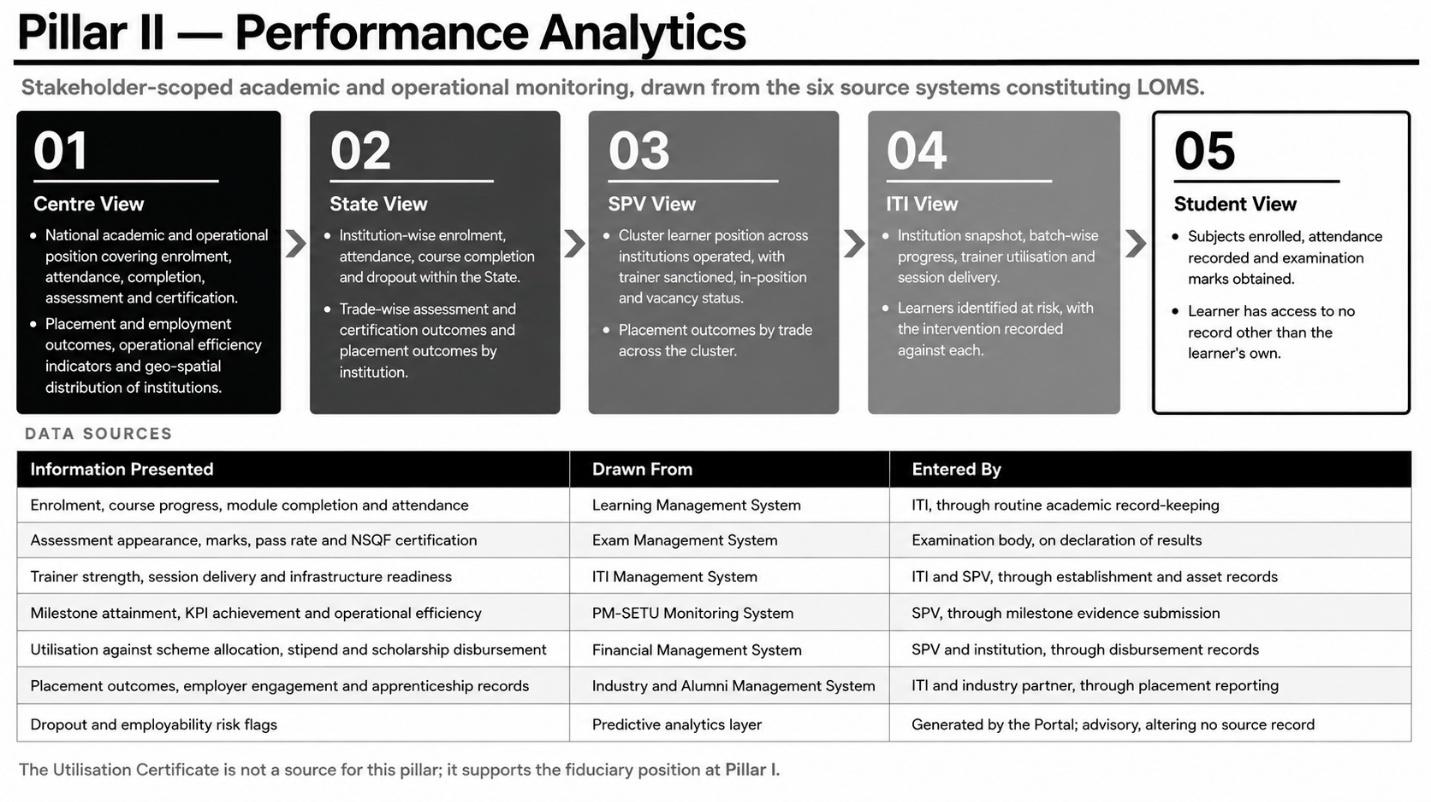
The Performance Analytics pillar presents the academic and operational position of the programme to each stakeholder within the scope of their role and entity permit, supporting monitoring of learner, trainer and institutional performance.
The pillar is available to Centre, State, SPV, ITI and Student, and to the Auditor in respect of milestone and key performance indicator evidence only, and to the MDB Representative at national, summary scope. The Centre view is national; the State view is scoped to institutions within the State; the SPV view to the cluster operated; the ITI view to the institution; and the student view to the learner's own record.
Functional Capabilities
The Portal shall:
- •Present enrolment, attendance, course completion and dropout at national, State, cluster, institution or learner scope as the stakeholder's entity permits.
- •Present trade-wise assessment appearance, pass rate and NSQF certification issued.
- •Present placement and employment outcomes, by State, by institution or by trade according to scope.
- •Present institutional readiness, comprising institutions onboarded, accreditation and affiliation renewals due, trainer sanctioned and in-position strength, and infrastructure and equipment status.
- •Present the geo-spatial distribution of institutions to the Centre and the State.
- •Present learners identified at risk of dropout, together with the intervention recorded against each, to the ITI and the SPV.
- •Present milestone and KPI attainment evidence to the Auditor for verification of claims made in support of a release.
- •Permit drill-down from national scope to a State, from a State to an institution, and from a cluster to an institution, retaining the filters applied.
- •Present predictive risk flags as advisory indicators, visually distinguished from recorded outcomes.
Data Sources
The Portal captures no academic or operational data of its own. The position presented is read from the six source systems constituting LOMS, into which institutions, trainers and examination bodies record information in the ordinary course of their operations.
| Information presented | Drawn from | Entered by |
| Enrolment, course progress, module completion and attendance | Learning Management System | ITI, through routine academic record-keeping |
| Assessment appearance, marks, pass rate and NSQF certification | Exam Management System | NCVT MIS, the existing DGT system of record for trainee registration and examination results under the AITT-CTS, with results also surfacing through the Skill India Digital Hub against the trainee's Permanent Registration Number. Attendance recording, as distinct from examination results, remains institution-local and is not confirmed to be held centrally. |
| Trainer strength, session delivery and infrastructure readiness | ITI Management System | ITI and SPV, through establishment and asset records |
| Milestone attainment, KPI achievement and operational efficiency | PM-SETU Monitoring System | SPV, through milestone evidence submission |
| Utilisation against scheme allocation, stipend and scholarship disbursement | Financial Management System | SPV and institution, through disbursement records |
| Information presented | Drawn from | Entered by |
| Placement outcomes, employer engagement and apprenticeship records | Industry and Alumni Management System | ITI and industry partner, through placement reporting |
| Dropout and employability risk flags | Predictive analytics layer | Generated by the Portal; advisory, altering no source record |
The Skill India Digital Hub is confirmed to integrate examination and certification data for ITI trainees through NCVT MIS and separately provides government and policymaker-facing analytics across its participating schemes. Whether the PM-SETU scheme is presently live on the Skill India Digital Hub, and the specific mechanism by which PM-SETU learner records would be isolated from the platform's wider dataset, remains to be confirmed with DGT and MSDE directly; this pillar's source systems are accordingly stated as above pending that confirmation, and this table is to be revised once confirmed.
The Utilisation Certificate is not a source for this pillar. It supports the fiduciary position at Section 3.1; the milestone and KPI evidence submitted alongside it is read into this pillar through the PM-SETU Monitoring System.
Acceptance Criteria
- •The stakeholder sees only the data their role and entity are authorised for.
- •Institution and trade-level figures reconcile with the aggregate presented at State and national level.
- •Thresholds applied to outcome indicators are stated on the view to which they apply.
- •Predictive risk flags are visually distinguished from recorded outcomes on every view carrying them.
- •Every view displays the time of last successful refresh.
Validation Rules
- •Every figure traces back to one of the six source systems named above. No value is calculated or entered within this pillar.
- •A predictive flag is advisory and does not itself alter a learner's record in a source system.
- •A predictive flag is presented only to the stakeholder closest to the learner concerned, being the institution at which the learner is enrolled and the SPV operating it.
- •Learner-level records are presented only to the learner concerned and to stakeholders authorised for the institution in which the learner is enrolled.
Exception Management
- •Where source data has not yet synchronised, the affected metric is shown as provisional with the time of last successful refresh.
- •Where an institution has not reported for the period, it is excluded from aggregate percentages, shown as non-reporting, and a compliance alert is raised.
- •Where the predictive layer output is unavailable, the risk flag is suppressed and recorded outcomes alone are displayed.
- •Where an aggregate does not reconcile with the records beneath it, the aggregate is flagged provisional and an exception raised to the administrator.
3.3. Pillar 3: Approvals Pillar
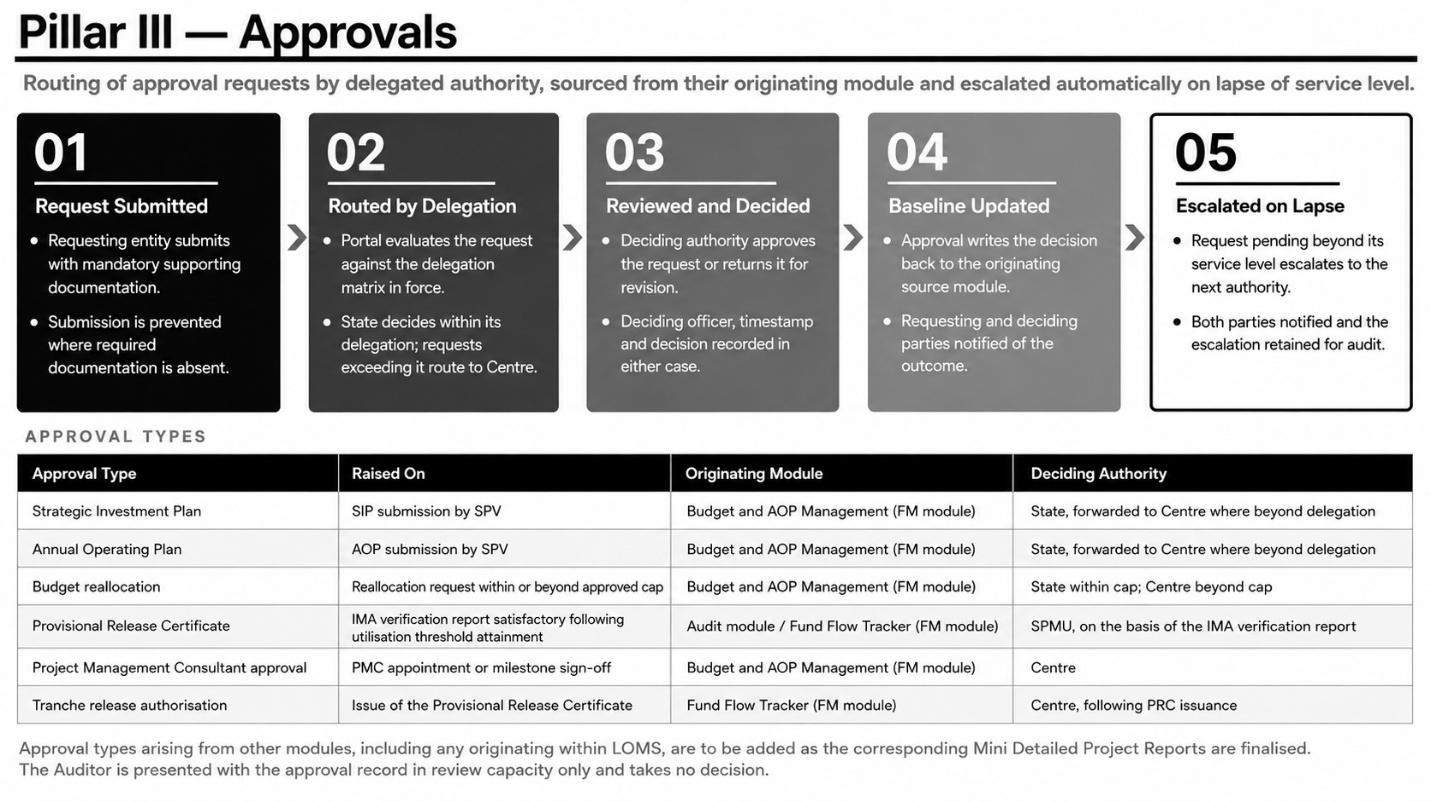
The Approvals pillar presents and routes the approval requests arising elsewhere in the Portal, directing each to the authority competent to decide it. Approval logic specific to a source module, the conditions under which a request is generated and the fields it carries are defined within that module's own Detailed Project Report; this pillar presents and routes the resulting request rather than re-specifying it.
The pillar is available to Centre, State and SPV, and to the Auditor and the MDB Representative in review capacity only, for the purpose of audit traceability and programme transparency respectively. It is not applicable to the ITI or the Student.
Functional Capabilities
The Portal shall:
- •Present to each stakeholder the count of requests awaiting their decision and the count decided in the current month, with an entry point into the approval queue.
- •Present within the queue each request's type, the entity that raised it, its value or scope, the date submitted, its present stage and the authority with which it rests.
- •Carry the approval types set out below, each sourced from its originating module.
- •Validate that mandatory supporting documentation is attached before a request may be submitted.
- •Route each request by delegated authority, the State deciding requests within its delegation and forwarding those exceeding it to the Centre.
- •Permit the deciding authority to approve a request or return it for revision, recording the decision, the deciding officer and the timestamp in either case.
- •Escalate a request automatically to the next authority where the service level lapses without decision, notifying both parties.
- •Present the complete approval history to the requesting and deciding parties, and to the Auditor in review capacity.
Approval Types
| Approval type | Raised on | Originating module | Deciding authority |
| Strategic Investment Plan | SIP submission by SPV | Budget and AOP Management (FM module) | State, forwarded to Centre where beyond delegation |
| Annual Operating Plan | AOP submission by SPV | Budget and AOP Management (FM module) | State, forwarded to Centre where beyond delegation |
| Budget reallocation | Reallocation request within or beyond approved cap | Budget and AOP Management (FM module) | State within cap; Centre beyond cap |
| Provisional Release Certificate | IMA verification reports satisfactory following utilization threshold attainment | Audit module / Fund Flow Tracker (FM module) | SPMU, on the basis of the IMA verification report |
| Project Management Consultant approval | PMC appointment or milestone signoff | Budget and AOP Management (FM module) | Centre |
| Tranche release authorization | Issue of the Provisional Release Certificate | Fund Flow Tracker (FM module) | Centre, following PRC issuance |
Approval types arising from modules other than those named above, including any approval originating within LOMS, are to be identified and added to this table as the corresponding module level Mini Detailed Project Reports are finalized.
Data Sources
Requests originate in the source module against which approval is sought, as set out in the table above. Portal presents and routes these requests and, on approval, is expected to write the decision back to the originating module, that expectation remaining to be confirmed.
Acceptance Criteria
- •Every action records the deciding officer, the timestamp and the decision.
- •A request exceeding the delegated authority of a stakeholder is routed automatically to the next level.
- •The complete approval history of a request is visible to the requesting and deciding parties.
- •Every request in the queue identifies its approval type and the module from which it originates.
Validation Rules
- •Approval is not finalized without the mandatory supporting documentation attached.
- •A request returned for revision requires resubmission before reentering the queue.
- •Approval authority is validated against the delegation matrix in force at the time of the decision, not at the time of submission.
- •The approval logic specific to a source module, including the conditions under which a request is generated, is governed by that module's own specification and is not restated within this pillar.
Exception Management
- •Where a request remains pending beyond its service level, it escalates automatically to the next authority and both parties are notified.
- •Where the deciding officer's authority is withdrawn during pendency, the request is rerouted to the current holder of the delegation and the transfer logged.
- •Where mandatory documentation is missing, submission is prevented and the missing item identified.
- •Where two decisions are recorded concurrently, the first is applied, the second is rejected, and an exception raised to the administrator.
3.4. Pillar 4: Alert Engine Pillar
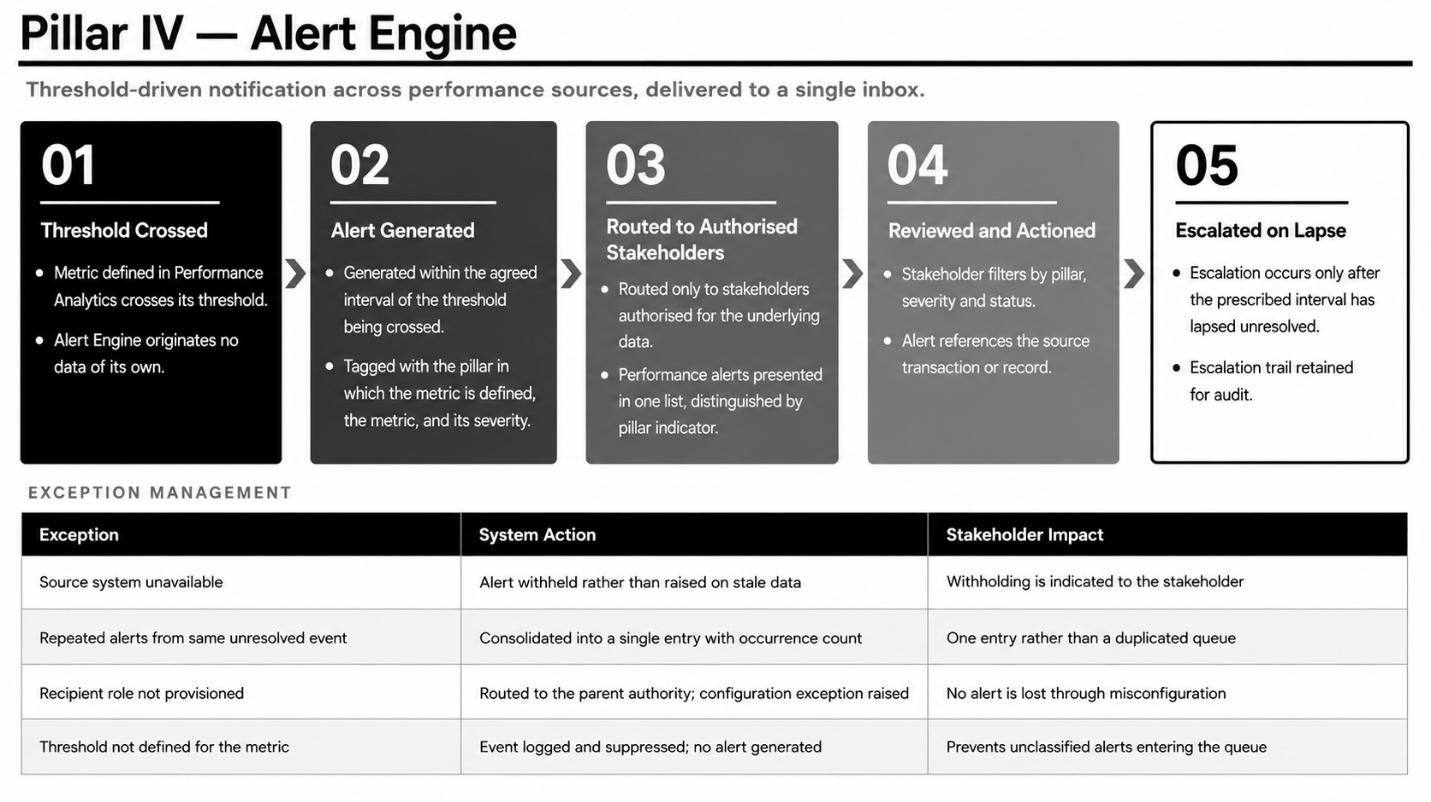
The Alert Engine generates a notification wherever a metric defined elsewhere in the Portal crosses a threshold set against it. It originates no data of its own, evaluating thresholds against the position already held in the Performance Analytics pillars.
The pillar is available to all stakeholders, scoped to the data each is authorized for. Alerts arising in either domain appear in a single list, each entry naming the pillar in which the underlying metric is defined, so that a stakeholder reviews a contribution shortfall and an attendance breach in one queue rather than across separate views.
Functional Capabilities
The Portal shall:
- •Evaluate every metric held in the Performance Analytics pillars against the threshold configured for it, on each refresh of the underlying position.
- •Classify each alert by severity and tag it with the pillar in which the metric is defined.
- •Determine the recipients authorized for the data giving rise to the alert, and dispatch to the inbox and to the configured notification channels.
- •Consolidate repeated occurrences of the same unresolved event into a single entry, incrementing the occurrence count.
- •Run a service level timer from dispatch and escalate to the next authority where the interval lapses without response, notifying both the original recipient and the escalation authority, and restarting the timer at the higher level.
- •Retain the escalation trail, comprising the originating office, each escalation level and the current owner.
- •Permit the stakeholder to filter by pillar, severity and status, and to acknowledge, action or close an alert from the list.
Data Sources
Performance alerts are evaluated against the position drawn from the six source systems constituting LOMS. The Alert Engine reads the reconciled position written by the Portal on each refresh and does not query the source systems independently.
Acceptance Criteria
- •Every alert identifies the pillar in which the metric is defined, the metric concerned, and a severity indicator.
- •The stakeholder may filter alerts by pillar, severity and status.
- •An alert is generated within an agreed interval of the underlying metric crossing its threshold.
- •An alert is routed only to stakeholders authorized for the data giving rise to it.
- •An alert unresolved beyond its prescribed interval is escalated, and the escalation is visible to both the original recipient and the escalation authority.
Validation Rules
- •A threshold is defined once, against a single metric, and is not duplicated across pillars.
- •An alert references the transaction or record giving rise to it and does not restate its value independently of its source.
- •Escalation occurs only after the interval prescribed for the original alert has lapsed unresolved.
- •An event for which no threshold is defined is logged and suppressed rather than raised.
Exception Management
- •Where the underlying metric cannot be evaluated owing to a source system being unavailable, the alert is withheld rather than raised on stale data, and this is indicated to the stakeholder.
- •Where the same unresolved event gives rise to repeated alerts, these are consolidated into a single entry.
- •Where the intended recipient role is not provisioned, the alert is routed to the parent authority and a configuration exception raised.
- •Where an alert remains unacknowledged after escalation to the highest authority in the chain, it is retained as open on that authority's inbox and reported in the exception summary.
3.5. Pillar 5: Reports Pillar
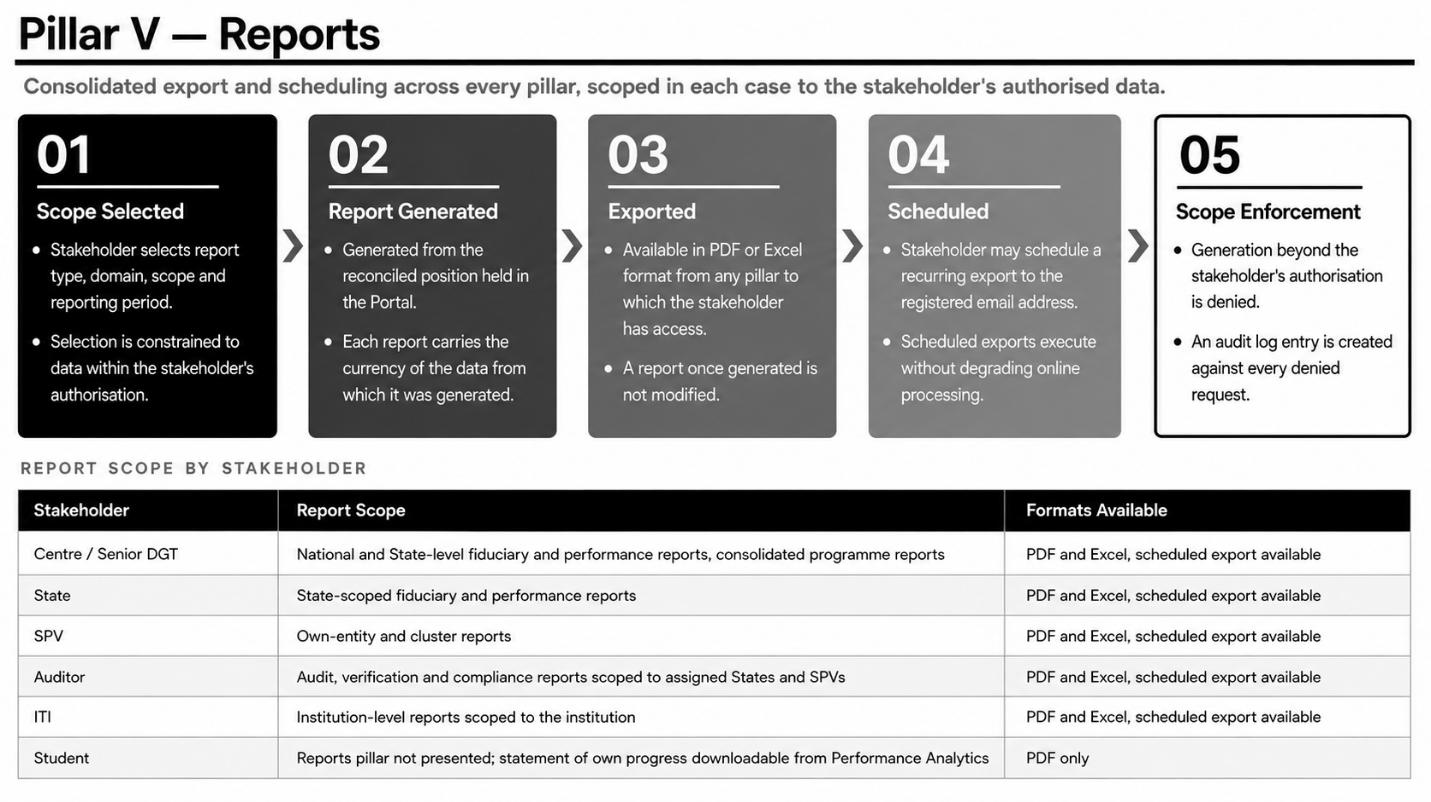
The Reports pillar consolidates the generation, export and scheduling reports across the pillars to which a stakeholder has access.
The pillar is available to Centre, State, SPV, Auditor and ITI, scoped in each case to the stakeholder's authorized data. It is not presented to the student, for whom a statement of the learner's own progress may be downloaded from the Performance Analytics view.
Functional Capabilities
The Portal shall:
- •Permit the stakeholder to select report type, domain, scope and reporting period, constraining the selection to data within their authorized scope.
- •Generate the report from the reconciled position, printing the currency of that data upon it.
- •Export in Portable Document Format and in spreadsheet format.
- •Execute consolidated and national-level reports asynchronously so as not to degrade online performance.
- •Permit the stakeholder to schedule a recurring export to their registered email address.
- •Retain a record of every generation, comprising the report, its scope, the time of generation and the stakeholder concerned.
- •Deny generation beyond the stakeholder's authorization and record the denial in the audit log.
Data Sources
Reports are generated from the reconciled position held by the Portal, and not by querying the source systems at the time of generation. The report therefore reflects the position at the last successful refresh, which is printed upon it.
The Skill India Digital Hub is documented to provide government and policymaker-facing analytics and dashboards across its participating ministries, states and schemes, stated by its implementing partner to
span 23 ministries, 26 states and 314 schemes nationally. Whether DGT or the Portal may draw a PM- SETU-specific extract from this capability, as distinct from viewing aggregate national figures, is to be confirmed with DGT, MSDE and NSDC; if confirmed, this would represent an additional prospective report source and is noted here for that purpose pending confirmation.
Acceptance Criteria
- •A report may be exported in PDF or Excel format from any pillar to which the stakeholder has access.
- •A stakeholder may schedule a recurring export to their registered email address.
- •Each report carries the currency of the data from which it was generated.
Validation Rules
- •A stakeholder may generate a report only for data within their authorized scope.
- •A report once generated is not modified.
Exception Management
- •Where an export fails, it is retried once, and the stakeholder is notified if it fails again.
- •Where the requested scope exceeds the stakeholder's authorization, generation is denied and an audit log entry created.
- •Where source data was incomplete at the time of generation, the report is annotated as provisional.
4. Solution Architecture
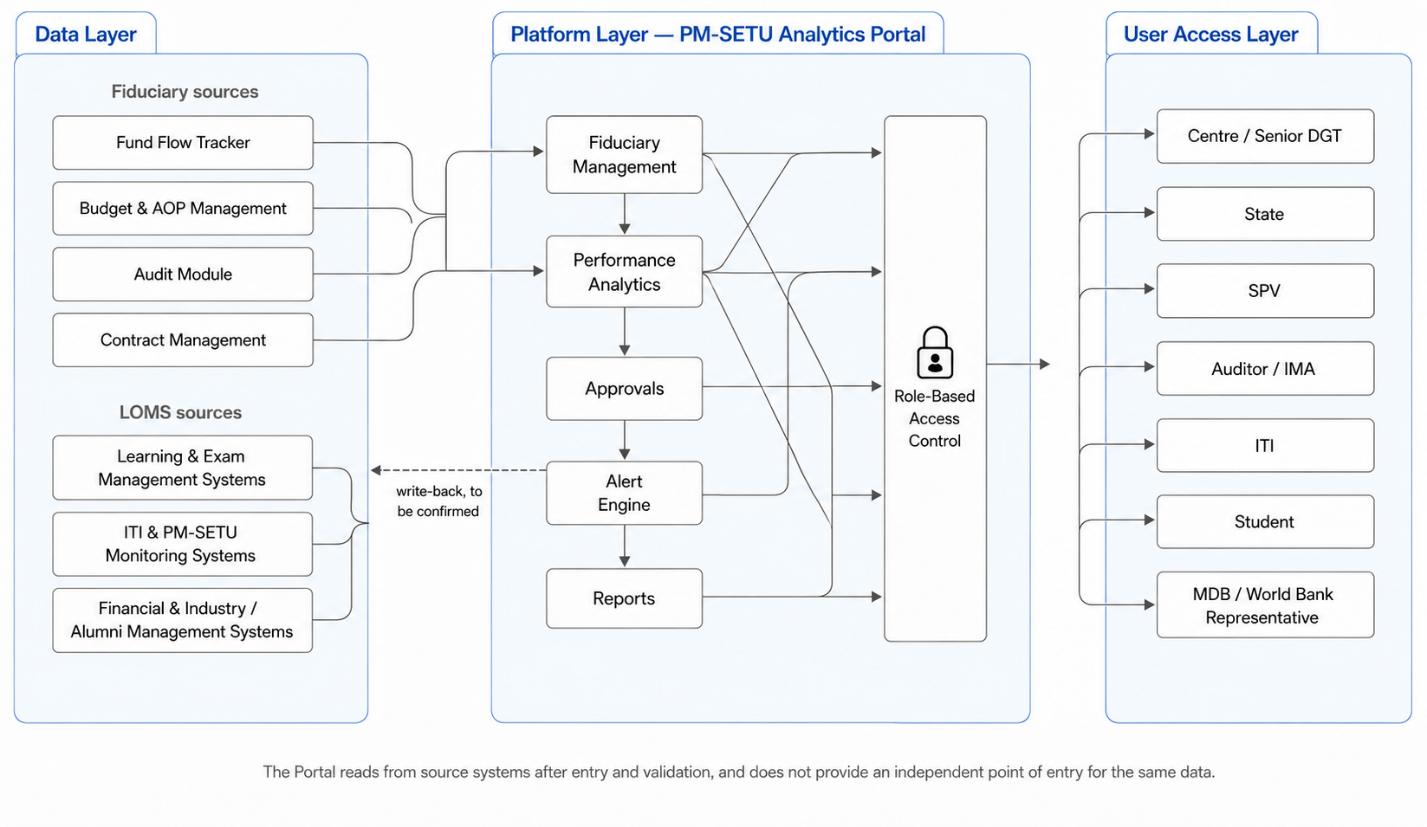
The Portal is organized into three layers. The Data Layer draws information from the source systems of record. The Platform Layer hosts the six pillars, the threshold evaluation logic and the access control that scopes every query. The User Access Layer authenticates each stakeholder and renders the navigation and data appropriate to their role and entity.
4.1. Data Layer
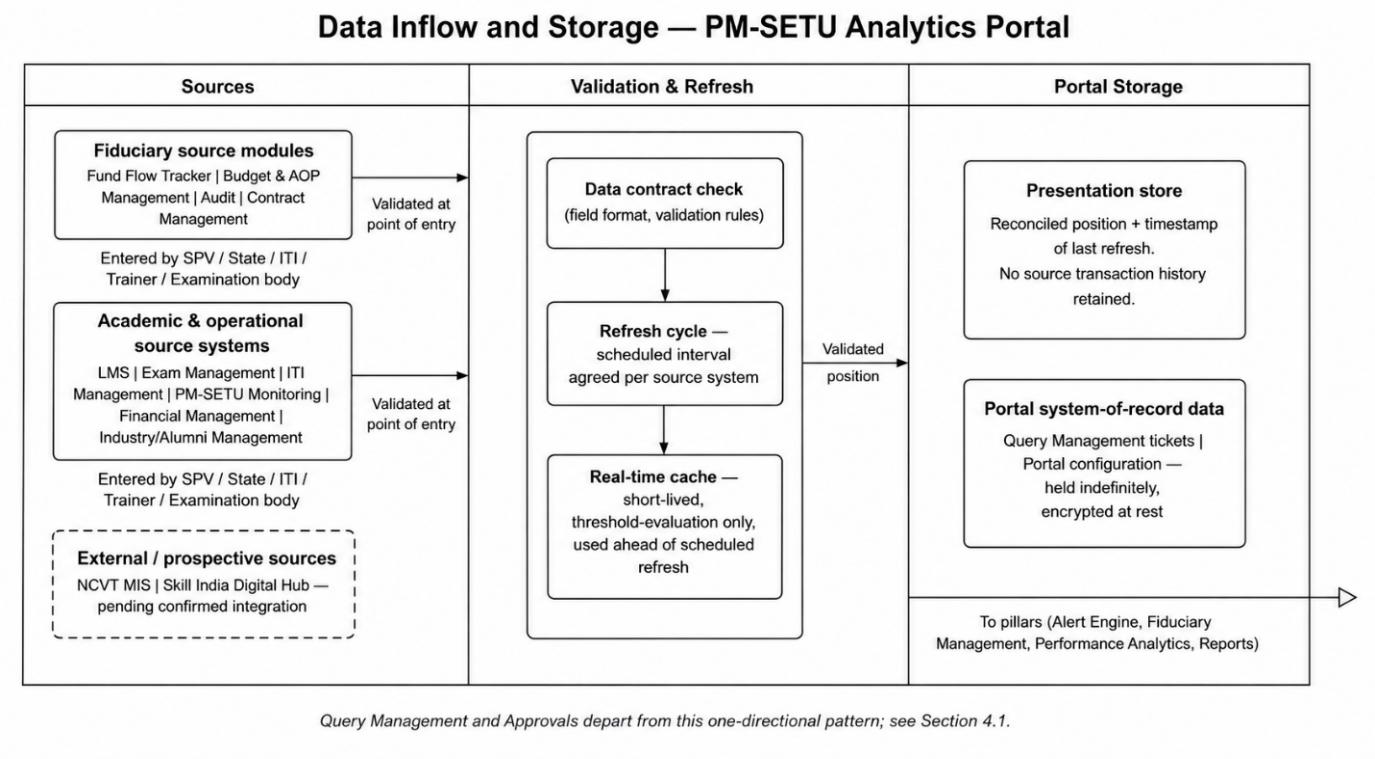
The Portal does not itself capture financial or academic transactions. Data displayed under the Fiduciary Management pillar originates in the Fund Flow Tracker, Budget and AOP Management, Audit and Contract Management modules, wherein SPVs and States enter fund utilization, audit and contract information in the ordinary course of their operations. Data displayed under the Performance Analytics pillar originates in the Learning Management System, Exam Management System, ITI Management System, PM-SETU Monitoring System, Financial Management System and Industry / Alumni Management System, wherein ITIs, trainers and examination bodies enter attendance, assessment and operational information in the ordinary course of their operations. In both cases, the Portal reads this information after it has been entered and validated in the respective source system and does not provide an independent point of entry for the same data.
One pillar departs from this pattern. The Approvals pillar, once its workflow is defined, is expected both to read from and to write back into the source system against which an approval is granted, for instance an AOP or a tranche release, though this remains to be confirmed.
4.1.1 Sources of Inflow
Data reaches the Portal from three distinct categories of upstream source, each with a different mode of entry and a different point at which it becomes available to the Portal.
Fiduciary sources: SPVs and States enter fund utilization, audit and contract information directly into the Fund Flow Tracker, Budget and AOP Management, Audit and Contract Management modules of the Fiduciary Management System, through their own user interfaces and workflows. This entry is validated within those modules for example, an AOP submission is checked against the approved SIP envelope, and a Utilisation Certificate is checked against recorded expenditure before the record is considered complete. The Portal draws only from records that have passed this validation; a submission still pending review within its source module is not visible to the Portal.
Academic and operational sources: ITIs, trainers and examination bodies enter attendance, assessment, trainer and institutional information into the Learning Management System, Exam Management System, ITI Management System, PM-SETU Monitoring System, Financial Management System and Industry / Alumni Management System, again through each system's own interface. As with fiduciary data, this entry is validated at the point of capture within the originating system.
External and prospective sources: Where a national platform outside the PM-SETU ecosystem holds data relevant to a PM-SETU learner or institution for example, examination and certification records held by NCVT MIS, or scheme-level analytics held by the Skill India Digital Hub the Portal is designed to draw upon such a source as a further inflow once the corresponding integration is confirmed and agreed with the owning ministry or agency, consistent with the federated data-exchange principle at Section 4.1.5. No such external inflow is presently active; each is noted at the pillar level where it becomes a confirmed source.
In every case, inflow into the Portal is one-directional from source to Portal, save for the Approvals pillar described above. The Portal is a consumer of already-validated data, not a point of first entry.
4.1.2 Data Storage
Data drawn from the source systems is held within the Portal in a presentation store, distinct from the systems of record described above and from the source modules named at 4.1.1.
What is stored: The presentation store holds the reconciled position last read from each source system the figures, statuses and records currently displayed to stakeholders together with the timestamp of the refresh that produced it. It does not hold source-system transaction history; where a stakeholder requires the underlying transaction, the Portal directs the query back to the originating module rather than reconstructing it from its own store.
How it is refreshed: The presentation store is updated on the refresh cycle agreed with each source system, described at 4.1.4. Each refresh replaces the previous position for the affected records; the store accordingly reflects the most recent successfully validated read, not a full history of every change.
What departs from this pattern: Portal configuration role definitions, threshold settings, navigation structure is held within the Portal as its own system of record, subject to the retention and audit logging requirements at Section 5.4.
Security of storage: Data held within the presentation store is encrypted at rest in accordance with Section 5.2, and access to it is scoped at the point of query by the role-based access control described at Section 4.2, so that the store itself carries no data a stakeholder is not separately authorised to see.
Real-Time and Standards-Based Handling
Where near real-time freshness is required principally for the Alert Engine, which must evaluate a threshold shortly after the underlying event occurs a short-lived cache is employed ahead of the standard refresh cycle, so that a threshold-crossing event can be detected and an alert dispatched within the
interval specified at Section 5.1, without waiting for the next scheduled full refresh. This cache is transient: it holds only the most recent value needed for threshold evaluation and is superseded by the next scheduled refresh into the presentation store.
Standard refreshes and the real-time cache alike operate against the data contract agreed with each source system the field definitions, formats and validation rules under which that system's data is exchanged. A change to a source system's data contract is managed through the programme-level change management process referenced at Section 1, so that the Portal's interpretation of incoming data remains consistent with what the source system provides.
4.1.4 Refresh Cycle
Inflow to the Portal, from the source systems named above into the Alert Engine, Fiduciary Management and Performance Analytics pillars, occurs on a refresh cycle to be agreed with each source system, with the short-lived cache described at 4.1.3 employed where near real-time freshness is required. Outflow from the Portal is limited to the exports generated under the Reports pillar and to whatever write-back the Approvals pillar is found to require.
4.1.5 Interoperability Principles
The Data Layer is designed on federated, standards-based data-exchange principles consistent with the National Digital Education Architecture, enabling interoperability with national skilling and education registries as they mature.
4.2. Platform Layer
The Platform Layer is the application layer within which the Portal operates. It hosts the rendering of each pillar, the threshold evaluation logic underlying the Alert Engine, the role-based access control that scopes every query to the stakeholder's role and entity, and the navigation state as a stakeholder moves between pillars or drills down from Centre to State to SPV.
The five pillars constitute the functional components of this layer:
| Component | Function within the Platform Layer |
| Fiduciary Management | Renders stakeholder-scoped fund flow, utilization, deviation, audit and contract views drawn from the fiduciary source modules. |
| Performance Analytics | Renders stakeholder-scoped academic and operational views drawn from the six source systems constituting LOMS. |
| Approvals | Presents and routes approval requests arising elsewhere in the Portal. Workflow pending definition. |
| Alert Engine | Evaluates thresholds against data held in the Performance Analytics pillar, and generates, routes and escalates notifications. |
| Reports | Consolidates export and scheduling across the pillars to which a stakeholder has access. |
Two functions operate across all five pillars rather than within any one of them. Threshold evaluation is defined once against a single metric and is not duplicated across pillars. Access control is applied at the level of the query rather than the page, so that a stakeholder's role and entity constrain the data returned and not merely the screens rendered.
4.3. User Access Layer
Every stakeholder is authenticated through Single Sign-On via the Government Identity and Access Management framework, with the exception of the student, who is authenticated through a learner credential verified by electronic Know Your Customer. The stakeholder's role and entity are resolved at login and govern both which pillars are rendered on the left-hand navigation and the data returned within each pillar.
| Stakeholder | Pillars rendered | Data scope |
| Centre / Senior DGT | All five | National |
| State | All five | The State concerned |
| SPV | All five | The SPV and the institutions within its cluster |
| Auditor / IMA | Five, with Approvals in review capacity only | Assigned States and SPVs |
| ITI | Three Alert Engine, Performance Analytics, Reports | The institution concerned |
| Student | Performance Analytics only | Learner's own record |
| MDB / World Bank Representative | Fiduciary Management, Performance Analytics, Approvals (review-only), Alert Engine (view-only), Reports | National / programme-wide, summary level no transaction- level or contract access |
This layer gives effect to the design principle established under the Fiduciary Management System, namely maximum transparency at summary level with zero intrusion into the operational autonomy of the SPV, compliance being enforced through the auditor rather than through central micromanagement. It follows that procurement contract records are presented to the Auditor stakeholder alone, are not presented to Centre or State stakeholders through routine access and are released to the Centre only on demand through a recorded procedure.
5. Nonfunctional Requirements
The PM-SETU Analytics Portal presents information originating in the fiduciary and LOMS source systems and, save for Portal configuration, holds no data of record of its own. Its non-functional requirements are accordingly framed around responsiveness, access control, freshness of presented data and auditability of access, rather than around transaction processing, which remains the responsibility of the source systems. Where a control is already established under the Fiduciary Management System or the module-level Detailed Project Reports, this section states the Portal's inheritance of that control rather than restating it.
5.1. Performance
| Performance Parameter | Minimum Requirement |
| Pillar load time | Each pillar shall load within 3 seconds for 90% of requests under normal load, and within 5 seconds under peak load. |
| Drill-down transition | Drill-down from Centre to State to SPV, and from State to institution, shall complete within 2 seconds. |
| Filter and query response | Application of a filter or change of reporting period shall be returned within 2 seconds for 95% of requests. |
| Source query response | Synchronous queries to source systems shall respond within 500 milliseconds at the 95th percentile. |
| Concurrent usage | The Portal shall support a minimum of 500 concurrent users across all stakeholder groups, scaling to 1000 during peak periods, with no more than 20% response-time degradation. |
| Data freshness | Data presented shall reflect the refresh cycle agreed with each source system, and the time of last successful refresh shall be displayed on every view. |
| Performance Parameter | Minimum Requirement |
| Alert dispatch | Alerts shall be dispatched within 5 minutes of the triggering event being recorded in the source system. |
| Report generation | Standard reports shall be generated within 10 seconds; consolidated national-level reports within 60 seconds; scheduled reports shall execute asynchronously without degrading online performance. |
| Availability | Portal shall provide a minimum of 99.5% monthly availability, excluding pre-notified planned maintenance scheduled outside business hours. |
| Scalability headroom | The architecture shall accommodate at least 20% year-on-year growth in users, stakeholders and source integrations over a five-year horizon through horizontal scaling, without architectural redesign. |
5.2. Security
The Portal inherits the security framework established for the PM-SETU platform, comprising ISO/IEC 27001:2022 certification of the hosting environment, CERT-In incident reporting and log retention directions, the Information Technology Act 2000 and the Digital Personal Data Protection Act 2023, hosting on MeitY-empanelled cloud infrastructure with data residency within India, and Vulnerability Assessment and Penetration Testing by a CERT-In empanelled agency prior to go-live and at least half- yearly thereafter. The following requirements apply specifically to the Portal.
| Security Requirement | Application to the Portal |
| Query-level access control | Role-based access control shall be enforced on every query executed against a source system, not on page access alone, so that a stakeholder's role and entity constrain the data returned and not merely the screens rendered. |
| Authentication | Stakeholders shall authenticate through Single Sign-On via the Government Identity and Access Management framework. Multi-factor authentication shall be mandatory for Centre, approval and audit roles. The student shall authenticate through a learner credential verified by electronic Know Your Customer. |
| Segregation of duties | Segregation between Centre, State, SPV, Auditor, ITI and Student shall be enforced in accordance with the stakeholder-to-pillar access matrix at Section 2.1. |
| Restricted records | Procurement contract records shall be presented to the Auditor stakeholder alone. Any attempt at access outside the permitted scope shall be denied and recorded in the audit log. |
| Learner data | Learner-level records shall be presented only to the learner concerned and to stakeholders authorized for the institution in which the learner is enrolled. |
| Encryption | All traffic shall be protected using TLS 1.2 or higher. Portal configuration held at rest shall be encrypted using AES-256. |
| Data minimization | No financial or academic data shall be duplicated outside the data layer governed by the source systems, save for the short-lived cache required for near real-time presentation. |
| Session controls | Session timeout, concurrent session limits and account lockout policies shall apply in accordance with the platform's security baseline, with quarterly access reviews across all stakeholder roles. |
5.3. Availability and Disaster Recovery
As the Portal holds no data of record other than Portal configuration and, prospectively, Approvals records, its recovery is principally a function of the disaster recovery posture of the underlying source systems. The Portal itself shall be re-deployable from its application code and configuration within the platform's standard recovery time objective and shall not require restoration of transactional data.
Where a source system is unavailable, the Portal shall continue to serve the last known position with a visible indication of staleness, rather than failing entirely, so that stakeholders retain visibility of the most recent reliable position. Portal configuration shall be backed up in accordance with the platform's backup schedule, encrypted at rest, and subject to periodic restoration testing.
5.4. Audit Logging
Every access, export and drill-down within the Portal shall be logged with stakeholder identity, role, entity, timestamp and the scope of data returned. Denied access attempts shall be logged with equal completeness, this being how the restriction on procurement contract records is proved.
Logs shall be tamper-resistant, retained in accordance with CERT-In directions and the programme's audit requirements, and accessible only to authorized administrators and auditors. The Portal shall support centralized log monitoring, exception detection and activity tracing in support of internal audit, external audit and independent verification.
5.5. Compliance
The Portal shall align with the interoperability and data-exchange principles of the National Digital Education Architecture, ensuring that its architecture remains consistent with the Government of India's digital public infrastructure standards for education and skilling.
Web interfaces shall conform to the Guidelines for Indian Government Websites 3.0, including accessibility to WCAG 2.1 Level AA, this being of relevance to the ITI and Student stakeholders, who access the Portal from a wider range of devices and connectivity conditions than the remaining stakeholders.
The Portal shall support the fiduciary and transparency requirements of the financing agreements with participating Multilateral Development Banks, including audit traceability, utilization verification and evidence-based reporting in support of governance review, while preserving the restriction on routine visibility of procurement contract records.
6. Testing Strategy and Deployment Approach
The Portal presents information originating in the source systems and does not itself process transactions. Testing is accordingly directed at whether each figure displayed agrees with its source, whether each stakeholder sees only what their role and entity permit, and whether the Portal performs to the parameters at Section 5.1. Functional testing of the source systems themselves is outside the scope of this document and is governed by their respective Detailed Project Reports.
6.1. Testing Strategy
Reconciliation testing: Every figure displayed under the Fiduciary Management and Performance Analytics pillars shall be checked against its source data prior to User Acceptance Testing. Reconciliation shall be verified at each level of aggregation, so that institution and SPV figures agree with the State roll- up and State figures agree with the national position. Where a source system is unavailable or has not
synchronized, the Portal shall be verified to display the affected metric as provisional together with the time of last successful refresh, rather than presenting stale data as current.
Access control testing: Each of the six stakeholders shall be tested against the stakeholder-to-pillar access matrix at Section 2.1, confirming that the pillars rendered and the data returned corresponds to that stakeholder's role and entity. Testing shall confirm that access control is enforced at the level of the query and not the page, that a stakeholder cannot retrieve data belonging to another State, SPV or institution, and that the learner is presented with no record other than the learner's own. Testing shall specifically confirm that procurement contract records are presented to the Auditor stakeholder alone, that attempts at access outside the permitted scope are denied, and that each denied attempt is recorded in the audit log.
Performance testing: Pillar load, drill-down transition, filter response, alert dispatch and report generation shall be validated against the parameters at Section 5.1, under both normal and peak load. Peak load shall simulate the concurrent usage anticipated during fund release cycles, annual planning exercises, audit submission windows and examination result publication.
Integration testing: Each source system interface shall be validated for data accuracy, refresh behaviour and error handling, including the Portal's response where a source system is unavailable, returns incomplete data, or fails to respond within the prescribed interval.
Security testing: Vulnerability Assessment and Penetration Testing shall be conducted by a CERT-In empanelled agency prior to go-live, covering authentication, session management, query-level authorization, and the completeness and tamper-resistance of audit logs. All critical and high-risk findings shall be resolved and retested before deployment approval.
User Acceptance Testing: UAT shall be conducted with a nominated representative of each stakeholder, namely Centre and Senior DGT, State, SPV, Auditor, ITI and Student. Testing with the ITI and Student stakeholders shall include access from the range of devices and connectivity conditions in which those stakeholders will use the Portal and shall verify conformance with the accessibility requirements at Section 5.5. Successful completion of UAT shall constitute formal business sign-off for production deployment.
6.2. Acceptance Criteria for Go-Live
- •All critical reconciliation test cases pass, with figures agreeing to source at every level of aggregation.
- •All access control test cases pass across all six stakeholders, including the restriction on procurement contract records and the logging of denied attempts.
- •Performance parameters at Section 5.1 are met under both normal and peak load.
- •All critical and high-severity defects are resolved and retested.
- •All security findings categorised as critical or high risk are closed.
- •User Acceptance Testing sign-off is obtained from a nominated representative of each of the six stakeholders.
6.3. Deployment Approach
Deployment shall follow the platform's standard phased environment promotion, comprising Development, Testing, User Acceptance Testing, Pre-Production and Production. Each release shall pass
automated code validation, build verification, security scanning and testing gates before promotion to the subsequent environment, within the platform's DevSecOps framework.
As Portal holds no data of record other than Portal configuration, releases require no data migration, and rollback is affected by redeployment of the preceding application code and configuration. Production deployment shall be executed within controlled release windows, with rollback procedures defined for critical failure.
Post-deployment validation shall confirm application availability, source system connectivity, correct rendering of each pillar for each stakeholder role, and enforcement of access control, before the release is confirmed to stakeholders.
7. Process Designs and Mockups
This section presents the process designs of the PM-SETU Analytics Portal in Business Process Model and Notation, followed by the mockups of the views rendered within each pillar. The user journeys of each stakeholder are set out at Section 2 and are not repeated here. The processes described below are those the Portal itself executes: the resolution of access and the acquisition of data from the source systems, the assembly of the fiduciary and performance positions, and the routing of the approvals, alerts and reports arising from them. The fiduciary processes governing fund release, budget reallocation, audit compliance and contract screening are administered within the Fiduciary Management System and are set out in its Detailed Project Report.
All data values appearing in the mockups are indicative and are included solely to demonstrate the structure and content of the proposed screens. They do not represent actual or projected programme figures.
7.1. Access and data acquisition process design
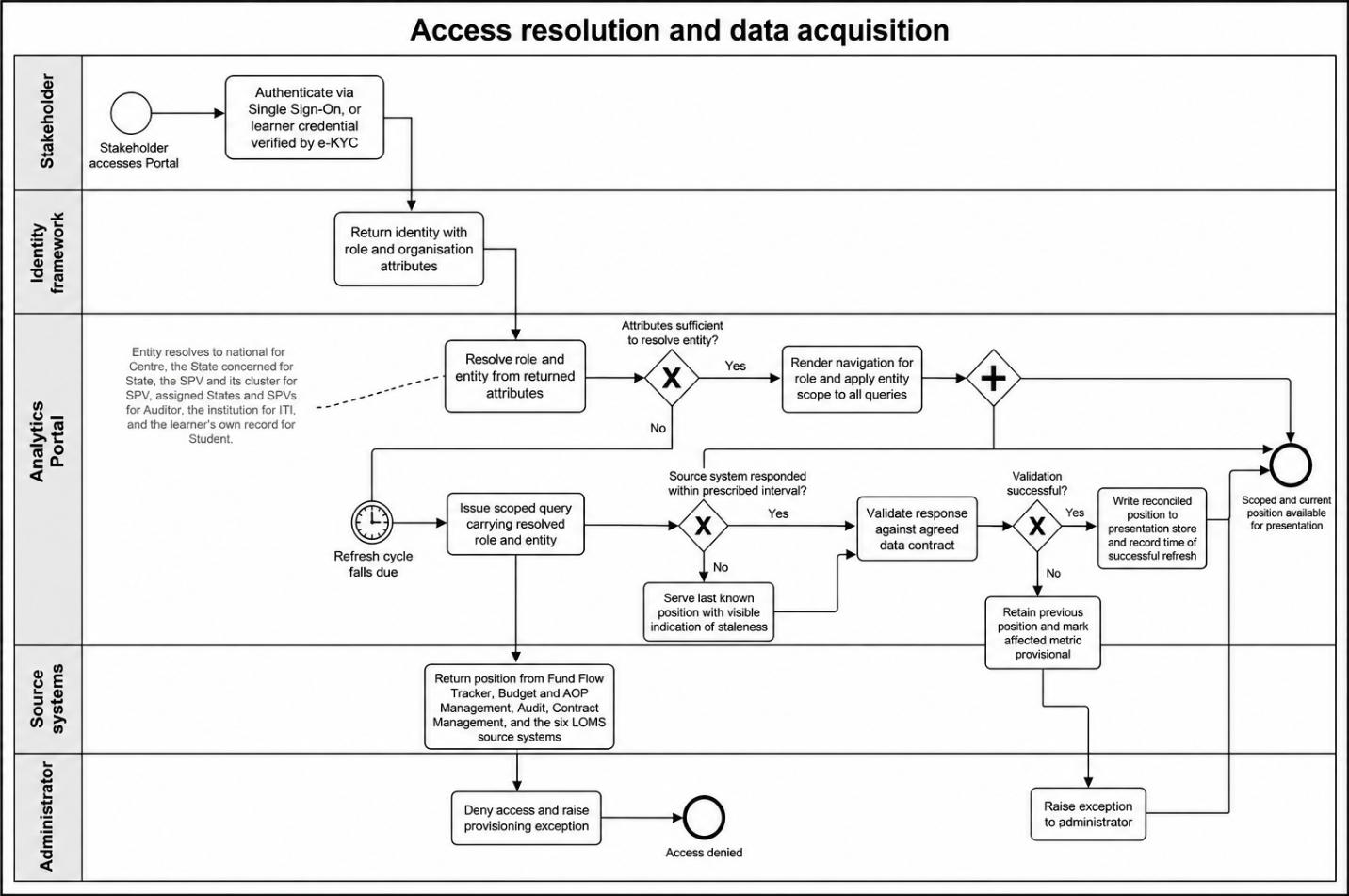
This process diagram illustrates how the Portal establishes what a stakeholder may see and how it obtains the information presented to them. The process begins when a stakeholder authenticates through Single Sign-On via the Government Identity and Access Management framework, or, in the case of a learner, through a learner credential verified by electronic Know Your Customer. The framework returns the stakeholder's identity together with the role and organization attributes held against it, from which the Portal resolves a role and an entity. The role determines which pillars are rendered on the left-hand navigation, and the entity determines the scope of data returned within each pillar: national for the Centre, the State concerned for a State stakeholder, the SPV and its cluster for an SPV, the assigned States and SPVs for an auditor, the institution for an ITI, and the learner's own record for a Student. If an attribute required to resolve the entity is absent, access is denied and a provisioning exception is raised to the administrator, rather than a default scope being applied.
In parallel, the Portal acquires the information it presents. It does not capture financial or academic transactions of its own. Data displayed under the Fiduciary Management pillar originates in the Fund Flow Tracker, Budget and AOP Management, Audit and Contract Management modules, into which SPVs and States enter fund utilization, audit and contract information in the ordinary course of their operations. Data displayed under the Performance Analytics pillar originates in the Learning Management System, Exam Management System, ITI Management System, PM-SETU Monitoring System, Financial Management System and Industry and Alumni Management System, into which institutions, trainers and examination bodies enter attendance, assessment and operational information. When the refresh cycle agreed with a source system falls due, the Portal issues a scoped query carrying the resolved role and entity, receives the response, and validates it against the data contract agreed for that interface. If validation succeeds,
the reconciled position is written to the presentation store, and the time of successful refresh is recorded against every metric drawn from it. If validation fails, the previous position is retained, the affected metric is marked provisional, and an exception is raised to the administrator. If a source system does not respond within the interval prescribed for it, the Portal continues to serve the last known position with a visible indication of staleness rather than presenting an empty view. This process ensures that every figure presented is traceable to its system of origin, that scoping is enforced at the point of retrieval rather than at the point of display, and that the currency of the information is always visible to the stakeholder.
7.2. Fiduciary and performance presentation process design
This process diagram depicts how the fiduciary and academic positions are assembled and presented at the level appropriate to each stakeholder. In the Fiduciary Management process, the sequence begins when a stakeholder selects the pillar. The Portal determines the presentation level from the resolved entity and assembles the view from the reconciled position: inflow, outflow and utilization by source from the Fund Flow Tracker, capital and operating expenditure against approved allocations from Budget and AOP Management, audit opinions and observation closure from the Audit module, and contract records with debarment screening results from Contract Management. Before rendering, the Portal applies the contract access rule: where the stakeholder is an auditor, contract records are included; where the stakeholder is Centre or State, they are excluded from the routine view and are obtainable only through the recorded on-demand procedure. The stakeholder may then drill down from the national position to a State and from a State to an SPV, each drill-down reissuing the query at the narrower level while retaining the filters already applied. Any request beyond the resolved entity is rejected and recorded in the audit log.
In parallel, the Performance Analytics process assembles the academic and operational position. Institution-level records enrolment, attendance, course completion, assessment outcomes, trainer
deployment and infrastructure readiness are aggregated to the SPV cluster, rolled up to the State, and rolled up again to the national position, the Portal verifying at each level that the aggregate reconciles with the records beneath it. If an institution has not reported for the period, it is excluded from the aggregate percentages, is shown as non-reporting on the view, and a compliance alert is raised. The predictive layer evaluates learner records against the dropout and employability risk models and returns advisory flags, which are presented against the stakeholder closest to the learner concerned and do not alter any record in a source system; where that layer is unavailable, the flags are suppressed and recorded outcomes alone are displayed. Together, these processes ensure that each stakeholder is presented with a complete position within their authorized scope, that the same structure is preserved at every level of drill-down, and that no figure is displayed without a traceable relationship to the records beneath it.
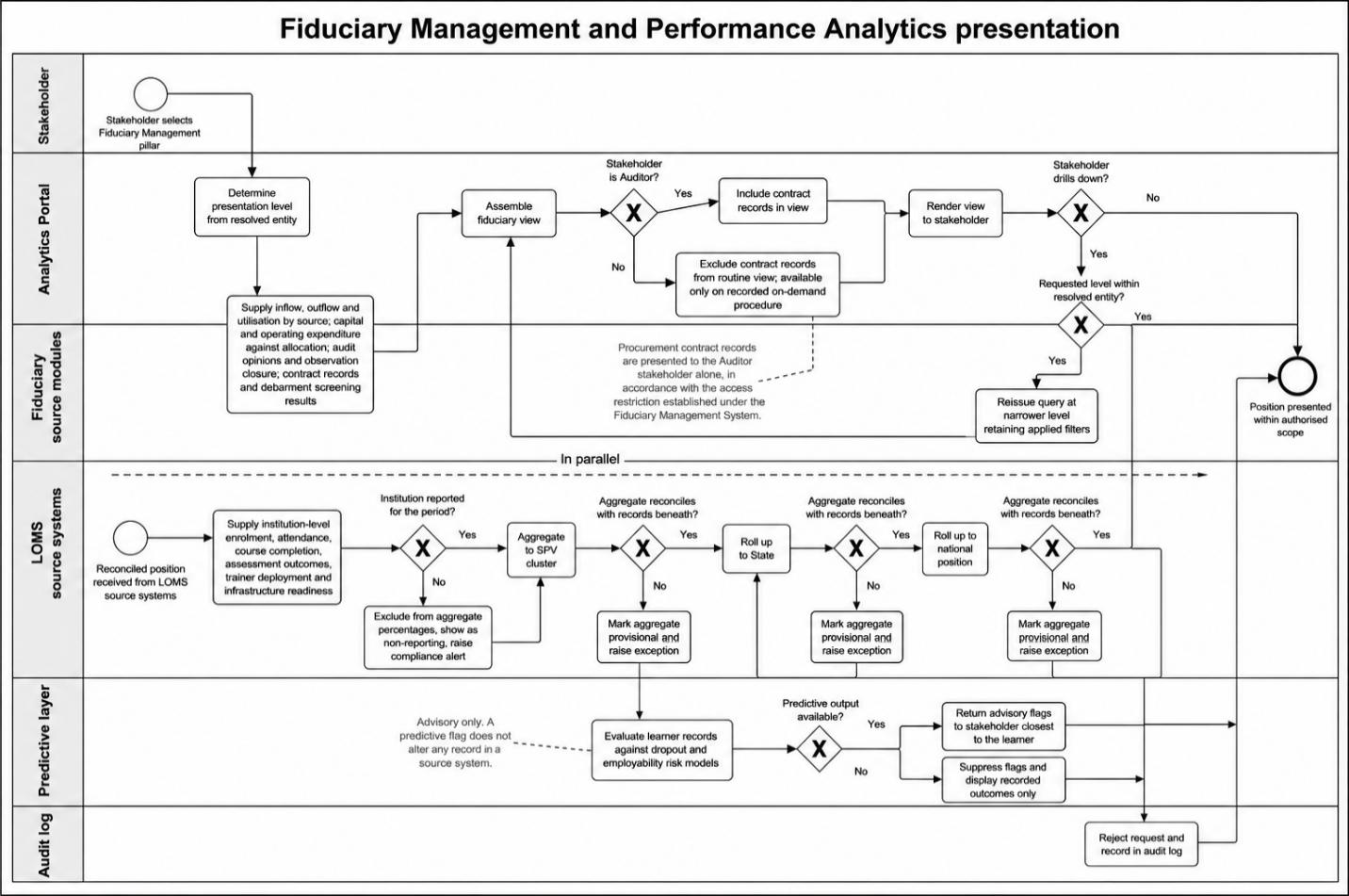
Mockups Fiduciary Management: The Centre view presents the national fund flow position comprising inflow, outflow and utilization by source, State-wise capital and operating expenditure, payment deviation, audit performance and the ranked position of States and SPVs, together with the Portfolio and Compliance summary carried under Centre. The State view presents the same structure scoped to the State, with SPV-wise expenditure and the status of State share and industry share contributions due. The SPV view presents the Fund, Audit, Utilization and Deviation trackers together with the submissions the SPV makes under this pillar. The Auditor view presents the verification position comprising pending audits, unresolved observations by severity, utilization certificates awaiting verification, and the contract review queue with debarment screening results. The MDB Representative view presents the same portfolio-level summary as the Centre's Portfolio and Compliance section, without transaction-level or SPV drill-down.
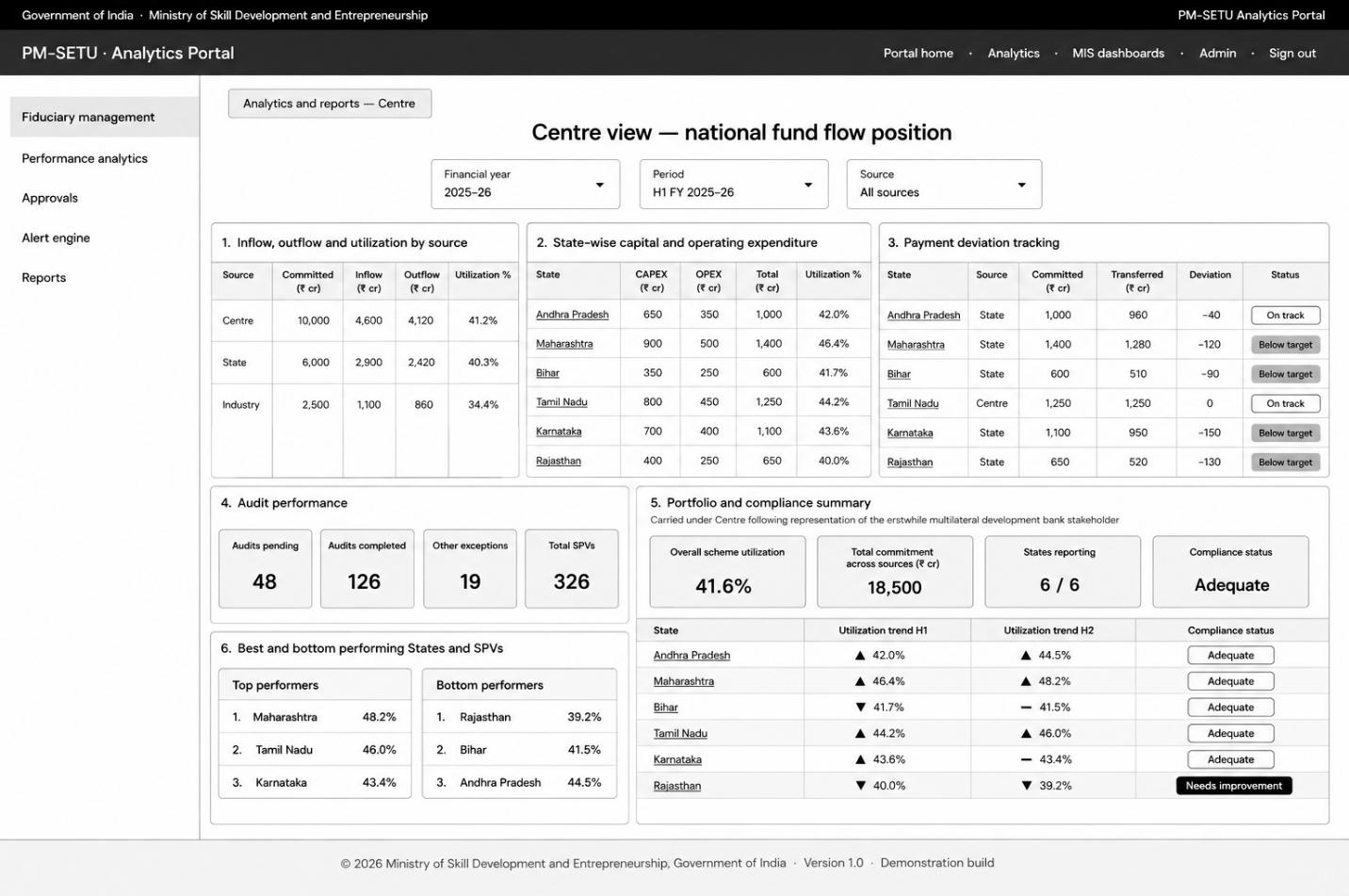
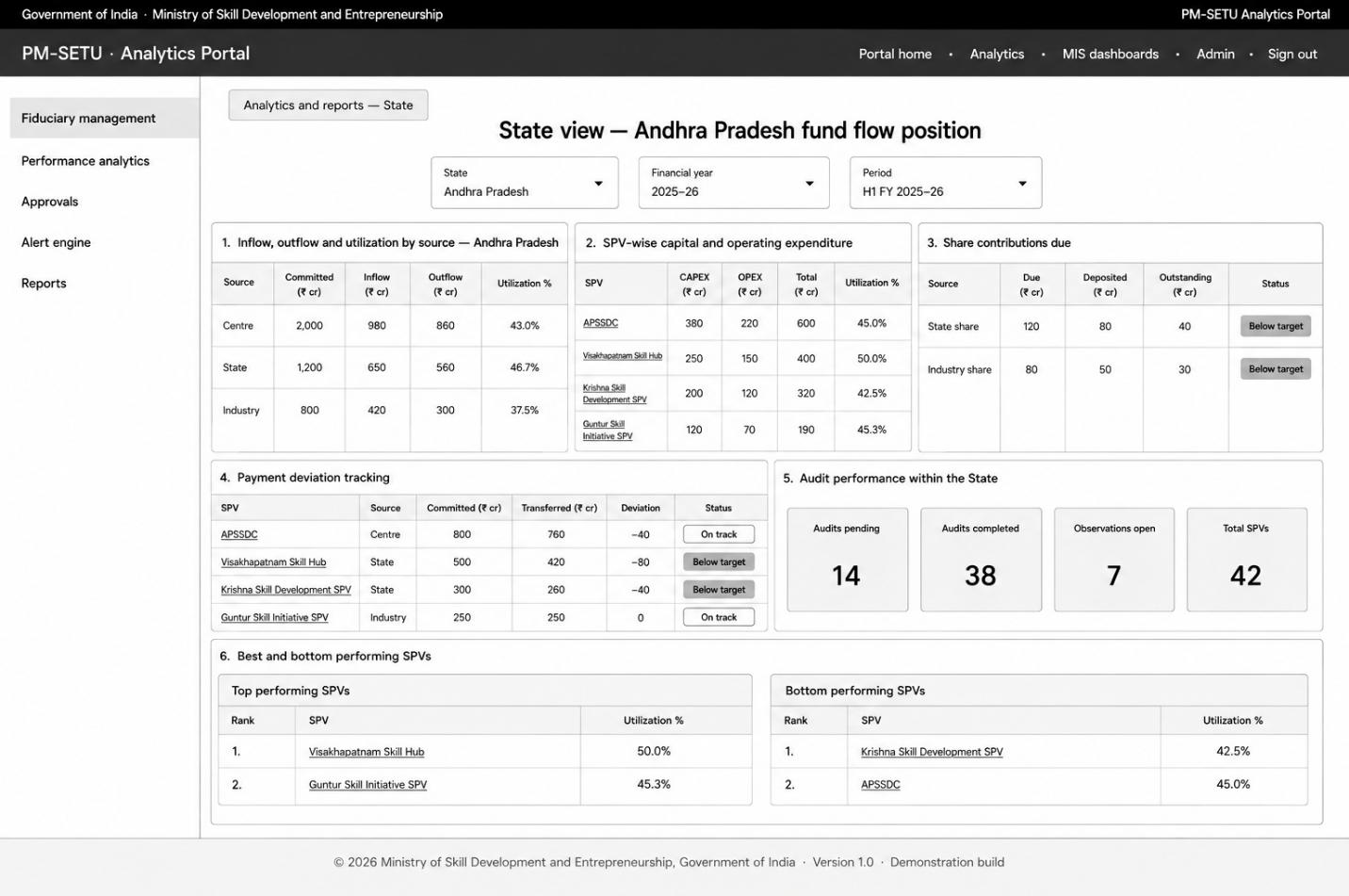
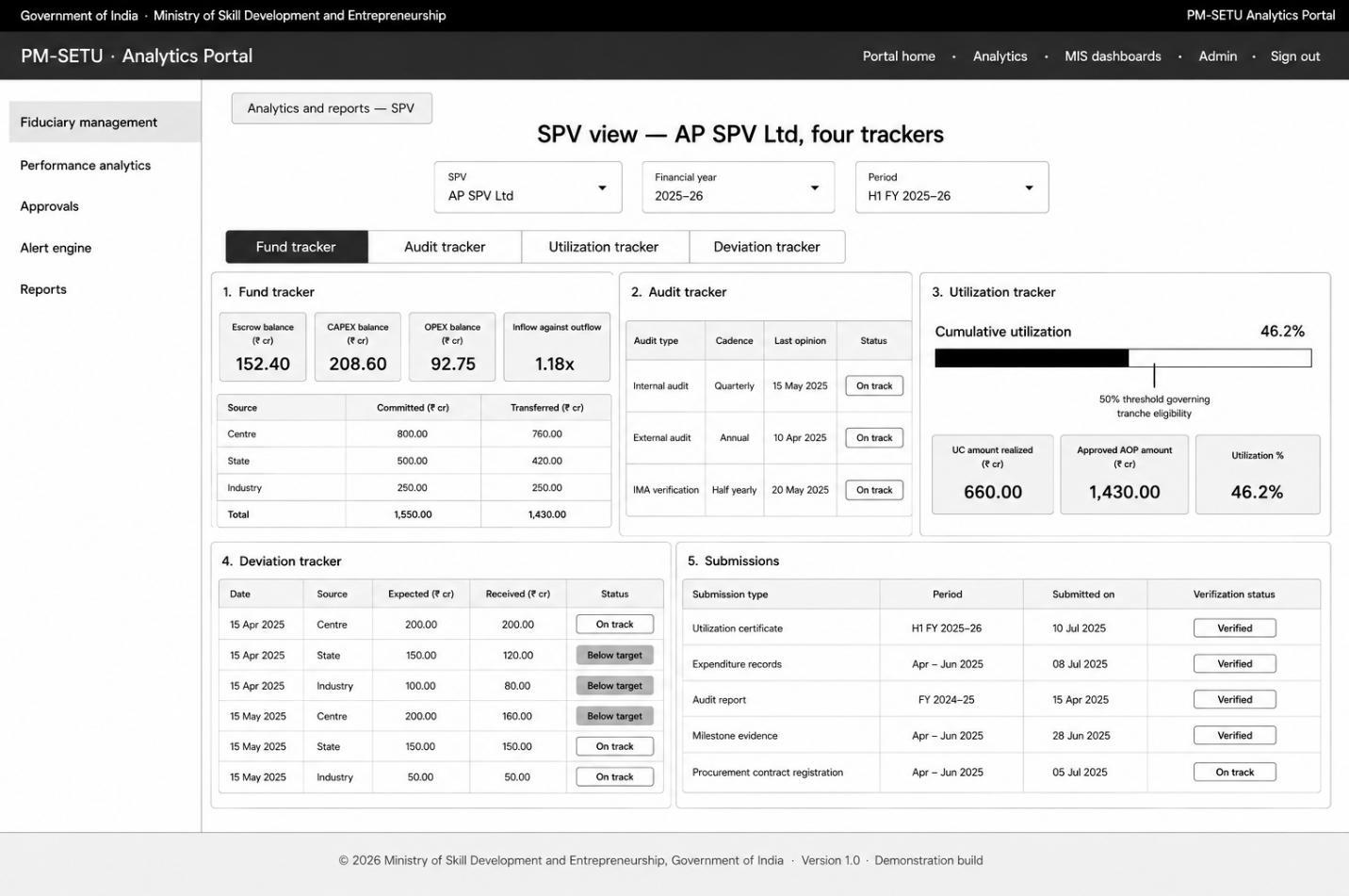
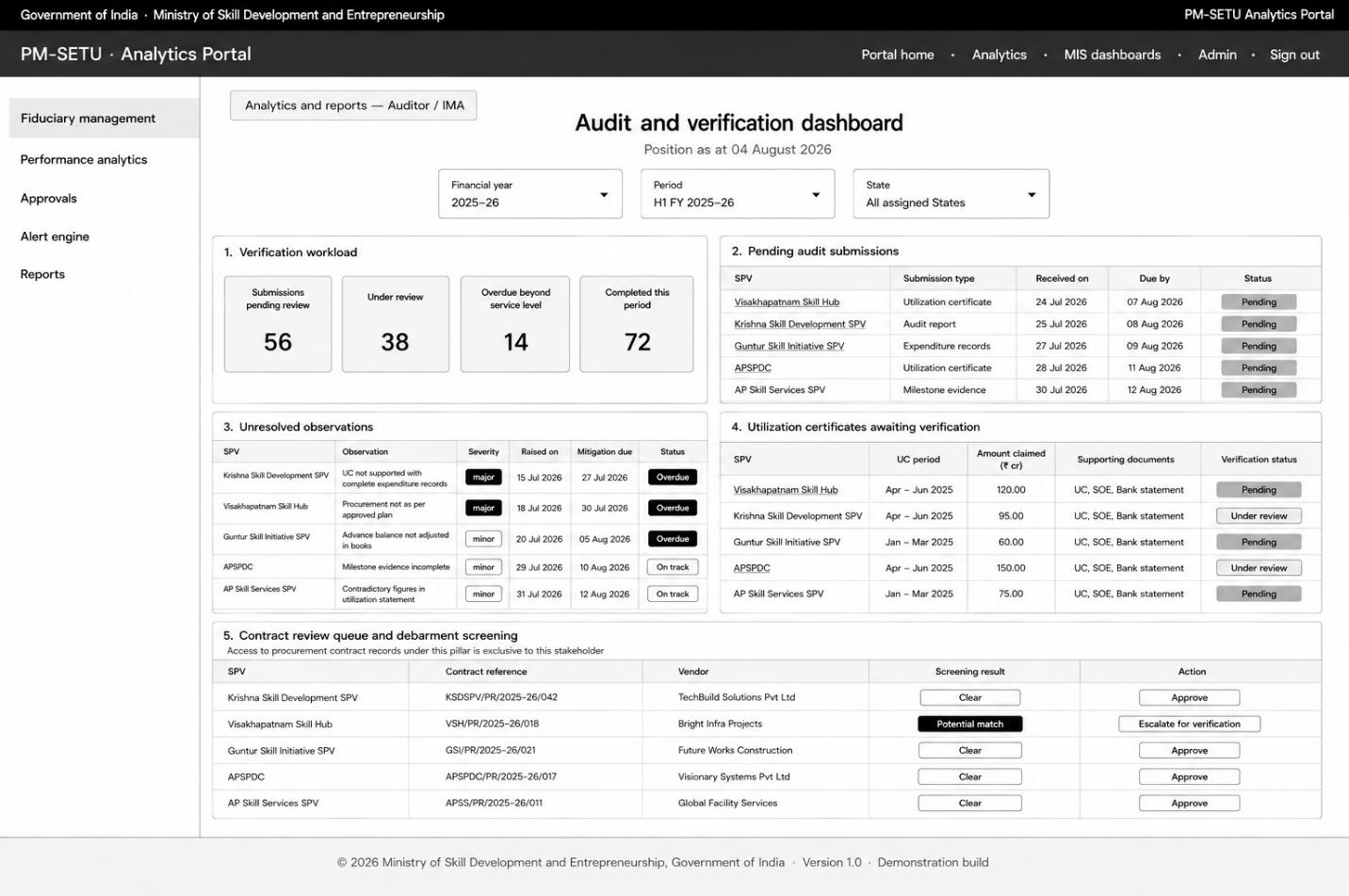
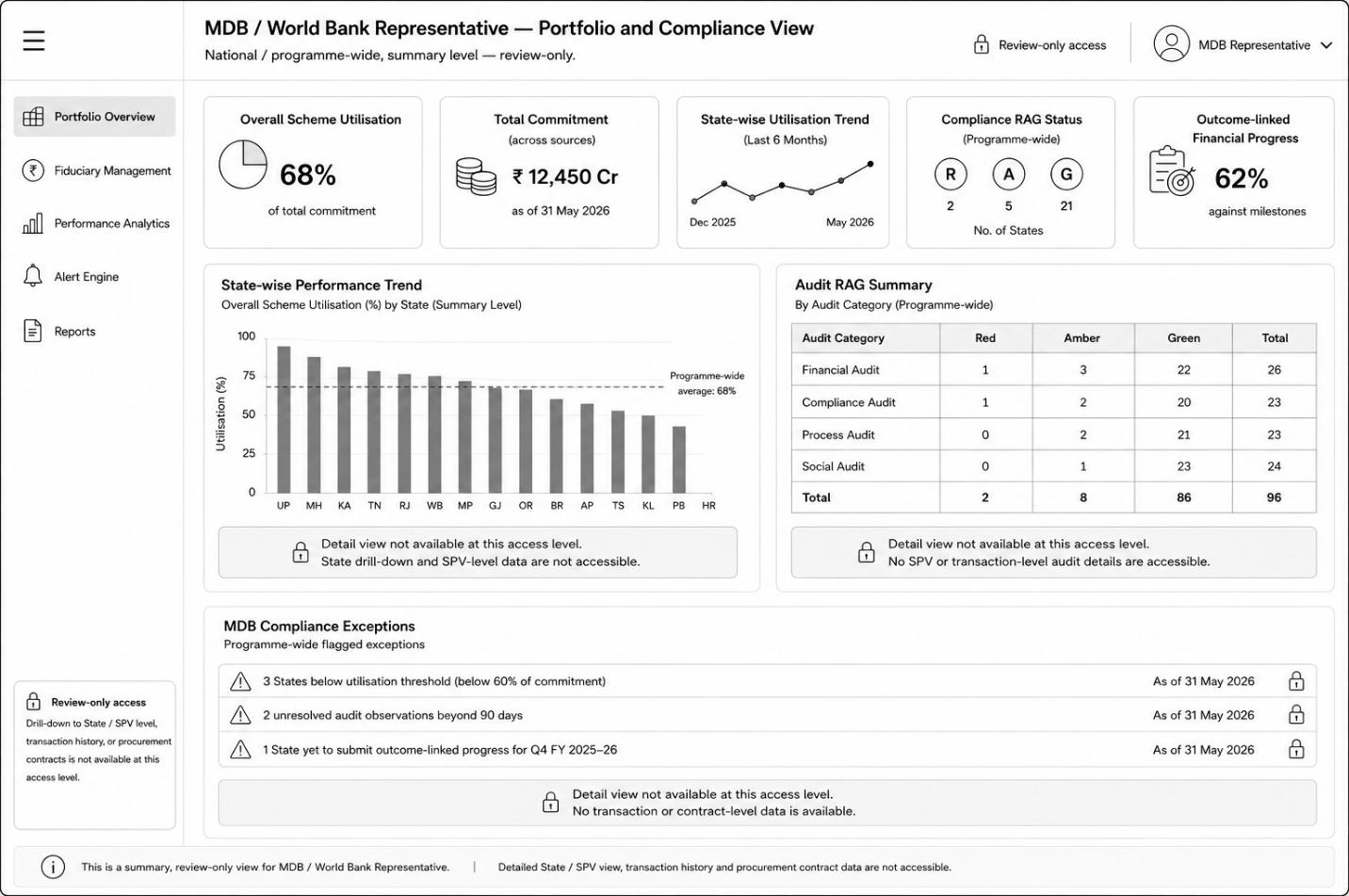
Mockups Performance Analytics: The national view presents enrolment, attendance, completion and dropout by State, trade-wise assessment and certification, placement outcomes, institutional readiness and the geo-spatial distribution of institutions. The State view presents the same structure scoped to the State, with the dropout risk flags raised against the institutions concerned. The SPV cluster view presents the learner, trainer, placement and compliance trackers across the institutions operated. The ITI view presents the institution snapshot, batch-wise progress by trade, learners identified at risk with the intervention recorded against each, and trainer utilization and session delivery. The student view presents the learner's own position comprising subjects enrolled, attendance recorded and examination marks obtained.
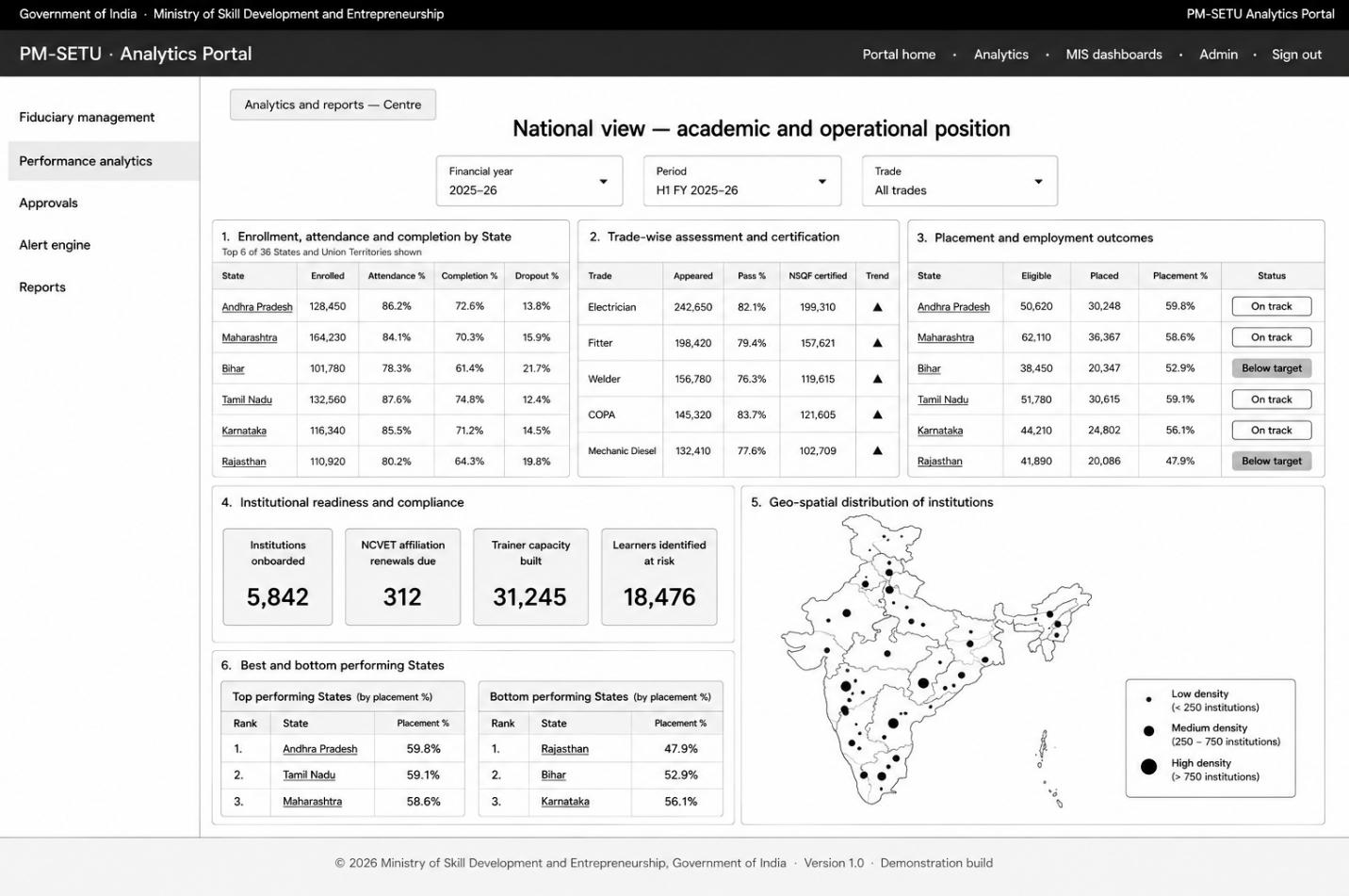
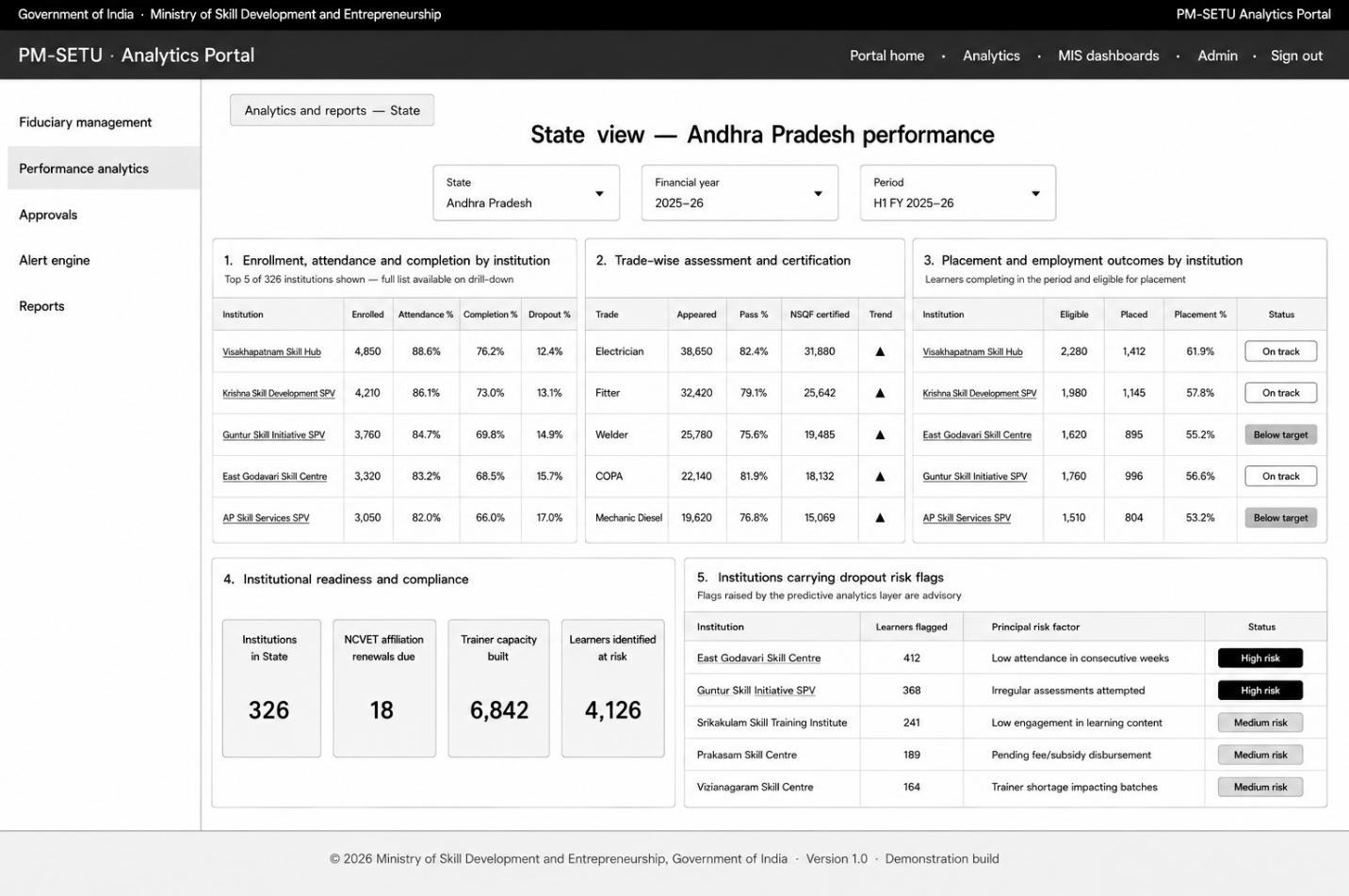
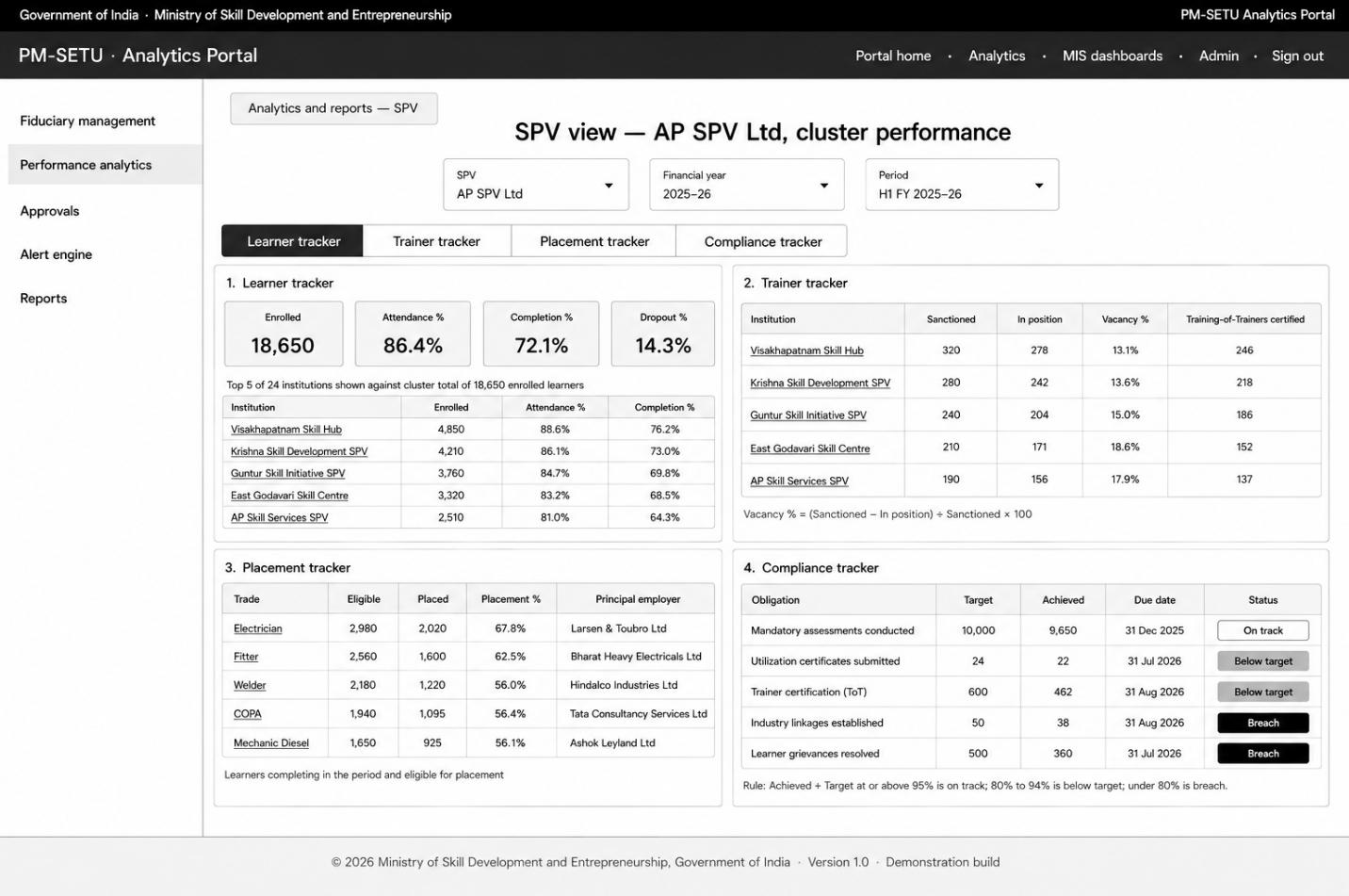
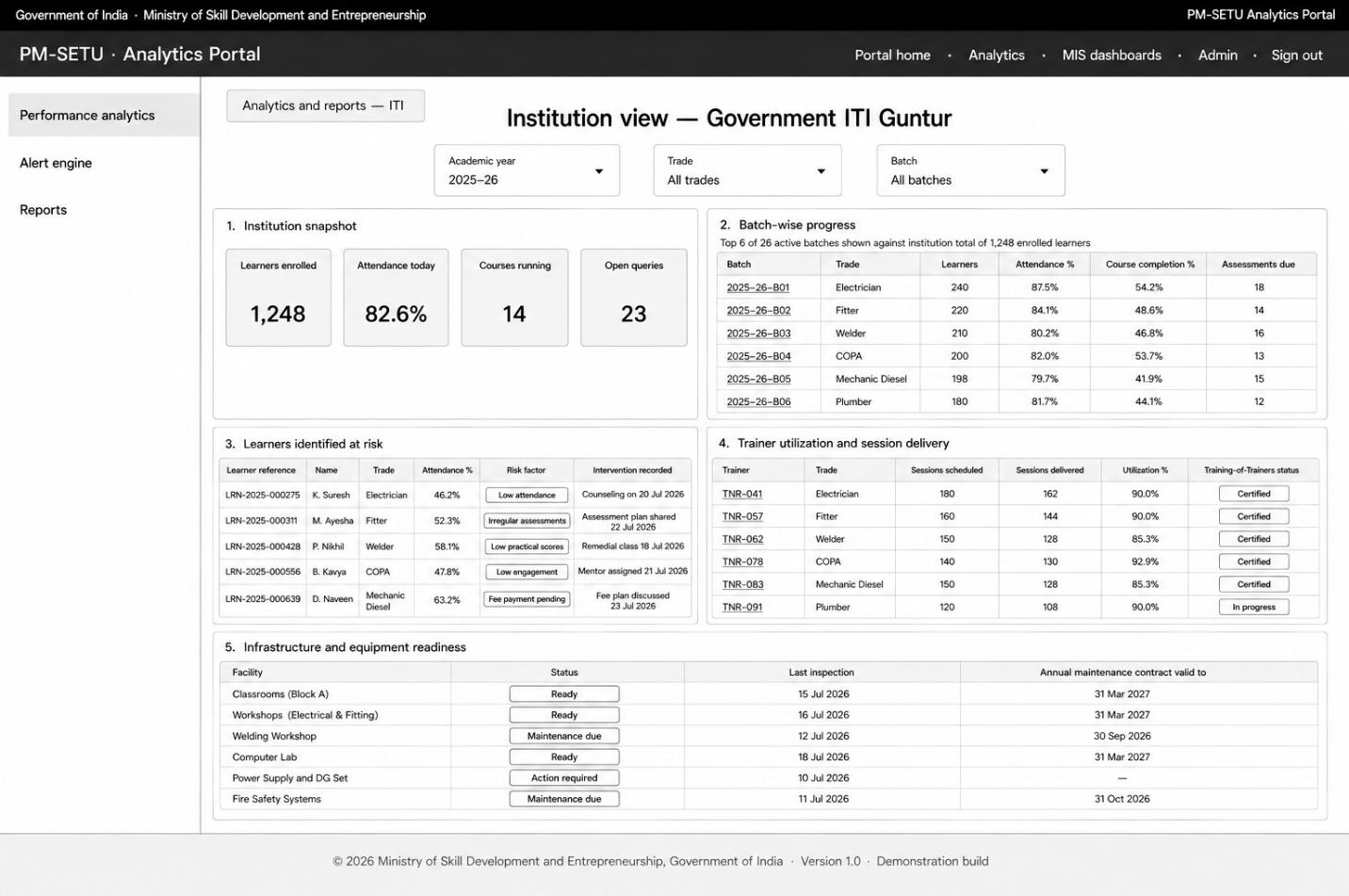
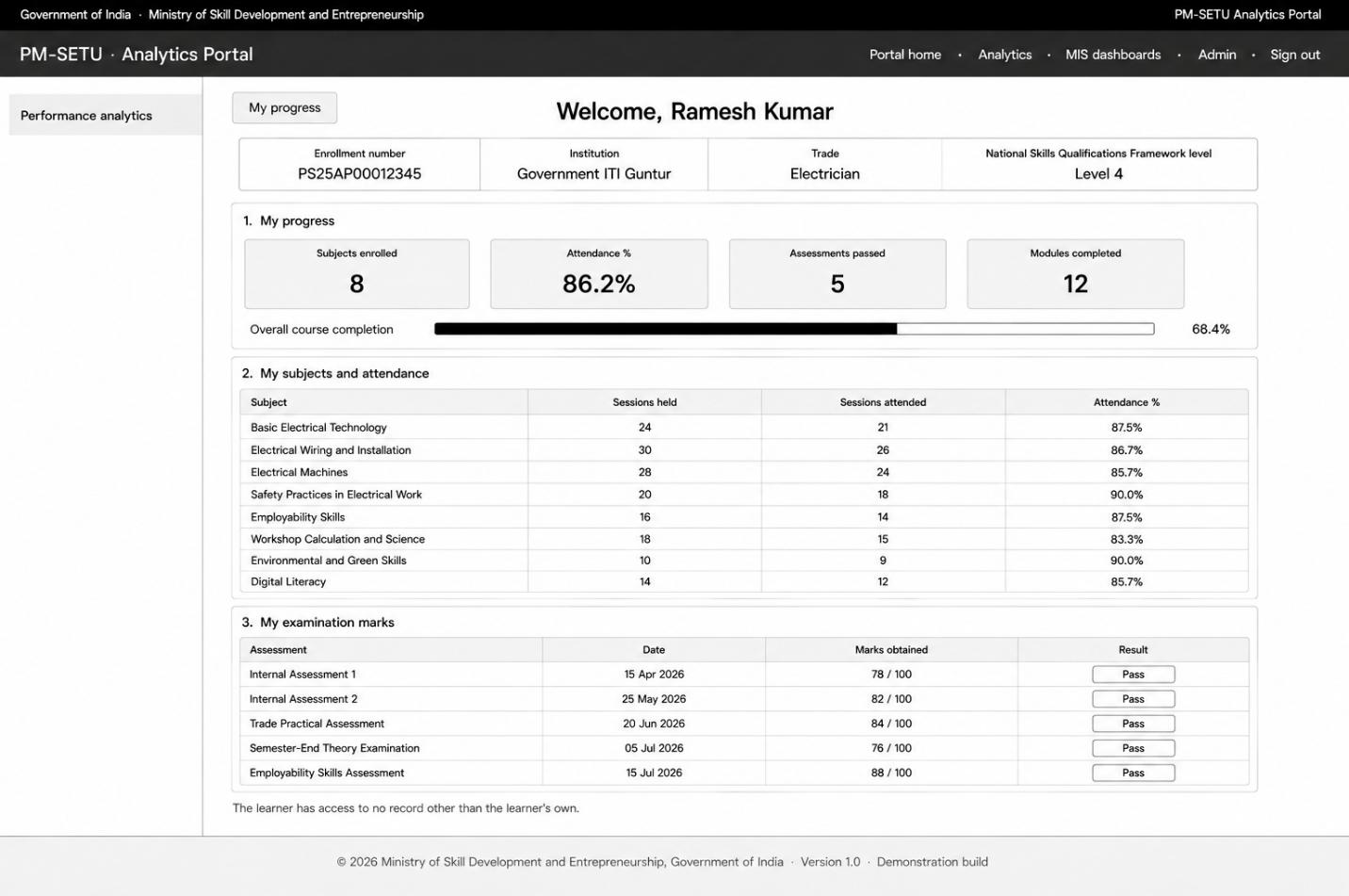
7.3. Approval routing process design
This process flow outlines the movement of an approval request through the Portal. The process begins when a request is raised, being a Strategic Investment Plan, an Annual Operating Plan, a budget reallocation, a Project Management Consultant approval, or a tranche release. The Portal validates that the mandatory supporting documentation is attached, and where it is not, the submission is prevented and the missing item identified. The request is then evaluated against the delegation matrix in force at the time of submission. If the request falls within the delegated authority of the State, it is routed to the State for decision; if it exceeds that authority, it is routed to the Centre. The deciding authority may approve the request, whereupon the relevant baseline is updated in the source system and the stakeholders are notified, or return it for revision, whereupon it re-enters the queue upon resubmission. Each approval task carries a service-level timer, and where the interval lapses without decision, the request escalates automatically to the next authority and both parties are notified. The auditor is presented with the approval record throughout in review capacity, for the purpose of audit traceability, and takes no decision. This process ensures that every approval is decided by an authority competent to decide it, that delay is escalated rather than absorbed, and that the complete decision history remains available for subsequent audit. The workflow underlying this pillar remains to be defined in the backend and is presented here in outline only.
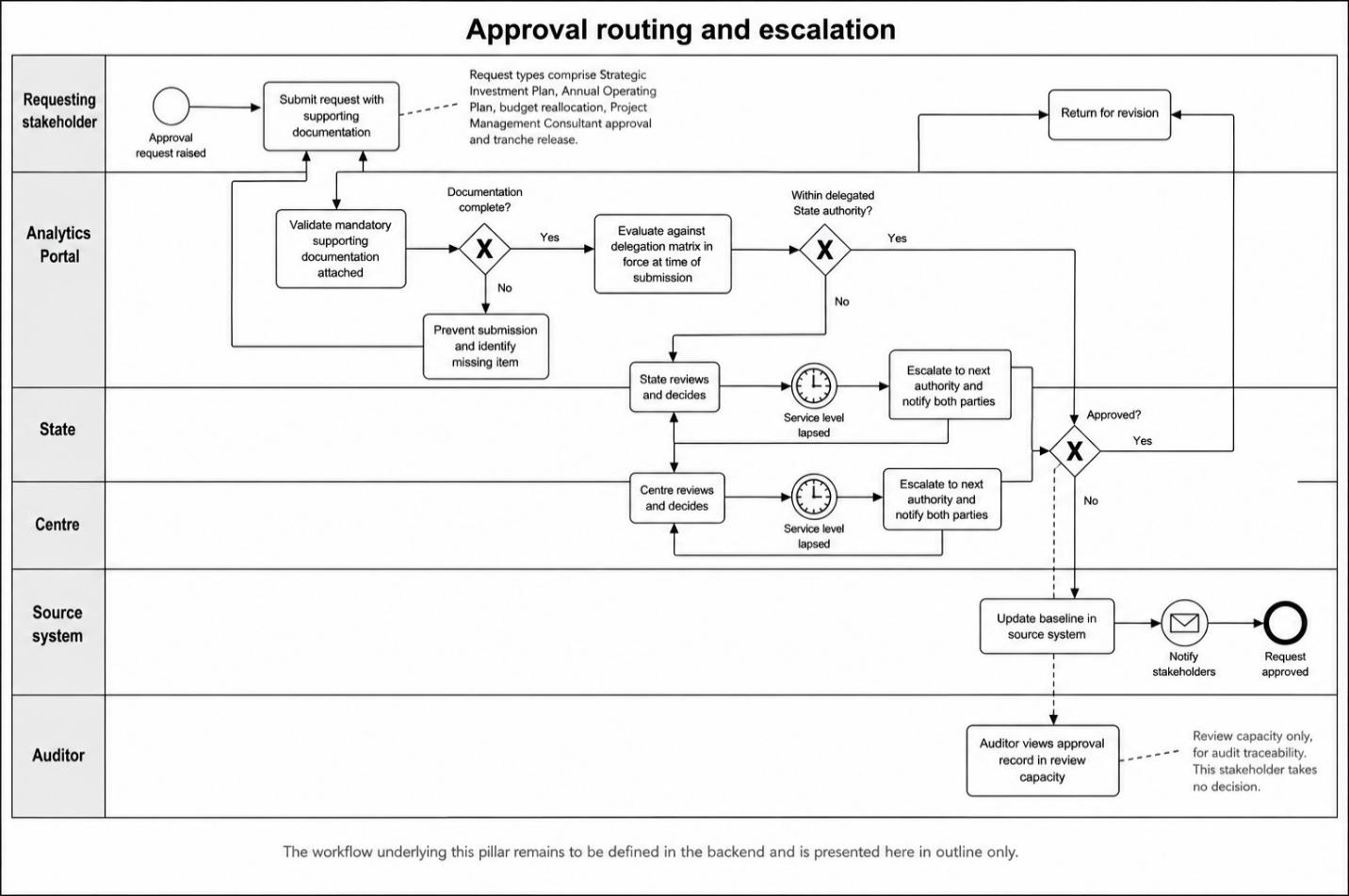
Mockup Approvals: The approval queue presents requests awaiting decision with their present stage and the authority with which each rest, together with the decision panel, and is provisional pending definition of the backend workflow.
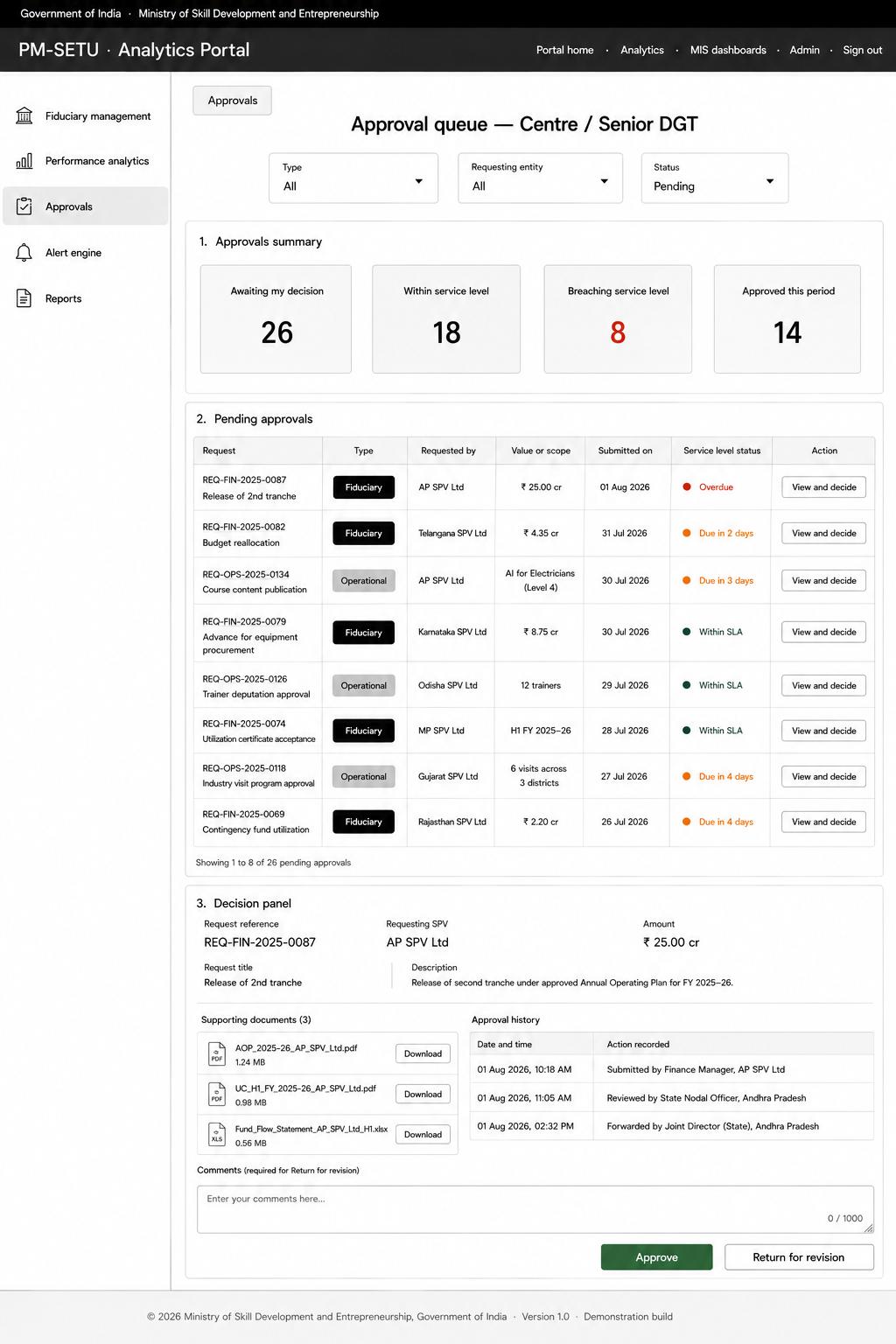
7.4. Alert Engine process design
This process illustrates how exceptions are raised, routed and brought to closure. The sequence begins when the reconciled position is evaluated against the thresholds configured for each metric. If no threshold is defined for a metric, the event is logged and suppressed rather than raised, so that unclassified alerts do not enter the queue. If a threshold is crossed, the Portal classifies the event by severity, tags it with the pillar in which the metric is defined, and determines the recipients authorized for the data giving rise to it. Where the same unresolved event has already generated an alert, the occurrence is consolidated into the existing entry and the count incremented rather than a duplicate raised. The alert is dispatched to the recipient's inbox and through the configured notification channels, and where a recipient role is not provisioned, it is routed to the parent authority and a configuration exception raised. A service-level timer runs from dispatch; if the alert is acknowledged and closed within the interval the process ends, and if the interval lapses without response the alert escalates to the next authority, both parties are notified, and the timer restarts at the higher level. The escalation trail, comprising the originating office, each escalation level and the current owner, is retained for audit. This process ensures that no exception passes unnoticed and that delay at any level becomes visible to the authority above it.
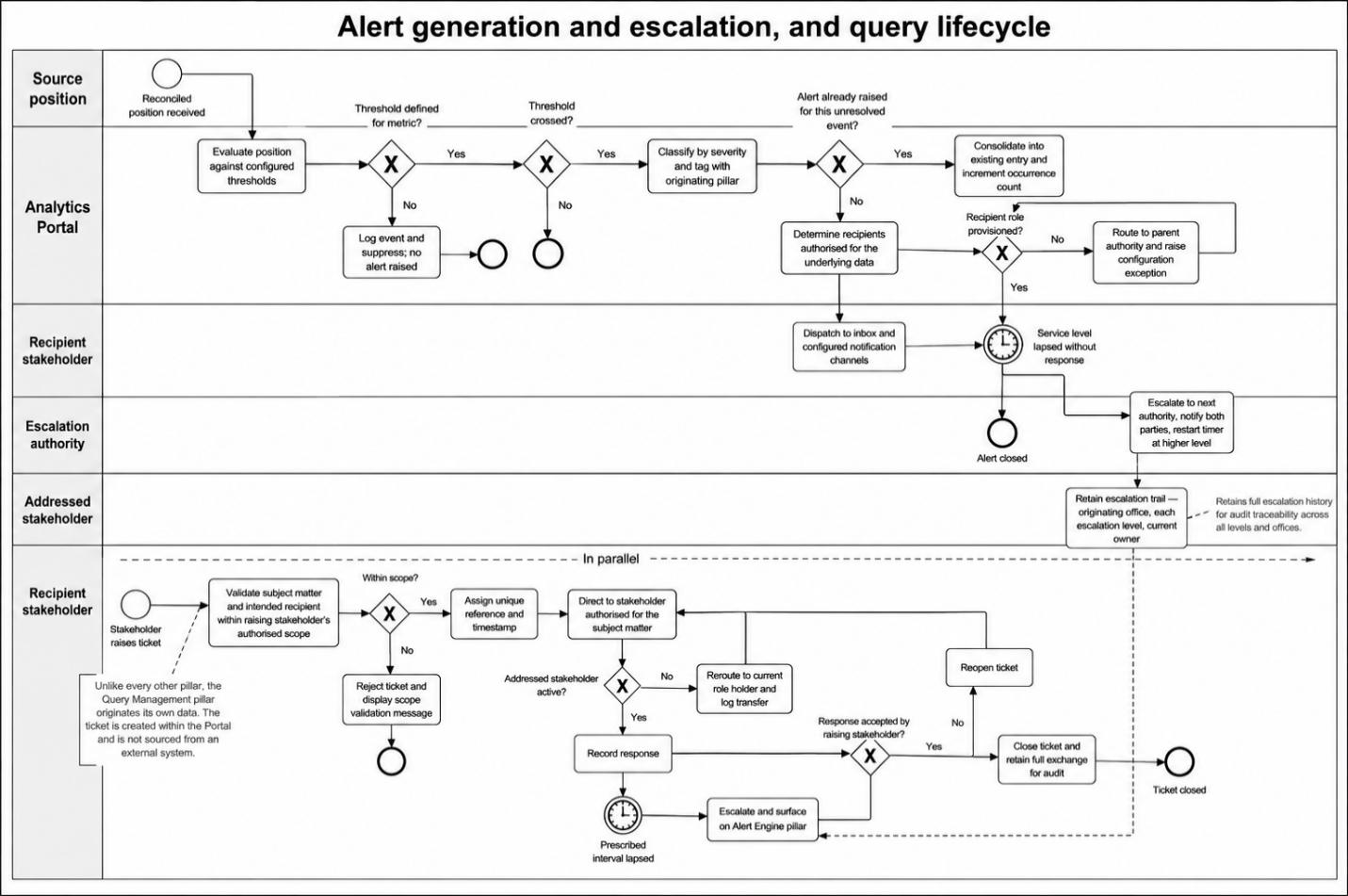
Mockup Alert Engine: The alert inbox presents alerts arising in the Performance Analytics pillar in a single list, each identified by the pillar in which the underlying metric is defined, with severity, service-level status and the escalation trail.
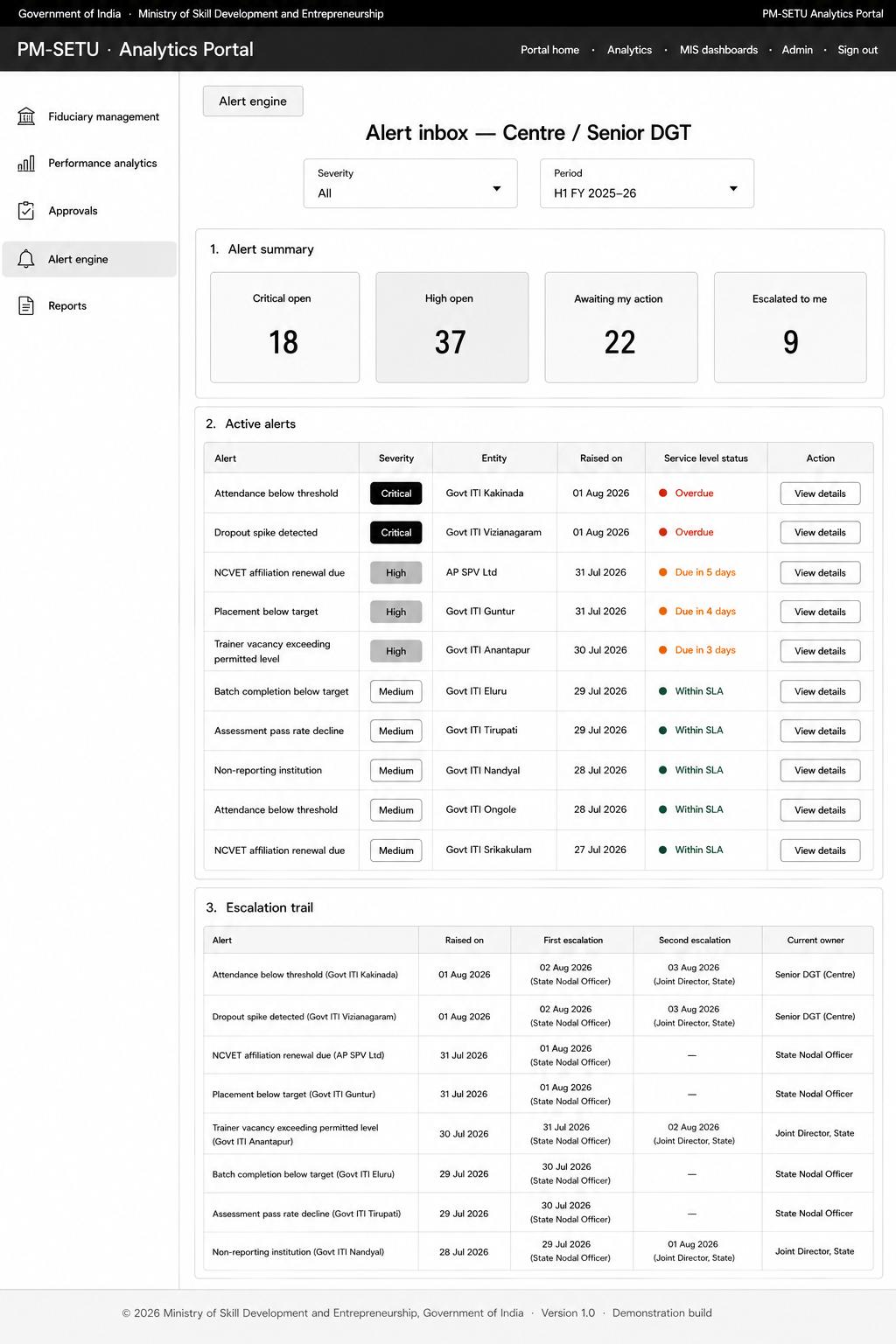
7.5. Report generation process design
This process flow depicts the production and export of a report. The process begins when a stakeholder selects the report type, domain, scope and reporting period. The Portal validates the requested scope against the stakeholder's resolved entity, and where the request exceeds that authorisation, generation is denied and an audit log entry created. Where the scope is within authorisation, the report is generated from the reconciled position held in the presentation store and the currency of that data printed upon it. Standard reports are generated synchronously, while consolidated and national-level reports execute asynchronously so as not to degrade online performance. If source data was incomplete at the time of generation, the report is annotated as provisional. The generated report is exported in Portable Document Format or in spreadsheet format, and a record of the generation the report, its scope, the time of generation and the stakeholder concerned is retained. Where a recurring export has been scheduled, the same process executes at the prescribed interval, and the output is dispatched to the registered email address. This process ensures that no stakeholder obtains data beyond their authorisation, that every report carries the currency of the information from which it was produced, and that a report once generated is not thereafter modified.
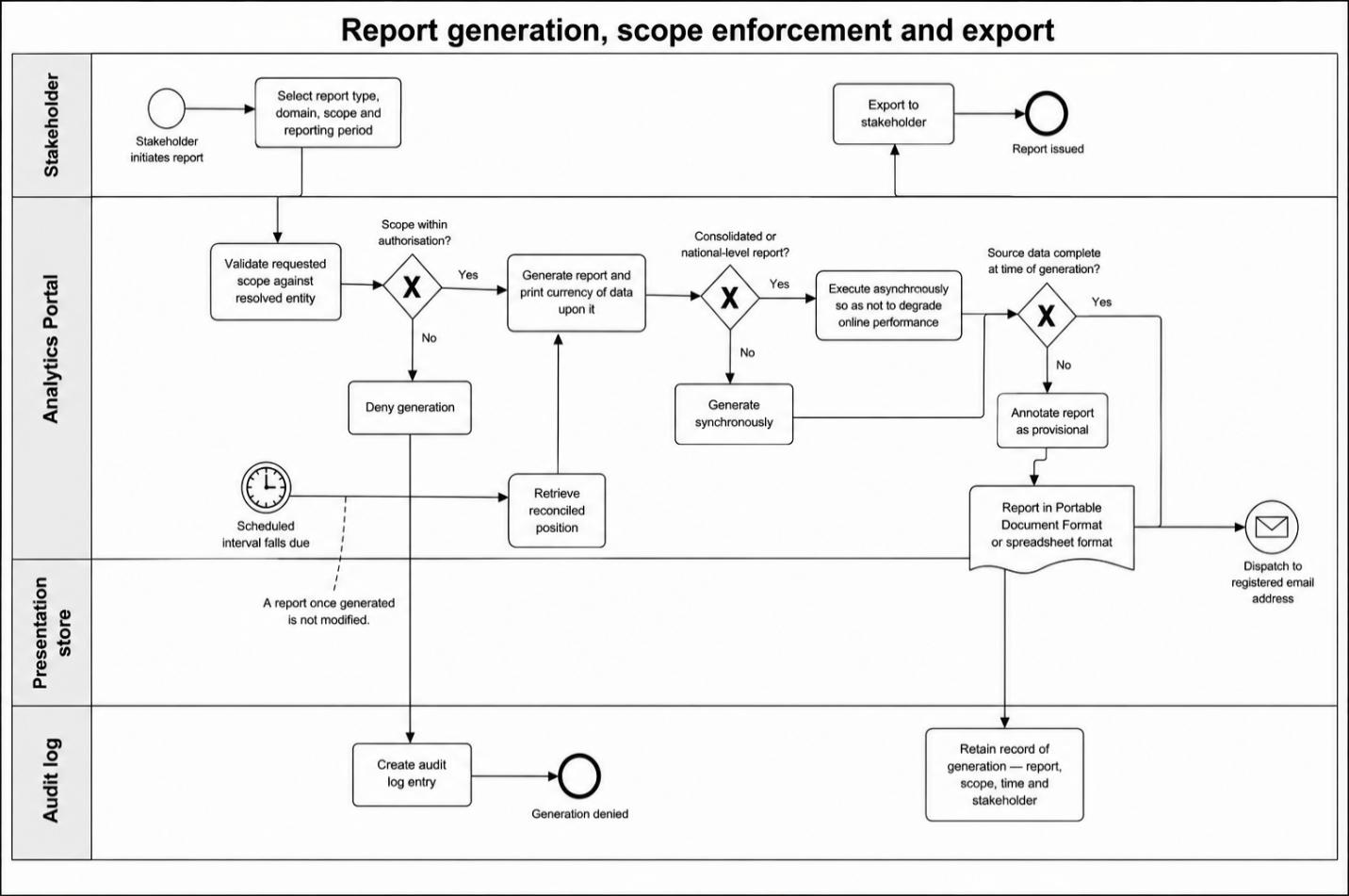
Mockup Reports: The report's view presents the configuration form comprising report type, domain, scope, period and output format, with the reports recently generated and those scheduled for recurring export.